




AppBrain's verdict
- Last updated
- August 12, 2026
- Size
- 138.3 MB
User feedback
Ratings and reviews on the App StoreComments on Drive Hub: CarPlay & Tracker for iOS
We don't have enough comments to show example comments. Please check back later.
Store listing
By Vu Van, from the App StoreDescription by Vu Van Written by the developer, not by AppBrain. Click to read.
Drive One: All-in-One transforms your iPhone into a smart in-car driving system, delivering a CarPlay-like experience for vehicles without built-in support.
Get CarPlay on any car — no adapter, no hardware. Drive One also tracks every trip, scores your driving, and auto-saves your parking. 8 features. One free app. The app is designed to support safer driving with a clear interface, simple controls, and smart assistance when you need it.
Key Features
1. CAR PLAY MIRROR — NO ADAPTER NEEDED
- Forget the $300 adapter. Drive One mirrors your iPhone to your car screen instantly — navigation, music, calls, and weather all in one clean view.
Large icons built for driving. No fumbling between apps. No squinting at your phone. Hands on the wheel, eyes on the road.
Works on any car, any iPhone. No head unit swap. Just mount and drive.
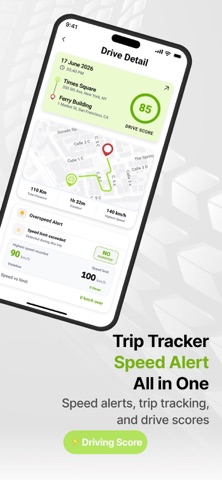
2. DRIVING TRACKER & SCORE
Every trip automatically logged. Drive One measures speed, hard braking, and acceleration — then gives you a driving score and shows exactly where to improve.
Watch your score go up trip by trip. No manual logging. No insurance company watching
3. SPEED ALERTS — DRIVE SMARTER
Real-time speed camera warnings and speed limit alerts on every road. Drive One pairs your score with live alerts — so you know the limit AND whether you're staying within it
PLUS THE FULL CAR COMPANION:
1. Auto-Save Parking — find your car every time
2. Car Health Monitor — tires, oil, brakes, lights
3. Remote Door Lock — check and lock from anywhere
4. Parking Finder — live prices and availability
5. Navigation — built in, free
WHY NOT JUST USE AN INSURANCE APP?
Apps like USAA DriveSafe track you to adjust your premium.
Drive One tracks you to help YOU — privately, with no insurer involved.
Your data. Your improvement. Your choice.
Free to download. Start tracking your driving today
-------------------------------------------
Terms of Use:https://sites.google.com/view/trailbyte-terms-conditions/trang-ch%E1%BB%A7
Give a feedback at: https://trailbyteapp.web.app/ or send email to: willtrailbyte@gmail.com
Safety and technology
Found in the app by AppBrain- Price
- Free
- App size
- 138.3 MB
- Content rating
- High
Technologies used by Drive Hub: CarPlay & Tracker
Releases
Updates seen on the App Store- Version
- 1.2.3
- Launched
- January 2026
No changelog data
Alternatives
Similar apps and more from Vu VanMore from Vu Van


Rankings
App Store top chartsApp Store Rankings for Drive Hub: CarPlay & Tracker
About the app and developer
About Drive Hub: CarPlay & Tracker
Drive Hub: CarPlay & Tracker is a navigation app developed by Vu Van.
User Ratings
The app has no ratings yet.
App Information
Drive Hub: CarPlay & Tracker is freely available from the App Store. The app size is 138.29 MB. The latest version available is 1.2.3. The last update was on August 12, 2026.
Technical Requirements
The app has a content rating of High Maturity. The app has been available on the App Store since January 2026.
Drive Hub: CarPlay & Tracker is made and published by Vu Van. AppBrain is an independent app data site and isn't affiliated with Vu Van. The app name, icon, screenshots and description belong to Vu Van and are shown as published on the App Store.
Developer information for Vu Van
Address: