

DriveDeck is made and published by Jared Ferguson. AppBrain is an independent app data site and isn't affiliated with Jared Ferguson. The app name, icon, screenshots and description belong to Jared Ferguson and are shown as published on the App Store.
AppBrain's verdict
- Last updated
- September 26, 2026
Rankings
App Store top chartsApp Store Rankings for DriveDeck
Competitors
Similar apps and more from Jared FergusonAlternatives to DriveDeck


Releases
Updates seen on the App Store- Version
- 1.1
- Launched
- May 2026
No changelog data
User feedback
Ratings and reviews on the App StoreComments on DriveDeck for iOS
We don't have enough comments to show example comments. Please check back later.
Technology
Found in the app by AppBrain- Price
- Free
- App size
- 2.32 MB
- Content rating
- Everyone
Technologies used by DriveDeck
About the app and developer
About DriveDeck
DriveDeck is a travel app developed by Jared Ferguson.
User Ratings
The app has no ratings yet.
App Information
DriveDeck is freely available from the App Store. The app size is 2.32 MB. The latest version available is 1.1. The last update was on September 26, 2026.
Technical Requirements
The app has a content rating of Everyone. The app has been available on the App Store since May 2026.
Developer information for Jared Ferguson
Address:
Frequently asked questions about DriveDeck
Is DriveDeck free?
Yes. DriveDeck is free on the App Store.
Is DriveDeck still available?
Yes. DriveDeck is on the App Store, and the last update we saw was on September 26, 2026.
How large is DriveDeck?
DriveDeck is 2.32 MB.
Is DriveDeck suitable for children?
App Store rates the content of DriveDeck as suitable for everyone.
Who made DriveDeck?
DriveDeck was developed by Jared Ferguson. It is listed in the travel category on the App Store.
What are the best alternatives to DriveDeck?
People looking at DriveDeck also look at these travel apps: DriveDeck: Car Widgets & HUD, Cruzen Partners, B-Tap, GPS Navigation & Car Road Maps, Vietmap Motrak.
Store listing
By Jared Ferguson, from the App Store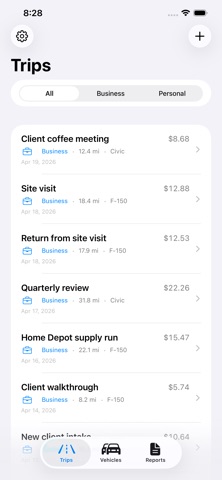



Description by Jared Ferguson Written by the developer, not by AppBrain. Click to read.
Track free all year. Pay once, $7.99, when you need the report. No subscription, ever.
TWO WAYS TO LOG
• GPS trips: tap Start, drive, tap End. DriveDeck records distance, time, start and end addresses, and your route on a map.
• Manual entry: forgot to track? Add a trip afterward with odometer readings or a distance, plus purpose and client.
ON THE ROAD
• Live Activity and Dynamic Island show distance, time, and estimated deduction while you drive.
• A reminder if you've been stopped for 5 minutes, with End Trip and Keep Going right in the notification.
• Home and Lock Screen widgets show year-to-date business miles. The medium widget's Start Trip button works from a locked phone with one tap of Face ID.
• Siri phrases: "start a trip," "end my trip," and "log a trip."
ORGANIZED RECORDS
• Classify every trip as business or personal, with IRS rate categories: Business, Medical, Charitable, Moving, or your own custom rate.
• Tag trips by client or project. DriveDeck suggests clients you've used before, and Clients & Projects lets you rename or merge them across every trip.
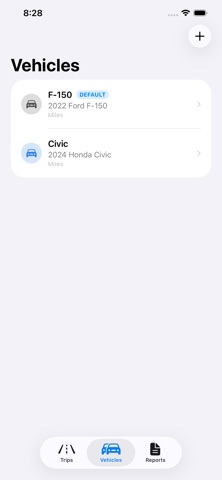
• Unlimited vehicles and unlimited trips, free.
CURRENT AND HISTORICAL IRS RATES
DriveDeck ships with the IRS standard mileage rates back to 2021, including the 2022 mid-year change. Each trip uses the rate in effect on its date, so a 2025 trip logged in 2026 still gets the 2025 rate. Set your own rate anytime for employer reimbursement plans.
DRIVEDECK PRO: TAX-READY EXPORTS
One-time $7.99 purchase. No subscription.
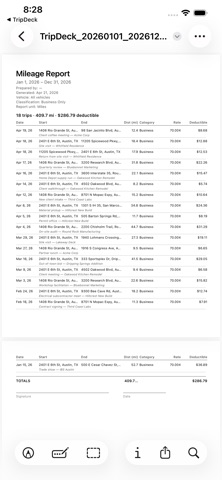
• Clean, unwatermarked PDF reports with distances to the hundredth of a mile
• Reimbursement subtotals by category and by client
• CSV export for spreadsheets and accounting software
• Custom date ranges: quarterly, mid-year, multi-year
• Advanced filters: vehicle, classification, and category
• One-tap IRS rate updates each year, with the citation printed on your reports
Your "Prepared by" name and report options are remembered between reports. Free users can export watermarked preview PDFs to see exactly what Pro reports look like first.
PRIVATE BY DESIGN
Your trips and locations stay on your iPhone and, only if you turn it on, sync through your own private iCloud account. No accounts, no analytics, no tracking, no third-party servers.
Also included: Light, Dark, or Match System appearance (PDF reports always print light), full backup and restore to a file, and in-app Help.
DriveDeck is a recordkeeping tool, not tax advice. Consult a qualified tax professional about your situation.