DriveHQ Team Anywhere Viewer
DriveHQ Team Anywhere Viewer is made and published by Drive Headquarters, Inc. AppBrain is an independent app data site and isn't affiliated with Drive Headquarters, Inc. The app name, icon, screenshots and description belong to Drive Headquarters, Inc. and are shown as published on the App Store.
AppBrain's verdict
- Last updated
- July 29, 2025
- Size
- 44.1 MB
User feedback
Ratings and reviews on the App StoreComments on DriveHQ Team Anywhere Viewer for iOS
We don't have enough comments to show example comments. Please check back later.
Store listing
By Drive Headquarters, Inc., from the App StoreDescription by Drive Headquarters, Inc. Written by the developer, not by AppBrain. Click to read.
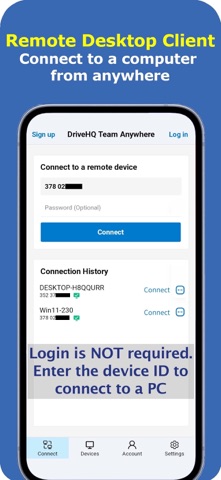
DriveHQ Team Anywhere is a powerful Remote Desktop service. It supports:
(1) Access your computers from anywhere.
(2) Remote assistance (support your users on their computers directly);
(3) Real-time team collaboration with desktop or application window sharing.
Access Your PC from Anywhere:
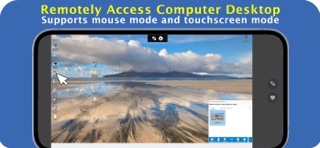
DriveHQ Team Anywhere allows you to access your PC remotely. You can install the software on the PC that you need to access remotely, then log in and leave the software running as a Windows service. You can remotely access your PC with another PC or mobile device running DriveHQ Team Anywhere, or simply with a web browser. Compared to Microsoft's remote desktop feature, it has two advantages:
(1) DriveHQ Team Anywhere supports all Windows editions, incl. Windows Home edition.
(2) Microsoft's remote desktop feature only works within the same local network. DriveHQ Team Anywhere works anywhere.
Remote Assistance:
DriveHQ Team Anywhere is a very convenient tool to support your employees or customers remotely. If you need to support a remote user on computer software or web service related issues, just ask the user to install DriveHQ Team Anywhere on the PC and tell you the device ID and password. You can then connect to the user's PC and solve the problem on the PC while the user is watching.
Real-time Team Collaboration:
DriveHQ Team Anywhere supports real-time group collaboration. Multiple people can share the same desktop or application window. They can work together on the same file at the same time while looking at the same application window. If they need to communicate verbally, they can use the built-in voice calling feature.
DriveHQ's real-time team collaboration feature has a very important advantage: It is not limited to Microsoft Office files or Google Docs files. It works for all file types and all programs.
Manage PCs in an organization or support many remote customers:
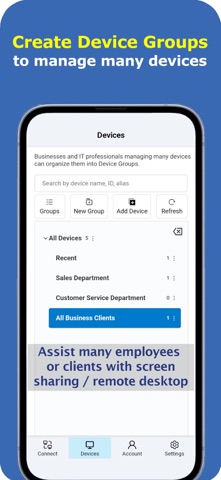
You can create device groups to organize and manage numerous devices. You can use DriveHQ's group account service to automatically manage PCs in your organization.
More Info About DriveHQ Team Anywhere
To enable remote access to a PC, you must install DriveHQ Team Anywhere on the PC. You can share the entire desktop, or an app window only.
To access the remote PC, you can install DriveHQ Team Anywhere on another PC or mobile device, then enter the remote PC's device ID and password to connect. You can also use a web browser to connect to the remote PC. From the remote PC, click the copy icon next to the device ID, then copy the URL for remote access to the PC.
DriveHQ Team Anywhere offers many security and access control features:
(1) Automatic Password Policy: After you install the app on your PC, it automatically generates a unique device ID and password. You can set a password policy. The password can be configured to change daily, when the app is re-launched, or every time after a connection is accepted. Long-term password is also supported.
(2) Connection Acceptance: You can configure it to automatically accept a connection request with the correct password, require manual acceptance of any connection requests, or require the correct password and manual acceptance of a connection request .
(3) Share Only One App Window: It is more secure than sharing the entire desktop. Remote users cannot access other parts of your computer.
(4) Connection History / Event Log / Screen Recording: DriveHQ Team Anywhere records the detailed connection history. You can check the connection history to make sure that no unauthorized connections have been made to your computer.
Safety and technology
Found in the app by AppBrain- Price
- Free
- App size
- 44.1 MB
- Content rating
- Everyone
Technologies used by DriveHQ Team Anywhere Viewer
Releases
Updates seen on the App Store- Version
- 1.2.199
- Launched
- April 2025
No changelog data
Alternatives
Similar apps and more from Drive Headquarters, Inc.More from Drive Headquarters, Inc.
Rankings
App Store top chartsApp Store Rankings for DriveHQ Team Anywhere Viewer
About the app and developer
About DriveHQ Team Anywhere Viewer
DriveHQ Team Anywhere Viewer is a business app developed by Drive Headquarters, Inc.
User Ratings
The app has no ratings yet.
App Information
DriveHQ Team Anywhere Viewer is freely available from the App Store. The app size is 44.08 MB. The latest version available is 1.2.199. The last update was on July 29, 2025.
Technical Requirements
The app has a content rating of Everyone. The app has been available on the App Store since April 2025.
Developer information for Drive Headquarters, Inc.
Address:
Frequently asked questions about DriveHQ Team Anywhere Viewer
Is DriveHQ Team Anywhere Viewer free?
Yes. DriveHQ Team Anywhere Viewer is free on the App Store.
Is DriveHQ Team Anywhere Viewer still available?
Yes. DriveHQ Team Anywhere Viewer is on the App Store, and the last update we saw was on July 29, 2025.
How large is DriveHQ Team Anywhere Viewer?
DriveHQ Team Anywhere Viewer is 44.08 MB.
Is DriveHQ Team Anywhere Viewer suitable for children?
App Store rates the content of DriveHQ Team Anywhere Viewer as suitable for everyone.
Who made DriveHQ Team Anywhere Viewer?
DriveHQ Team Anywhere Viewer was developed by Drive Headquarters, Inc. It is listed in the business category on the App Store.