

DriveIndex Companion
DriveIndex Companion is made and published by Neon Media LLC (TN). AppBrain is an independent app data site and isn't affiliated with Neon Media LLC (TN). The app name, icon, screenshots and description belong to Neon Media LLC (TN) and are shown as published on the App Store.
AppBrain's verdict
- Rating on App Store
- 5.00
- 1 ratings
- Last updated
- October 2, 2026
It doesn't have enough ratings yet to judge what users think.
Rankings
App Store top chartsApp Store Rankings for DriveIndex Companion
Competitors
Similar apps and more from Neon Media LLC (TN)Alternatives to DriveIndex Companion


More from Neon Media LLC (TN)


Releases
Updates seen on the App Store- Version
- 0.1.0
- Launched
- December 2025
No changelog data
User feedback
Ratings and reviews on the App StoreComments on DriveIndex Companion for iOS
We don't have enough comments to show example comments. Please check back later.
Technology
Found in the app by AppBrain- Price
- Free
- App size
- 5.94 MB
- Content rating
- Everyone
Technologies used by DriveIndex Companion
About the app and developer
About DriveIndex Companion
DriveIndex Companion is a productivity app developed by Neon Media LLC (TN).
What is the rating of DriveIndex Companion?
DriveIndex Companion is rated 5.00 out of 5 stars, based on one rating ratings.
Is DriveIndex Companion free?
DriveIndex Companion is free. The app size is 5.94 MB. The latest version available is 0.1.0. The last update was on October 2, 2026.
What are the requirements for DriveIndex Companion?
The app has a content rating of Everyone. The app has been available on the App Store since December 2025.
Developer information for Neon Media LLC (TN)
Address:
Frequently asked questions about DriveIndex Companion
Is DriveIndex Companion free?
Yes. DriveIndex Companion is free on the App Store.
Is DriveIndex Companion still available?
Yes. DriveIndex Companion is on the App Store, and the last update we saw was on October 2, 2026.
How large is DriveIndex Companion?
DriveIndex Companion is 5.94 MB.
Is DriveIndex Companion suitable for children?
App Store rates the content of DriveIndex Companion as suitable for everyone.
How do people rate DriveIndex Companion?
DriveIndex Companion has one rating of 5.00 stars on the App Store.
Who made DriveIndex Companion?
DriveIndex Companion was developed by Neon Media LLC (TN). It is listed in the productivity category on the App Store.
What are the best alternatives to DriveIndex Companion?
People looking at DriveIndex Companion also look at these productivity apps: Privacy Defender: Focus Shield, Search App for Google Search ®, iReadr — Speed Reader, Notepad with Browser - Sprout, Pinster AI.
Store listing
By Neon Media LLC (TN), from the App Store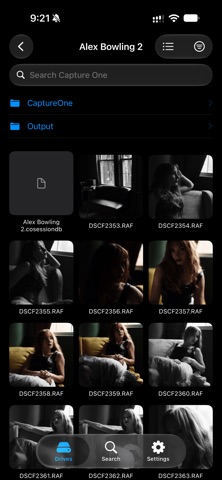


Description by Neon Media LLC (TN) Written by the developer, not by AppBrain. Click to read.
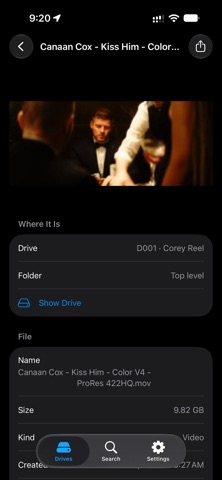
A companion to the DriveIndex app for Mac, it pairs with your Mac once over your local network and keeps a copy of your catalog on your device. On set, in the edit suite or standing at the shelf, search for a clip and see exactly which drive and folder it lives in.
Key Features
• Works without your Mac
File names, folders, sizes and dates are kept on your device and update whenever your Mac is nearby. Search and browse anywhere.
• Search every drive at once
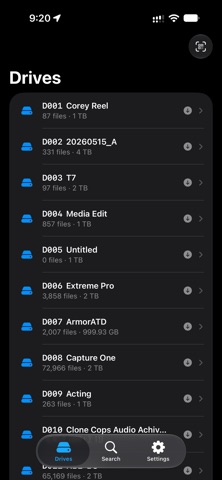
Type part of a file or folder name, or a drive's code, and see which drives have it. Narrow results to video, photo or audio.
• Browse like the Finder
Open any drive and move through its folders as a list or as a grid of thumbnails.
• Full details when connected
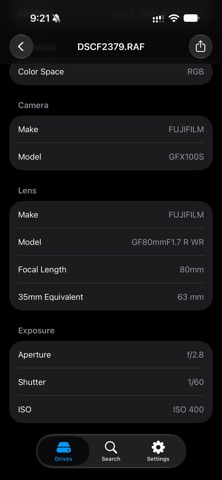
On the same network as your Mac, see thumbnails and camera, lens, codec and resolution details, and filter by camera, codec, colour space or date.
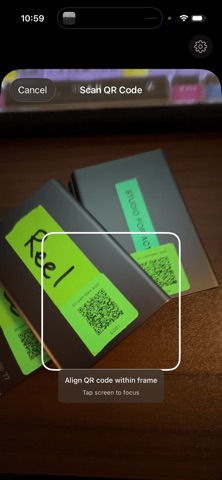
• QR code scanning
Scan a DriveIndex label to jump straight to that drive.
• Siri and Spotlight
Ask "Find a file in DriveIndex" and hear which drives have it.
• Private by design
The connection to your Mac is encrypted and only devices you pair can connect. No accounts and no cloud: your catalog stays on your own devices.
• Read-only
A viewer that never modifies your files or drives.
How It Works
1. Install and open DriveIndex on your Mac.
2. In DriveIndex on your Mac, open Settings, then Companion, and scan the pairing code with this app.
3. Your catalog copies to your device over your local network.
4. Search and browse your drives anywhere. Reconnect to your Mac's network for thumbnails and full details.
Who It's For
Filmmakers, photographers, editors and media professionals who manage large drive libraries and want to know what is on every drive without connecting hardware.
Requires DriveIndex 0.1.0 or later for Mac.