

Drum Loops by Steve Gadd
Drum Loops by Steve Gadd is made and published by Go Independent Records. AppBrain is an independent app data site and isn't affiliated with Go Independent Records. The app name, icon, screenshots and description belong to Go Independent Records and are shown as published on the App Store.
AppBrain's verdict
Established- Rating on App Store
- 4.67
- 12 ratings
- Last updated
- July 25, 2019
It doesn't have enough ratings yet to judge what users think.
Rankings
App Store top chartsApp Store Rankings for Drum Loops by Steve Gadd
Competitors
Similar apps and more from Go Independent RecordsAlternatives to Drum Loops by Steve Gadd







More from Go Independent Records





Releases
Updates seen on the App Store- Version
- 1.2
- Launched
- December 2017
No changelog data
User feedback
Ratings and reviews on the App StoreComments on Drum Loops by Steve Gadd for iOS
We don't have enough comments to show example comments. Please check back later.
Technology
Found in the app by AppBrain- Price
- $14.99
- App size
- 846.6 MB
- Content rating
- Everyone
Technologies used by Drum Loops by Steve Gadd
About the app and developer
About Drum Loops by Steve Gadd
Drum Loops by Steve Gadd is a music app developed by Go Independent Records.
User Ratings
Drum Loops by Steve Gadd is rated 4.67 out of 5 stars. The rating is based on 12 ratings.
App Information
Drum Loops by Steve Gadd costs $14.99. The app size is 846.65 MB. The latest version available is 1.2. The last update was on July 25, 2019.
Technical Requirements
The app has a content rating of Everyone. The app has been available on the App Store since December 2017.
Developer information for Go Independent Records
Address:
Frequently asked questions about Drum Loops by Steve Gadd
Is Drum Loops by Steve Gadd free?
No. Drum Loops by Steve Gadd costs $14.99 on the App Store.
Is Drum Loops by Steve Gadd still available?
Yes. Drum Loops by Steve Gadd is on the App Store, and the last update we saw was on July 25, 2019.
How large is Drum Loops by Steve Gadd?
Drum Loops by Steve Gadd is 846.65 MB.
Is Drum Loops by Steve Gadd suitable for children?
App Store rates the content of Drum Loops by Steve Gadd as suitable for everyone.
How do people rate Drum Loops by Steve Gadd?
Drum Loops by Steve Gadd scores 4.67 out of 5 stars, from 12 ratings on the App Store.
Who made Drum Loops by Steve Gadd?
Drum Loops by Steve Gadd was developed by Go Independent Records. It is listed in the music category on the App Store.
What are the best alternatives to Drum Loops by Steve Gadd?
People looking at Drum Loops by Steve Gadd also look at these music apps: Future Drummer, Funk Drummer: Drum Machine, Jazz Drummer, Indian Drummer - Tabla Beats, Reggae Drummer.
Store listing
By Go Independent Records, from the App Store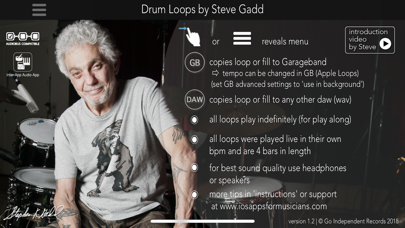
Description by Go Independent Records Written by the developer, not by AppBrain. Click to read.
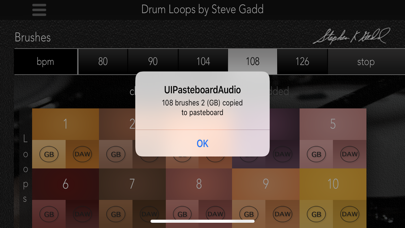
Perfect for songwriters, producers, teachers and fans…… a one time opportunity to play along with as legend. hundreds of loops and fills played by the absolute master of his craft. Steve has recorded in his fav tempos and styles, providing you with signature ‘feel’ grooves that have set Steve aside long ago from his colleagues. Copy any loop to any paste equipped DAW for songwriting or play loops within the app as a ‘human metronome’ for practicing.
If you use GB as your DAW of choice you get an incredible advantage, you can copy a loop or fill into GB and from there on change the tempo and maintaining Steve’s feel!
MAIN FEATURES:
* Steve Gadd in your back pocket!
* Introduction video by Steve himself
* All loops are 4 bars in length giving you a very natural sense of groove and feel and less repetition than normal
* Copy/paste to your favorite multi tracker!
* Ability to change loops and fills in tempo in Garageband!
* Audiobus compatible
* Inter App Audio compatible
* Play along for as long as you want and enjoy Steve’s groove. (all grooves loop perfectly in the app itself)
* Performed, recorded and built only for iPad, iPhone and iPod Touch
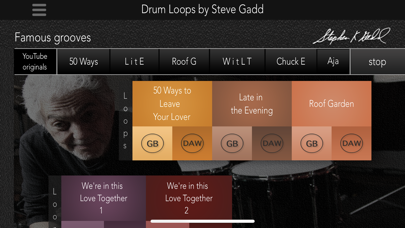
* Famous grooves chapter with some of his signature feel grooves on hits we all know
* Loops in 4/4, 6/8, ballads plus a special chapter with brushes loops, performed with his own unique technique
* Uncut, not time stretched, not chopped but actual high end recordings
* 360 degree videos included, check out Steve and the studio in VR
* Audio quality: 44.1 kHz, 16 bit (cd). For copying to any multi tracker including GB.
* All loops and fills actually played in all bpms, by a living legend
* Copies loops to any DAW, all loops offered in 2 formats, WAV and Apple Loops
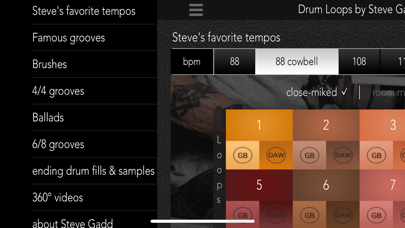
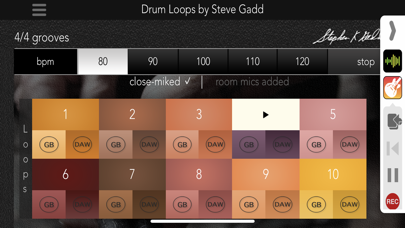
Every loop or fill is available in 2 distinct mixes, a close miked ‘dry’ mix and a ‘room mics added’ version, giving you the option to choose or to combine both sounds within the environment of your sequencer.
Full content:
Every chapter comes in a wide range of tempos including:
* Steve’s favorite tempos - 88, 88 plus cowbell (signature!), 108, 116 plus cowbell and 124, 8 to 10 loops each
* Famous grooves - 8 loops played as an homage to the originals Steve performed on like 50 WAYS, LATE IN THE EVENING, ROOF GARDEN, AJA……
* Brushes - 80, 90, 104 (half time and regular time), 108 and 126 bpm grooves, 10 loops each
* 4/4 grooves - 80, 90, 100, 110 and 120 bpm grooves, 10 each plus 6 fills per tempo
* Ballads - 62 and 72 bpm grooves, 10 each plus 6 fills per tempo
* 6/8 grooves - performed at 110 and 130 bpm (eight note is 110/130), 6 grooves each plus 6 fills
* Ending drum fills (3) plus crashes (6) to complete your arrangement and to add crashes after fills!
* 360 videos of Steve performing grooves and improv (including 50 ways to leave your lover)……..look around in the studio where the app was recorded
* About Steve Gadd - full bio on Steve’s career
* Instructions - the company’s page on ‘how to’ with tips and tricks
* Mic list and credits
* Other apps page
In fact, a revolutionary app with a living legend on drums! The most sought after studio and live drummer for the last couple of decades unleashes his feel for the world to have and to enjoy!
See this app in action here: www.iosappsformusicians.com (support site with trailers)
Also you will find DAW specific instructions on this site.