

Dual Messenger: Web Clone
Dual Messenger: Web Clone is made and published by Eyermin Colon Sanchez. AppBrain is an independent app data site and isn't affiliated with Eyermin Colon Sanchez. The app name, icon, screenshots and description belong to Eyermin Colon Sanchez and are shown as published on the App Store.
AppBrain's verdict
EstablishedWell rated- Rating on App Store
- 4.31
- 270 ratings
- Last updated
- October 2, 2026
Users rate it well: 4.3 stars from 270 ratings.
Rankings
App Store top chartsApp Store Rankings for Dual Messenger: Web Clone
Competitors
Similar apps and more from Eyermin Colon SanchezAlternatives to Dual Messenger: Web Clone



More from Eyermin Colon Sanchez


Releases
Updates seen on the App Store- Version
- 2.0.0
- Launched
- October 2020
No changelog data
User feedback
Ratings and reviews on the App StoreComments on Dual Messenger: Web Clone for iOS
We don't have enough comments to show example comments. Please check back later.
Technology
Found in the app by AppBrain- Price
- Free
- App size
- 110.6 MB
- Content rating
- High
Technologies used by Dual Messenger: Web Clone
About the app and developer
About Dual Messenger: Web Clone
Dual Messenger: Web Clone is a social networking app developed by Eyermin Colon Sanchez.
What is the rating of Dual Messenger: Web Clone?
Dual Messenger: Web Clone is rated 4.31 out of 5 stars, based on 270 ratings.
Is Dual Messenger: Web Clone free?
Dual Messenger: Web Clone is free. The app size is 110.58 MB. The latest version available is 2.0.0. The last update was on October 2, 2026.
What are the requirements for Dual Messenger: Web Clone?
The app has a content rating of High Maturity. The app has been available on the App Store since October 2020.
Developer information for Eyermin Colon Sanchez
Address:
Store listing
By Eyermin Colon Sanchez, from the App Store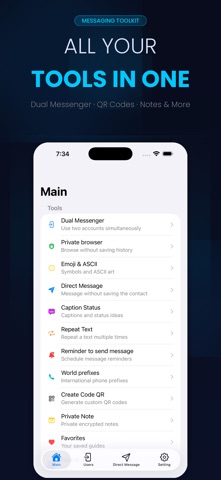




Description by Eyermin Colon Sanchez Written by the developer, not by AppBrain. Click to read.
Messenger lets you scan a web QR code from WhatsApp, Telegram, and
other apps to run a parallel session right inside this app, so you
can keep your personal and work chats separate on one device.
HOW IT WORKS
1. Open Dual Messenger and tap "Scan QR"
2. On your other device, open WhatsApp (or another supported app)
and go to the 3-dot menu > Linked Devices / Web
3. Point your camera at the QR code shown here
4. That's it — your second account is now linked and ready to use
WORKS WITH
WhatsApp · Telegram · Instagram · Facebook · Messenger · Twitter ·
LinkedIn · Skype · Snapchat · WeChat
WHY PEOPLE USE DUAL MESSENGER
- Keep work and personal chats on separate accounts, same phone
- Use the same WhatsApp number across multiple devices
- Built-in Status Saver — download Status images and videos
- Caption & Ascii Faces creators for WhatsApp posts
- Text Repeater and Text-to-Emoji tools
- Private Browser with ad blocking, built in
- Private Notes, locked and hidden
- Message Reminder — schedule a message to send later
- Send a WhatsApp message to any number without saving the contact
- Step-by-step guides: hide your last seen, disable auto-download,
change number without losing chat history, and more
PREMIUM
Unlock every feature with a subscription (monthly, annual, or
one-time) or continue using the free tier with ads. Manage or cancel
anytime from your iTunes account: iTunes > Account > Subscriptions.
Dual Messenger is an independent utility and is not affiliated with,
endorsed by, or sponsored by WhatsApp Inc., Telegram FZ-LLC, Meta
Platforms, or any other messaging service mentioned above. All
trademarks belong to their respective owners.
Terms & Privacy: https://ecapps.info/terms-of-use-and-privacy-policy/