

Dual Temp - Weather
Dual Temp - Weather is made and published by Jihwan Park. AppBrain is an independent app data site and isn't affiliated with Jihwan Park. The app name, icon, screenshots and description belong to Jihwan Park and are shown as published on the App Store.
AppBrain's verdict
- Rating on App Store
- 5.00
- 2 ratings
- Last updated
- September 21, 2026
It doesn't have enough ratings yet to judge what users think.
Rankings
App Store top chartsApp Store Rankings for Dual Temp - Weather
Competitors
Similar apps and more from Jihwan ParkAlternatives to Dual Temp - Weather


Releases
Updates seen on the App Store- Version
- 1.2.3
- Launched
- April 2026
No changelog data
User feedback
Ratings and reviews on the App StoreComments on Dual Temp - Weather for iOS
We don't have enough comments to show example comments. Please check back later.
Technology
Found in the app by AppBrain- Price
- Free
- App size
- 115.4 MB
- Content rating
- Everyone
Technologies used by Dual Temp - Weather
About the app and developer
About Dual Temp - Weather
Dual Temp - Weather is a weather app developed by Jihwan Park.
User Ratings
Dual Temp - Weather is rated 5.00 out of 5 stars. The rating is based on 2 ratings.
App Information
Dual Temp - Weather is freely available from the App Store. The app size is 115.36 MB. The latest version available is 1.2.3. The last update was on September 21, 2026.
Technical Requirements
The app has a content rating of Everyone. The app has been available on the App Store since April 2026.
Developer information for Jihwan Park
Address:
Frequently asked questions about Dual Temp - Weather
Is Dual Temp - Weather free?
Yes. Dual Temp - Weather is free on the App Store.
Is Dual Temp - Weather still available?
Yes. Dual Temp - Weather is on the App Store, and the last update we saw was on September 21, 2026.
How large is Dual Temp - Weather?
Dual Temp - Weather is 115.36 MB.
Is Dual Temp - Weather suitable for children?
App Store rates the content of Dual Temp - Weather as suitable for everyone.
How do people rate Dual Temp - Weather?
Dual Temp - Weather scores 5.00 out of 5 stars, from 2 ratings on the App Store.
Who made Dual Temp - Weather?
Dual Temp - Weather was developed by Jihwan Park. It is listed in the weather category on the App Store.
What are the best alternatives to Dual Temp - Weather?
People looking at Dual Temp - Weather also look at these weather apps: Luxury Weather, Clima: Live Weather, Mile High Weather, WeatherReport:Weather Forecast, Threshold Weather.
Store listing
By Jihwan Park, from the App Store





Description by Jihwan Park Written by the developer, not by AppBrain. Click to read.
"Dual Temp - Weather" shows metric and imperial weather values together, including Celsius (°C ) and Fahrenheit (°F ), km/h and mph, mm and inches, and km and miles.
Built for daily use, Dual Temp Weather combines Apple Weather-powered forecasts, detailed 24-hour weather insights, saved city widgets, and a clean dual-unit design.
KEY FEATURES
ALWAYS SEE CELSIUS AND FAHRENHEIT TOGETHER
View key weather units together across the app and widgets.
- Temperatures shown in both Celsius and Fahrenheit
- Wind shown in km/h and mph
- Precipitation and visibility shown with metric and imperial units
APPLE WEATHERKIT POWERED FORECASTS
Uses Apple WeatherKit forecast data for reliable weather information on iOS.
- Current conditions
- Hourly forecast
- Multi-day forecast
- Sunrise and sunset
- Wind, humidity, UV, cloud cover, visibility, and more
HOME SCREEN WIDGETS
Check weather from your Home Screen without opening the app.
- Small, medium, and large widget layouts
- Saved city selection from Edit Widget
- Current location or saved city weather
- Celsius and Fahrenheit shown together
- AQI, wind, sunrise and sunset, moon phase, and high and low temperatures
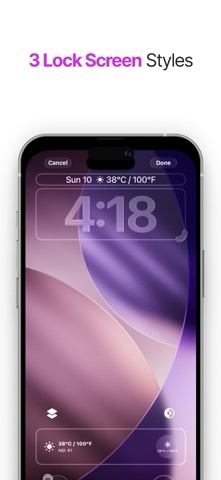
LOCK SCREEN WIDGETS
View key weather information directly from your Lock Screen.
- Inline, circular, and rectangular Lock Screen widget styles
- Designed for fast reading
- Dual-unit weather display
24-HOUR WEATHER DETAILS
Tap weather detail cards to see hourly changes.
- Wind speed and wind direction
- Current AQI and its color-coded scale
- UV index
- Humidity
- Precipitation
- Visibility
- Cloud cover
- Moon phase and more
SMART VISUAL GAUGES
Color-coded bars make weather levels easier to read.
- AQI levels
- UV risk
- Wind strength
- Humidity comfort
- Precipitation intensity
- Visibility and cloud cover
DYNAMIC WEATHER DESIGN
The interface changes with weather, time, and sky conditions.
- Dynamic backgrounds
- Sunrise and sunset emphasis
- Clean glass-style cards
- Improved readability across the app and widgets
GLOBAL CITY SEARCH
Search, save, and organize cities around the world.
- Add saved cities
- Reorder saved cities
- Quickly switch between current location and saved locations
- Use saved cities in widgets
WEATHER ALERTS
See important weather alerts where available.
- National Weather Service (NWS) alerts where supported
- Alert banners in the app and widgets
- Clear warning display for severe conditions
HEALTH AND ENVIRONMENT DETAILS
Check environmental factors that affect daily comfort.
- Air quality
- PM2.5 and PM10
- Pollen concentrations where available in Europe
- Outdoor humidity and air quality context
- Plain-language pollutant explanations
- Data sources and regional availability
Environmental data is based on CAMS forecasts via Open-Meteo. Coverage and resolution vary by region. Health information describes weather factors; it is not a personal medical assessment.
MOON AND SKY DETAILS
Track sky conditions for day and night planning.
- Moon phase
- Moon illumination
- Sunrise and sunset
- Visibility
- Cloud cover
- Stargazing-friendly details
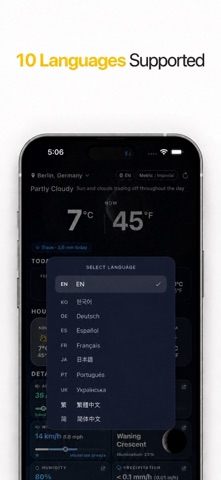
10 LANGUAGES SUPPORTED
Use the app in your preferred language.
- English
- Korean
- German
- Spanish
- French
- Japanese
- Portuguese (Brazil)
- Ukrainian
- Traditional Chinese
- Simplified Chinese
Dual Temp Weather is designed for people who want weather information that is easy to read, visually clear, and practical every day.