

DualPane is made and published by Wolfram Wacker. AppBrain is an independent app data site and isn't affiliated with Wolfram Wacker. The app name, icon, screenshots and description belong to Wolfram Wacker and are shown as published on the App Store.
AppBrain's verdict
- Rating on App Store
- 5.00
- 2 ratings
- Last updated
- October 31, 2026
It doesn't have enough ratings yet to judge what users think.
Rankings
App Store top chartsApp Store Rankings for DualPane
Competitors
Similar apps and more from Wolfram WackerMore from Wolfram Wacker


Releases
Updates seen on the App Store- Version
- 5.9
- Launched
- March 2026
No changelog data
User feedback
Ratings and reviews on the App StoreComments on DualPane for iOS
We don't have enough comments to show example comments. Please check back later.
Technology
Found in the app by AppBrain- Price
- Free
- App size
- 2.83 MB
- Content rating
- Low
Technologies used by DualPane
About the app and developer
About DualPane
DualPane is an utilities app developed by Wolfram Wacker.
User Ratings
DualPane is rated 5.00 out of 5 stars. The rating is based on 2 ratings.
App Information
DualPane is freely available from the App Store. The app size is 2.83 MB. The latest version available is 5.9. The last update was on October 31, 2026.
Technical Requirements
The app has a content rating of Low Maturity. The app has been available on the App Store since March 2026.
Developer information for Wolfram Wacker
Address:
Store listing
By Wolfram Wacker, from the App Store




Description by Wolfram Wacker Written by the developer, not by AppBrain. Click to read.
Browse two folders side by side, move and copy files between locations, organize documents, manage archives, preview text files and work with shared files from other apps. DualPane is designed for practical file workflows without clutter. Whether you are sorting downloads, organizing project folders, reviewing shared files or working with archives, DualPane gives you a faster way to manage files directly on your device.
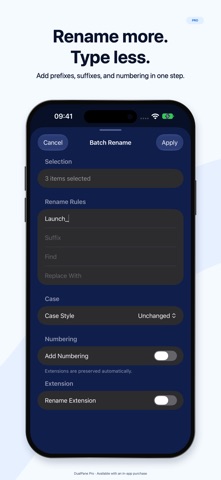
DualPane Pro unlocks advanced tools for power users, including batch rename, folder compare, duplicate finding, within-pane copy and move, archive browsing, text editing and more.
Key Features:
• Dual-Pane file management for faster file operations
• Long-press any file or folder to access the context menu
• Browse folders side by side, copy and move files between panes
• Adjustable pane widths (drag the divider, reset in settings)
• Open folders, navigate subfolders and manage files efficiently
• Rename files and folders
• Create new folders
• Delete files and folders
• Search within the active pane, including subfolders
• Import files from other apps with the share extension
• Review pending imports before saving them into a folder
• Preview text-based files such as TXT and JSON
• Share files to other apps, AirDrop, Print or Save to Files
• Create and extract archives
• Preview archive contents and handle unsupported files more clearly
• Works on iPhone, iPad and Apple Silicon Mac
DualPane Pro:
• Undo renames, file moves and supported local deletions
• Recover deleted files and folders using Recently Deleted.
• Batch rename multiple files
• Advanced batch rename options
• Compare left and right folders
• Find duplicate files
• Copy to another folder within the same pane
• Move to another folder within the same pane
• Browse archive contents before extraction
• Extract only selected files from archive preview
• Edit and save text-based files directly in the app
• Share folders and selections as archive files
• Customization for pane background colours
• Customization for bottom toolbar icon styles
• Saved Workspaces