

DualView Translator
DualView Translator is made and published by Hirokatsu Hibino. AppBrain is an independent app data site and isn't affiliated with Hirokatsu Hibino. The app name, icon, screenshots and description belong to Hirokatsu Hibino and are shown as published on the App Store.
AppBrain's verdict
- Last updated
- June 9, 2026
- Size
- 1.30 MB
User feedback
Ratings and reviews on the App StoreComments on DualView Translator for iOS
We don't have enough comments to show example comments. Please check back later.
Store listing
By Hirokatsu Hibino, from the App Store

Description by Hirokatsu Hibino Written by the developer, not by AppBrain. Click to read.
■ Key Features
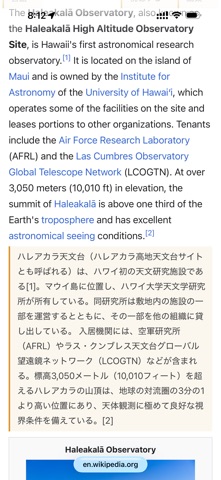
・Dual-view display — Translations appear directly below the original text
・8 translation modes — Select-and-translate, full-page translation, element-select translation & summary, and more
・Automatic Translation Rules — Automatically translate specific sites based on URL patterns. Narrow down target elements using CSS selectors
・Translation Reset — Reset individual elements with the × button, or reset all at once
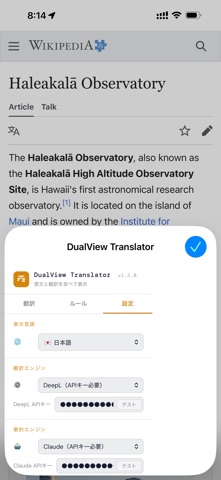
・Two Translation Engines — Google Translate (free) and DeepL (high quality)
・AI Summary Feature — Summarize translation results into 3–5 lines using Claude / Gemini
・Tabbed Pop-up — Clean UI that separates translation operations from settings
・UI Support for 11 Languages — Japanese, English, Chinese, Korean, French, German, Spanish, Portuguese, Russian, Arabic
・Dark / Light Theme — Automatically follows OS settings
■ Translation Modes
1. Select Translation — Simply select text to display the translation panel
2. Full Page Translation — Translate entire articles or documents in dual-view mode
3. Full-Page Translation & Summary — Displays an AI-generated summary in addition to the translation
4. Element Selection Translation — Click on specific elements on the page to translate them
5. Element Selection Translation & Summary — Click on an element to translate it and view an AI summary
6. Right-Click Translation (macOS only) — Select text, then right-click to translate instantly
7. Element Translation (macOS only) — Translate by block with a right-click
8. Element Translation & Summary (macOS only) — Translate and display an AI summary with a right-click
■ Translation Bar
When you open a page in a foreign language, a translation bar automatically appears at the top of the screen. You can execute "Translate" or "Translate & Summary" with a single click.
■ Automatic Translation Rules
Register frequently visited sites as rules, and automatic translation will run as soon as you open them. You can specify targets in detail using URL patterns and CSS selectors, and the tool includes an element picker feature that automatically generates selectors just by clicking on elements on the page. It also supports SPAs, dynamic content, webmail, and more.
■ About API Keys
・Google Translate: No API key required (default)
・DeepL: Set the API key obtained after free registration (Free up to 500,000 characters per month)
・Claude (Summary): Requires an Anthropic API key
・Gemini (Summary): Available using the free-tier API key from Google AI Studio
API keys are stored only in the browser’s local storage and are never sent to our servers. Text to be translated is sent directly to the API of the selected engine; we do not receive or store it.
■ iOS Limitations
Since iOS Safari does not support some parts of the Web Extension API (keyboard shortcuts, right-click menu), these features are automatically hidden. Page translation, selected text translation, area selection translation, and settings can all be accessed via pop-ups.
■ Privacy
Please review our Privacy Policy for details.
https://hirokatsuhibino.github.io/dualview-translator/privacy-policy.html
Safety and technology
Found in the app by AppBrain- Price
- Free
- App size
- 1.30 MB
- Content rating
- High
Technologies used by DualView Translator
Releases
Updates seen on the App Store- Version
- 1.8.0
- Launched
- April 2026
No changelog data
Alternatives
Similar apps and more from Hirokatsu HibinoAlternatives to DualView Translator


Rankings
App Store top chartsApp Store Rankings for DualView Translator
About the app and developer
About DualView Translator
DualView Translator is a productivity app developed by Hirokatsu Hibino.
What is the rating of DualView Translator?
DualView Translator has no ratings yet.
Is DualView Translator free?
DualView Translator is free. The app size is 1.30 MB. The latest version available is 1.8.0. The last update was on June 9, 2026.
What are the requirements for DualView Translator?
The app has a content rating of High Maturity. The app has been available on the App Store since April 2026.
Developer information for Hirokatsu Hibino
Address:
Frequently asked questions about DualView Translator
Is DualView Translator free?
Yes. DualView Translator is free on the App Store.
Is DualView Translator still available?
Yes. DualView Translator is on the App Store, and the last update we saw was on June 9, 2026.
How large is DualView Translator?
DualView Translator is 1.30 MB.
Is DualView Translator suitable for children?
App Store gives DualView Translator a high maturity rating. It is meant for adults.
Who made DualView Translator?
DualView Translator was developed by Hirokatsu Hibino. It is listed in the productivity category on the App Store.
What are the best alternatives to DualView Translator?
People looking at DualView Translator also look at these productivity apps: Adara Translate, Southwind Screenplay, Cycler - Interval Reminder, SaySay: Screen Translator, Capacity: Vibe Code anywhere.