

Due Okay Pro
Due Okay Pro is made and published by Diptimaya Patra. AppBrain is an independent app data site and isn't affiliated with Diptimaya Patra. The app name, icon, screenshots and description belong to Diptimaya Patra and are shown as published on the App Store.
AppBrain's verdict
- Last updated
- May 1, 2026
Rankings
App Store top chartsApp Store Rankings for Due Okay Pro
Competitors
Similar apps and more from Diptimaya PatraMore from Diptimaya Patra


Also available on Google Play

Releases
Updates seen on the App Store- Version
- 1.0.6
- Launched
- April 2026
No changelog data
User feedback
Ratings and reviews on the App StoreComments on Due Okay Pro for iOS
We don't have enough comments to show example comments. Please check back later.
Technology
Found in the app by AppBrain- Price
- $0.99
- App size
- 68.4 MB
- Content rating
- High
Technologies used by Due Okay Pro
About the app and developer
About Due Okay Pro
Due Okay Pro is a productivity app developed by Diptimaya Patra.
User Ratings
The app has no ratings yet.
App Information
Due Okay Pro costs $0.99. The app size is 68.42 MB. The latest version available is 1.0.6. The last update was on May 1, 2026.
Technical Requirements
The app has a content rating of High Maturity. The app has been available on the App Store since April 2026.
Developer information for Diptimaya Patra
Address:
Frequently asked questions about Due Okay Pro
Is Due Okay Pro free?
No. Due Okay Pro costs $0.99 on the App Store.
Is Due Okay Pro still available?
Yes. Due Okay Pro is on the App Store, and the last update we saw was on May 1, 2026.
How large is Due Okay Pro?
Due Okay Pro is 68.42 MB.
Is Due Okay Pro suitable for children?
App Store gives Due Okay Pro a high maturity rating. It is meant for adults.
Who made Due Okay Pro?
Due Okay Pro was developed by Diptimaya Patra. It is listed in the productivity category on the App Store.
Store listing
By Diptimaya Patra, from the App Store


Description by Diptimaya Patra Written by the developer, not by AppBrain. Click to read.
Stay on top of every recurring payment, renewal, and subscription in one simple app.
Whether it's insurance premiums, streaming subscriptions, vehicle registration, medical checkups, tax deadlines, or domain renewals — Due Okay keeps track so you don't have to remember.
KEY FEATURES
Track 15+ categories — subscriptions, insurance, vehicle, medical, tax, home maintenance, warranties, leases, certifications, domains, education, pet care, lifestyle, and more.
Smart reminders — get notified before due dates so you never miss a payment or renewal. Customize reminder timing to suit your schedule.
Spending insights — see where your money goes with monthly and yearly breakdowns. Track spending trends across all your recurring commitments.
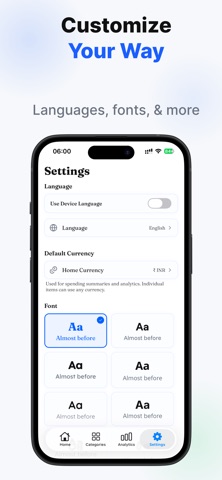
Multi-currency support — track expenses in any currency with automatic conversion. The app detects your local currency from your device settings.
Timeline view — visualize all your upcoming dues at a glance. See what's due this week, this month, or overdue at a glance.
Renewal history — a complete log of every payment and renewal you've made. Never lose track of when you last paid or renewed something.
Data stays on your device — no accounts, no cloud, no sign-ups. Everything is stored locally on your phone.
Export and backup — save your data as a backup file and restore it anytime on any device. Your data, your control.
Available in 10+ languages — English, Hindi, Spanish, French, German, Portuguese, Japanese, Korean, Chinese, Arabic, and more.
WHO IS IT FOR
Anyone juggling multiple subscriptions and memberships who wants a single place to see what's due and what it costs.
Homeowners tracking insurance, maintenance schedules, and utility renewals across the year.
Professionals managing certifications, licenses, compliance deadlines, and domain renewals.
Families keeping track of medical visits, vehicle servicing, school fees, and warranties.
Freelancers and small business owners monitoring software subscriptions, hosting renewals, and recurring expenses.
HOW IT WORKS
1. Add your recurring items — pick a category, enter the details, set the billing cycle.
2. Get reminders — Due Okay notifies you before each due date.
3. Mark as done — tap to record the payment and automatically advance to the next cycle.
4. Review your spending — check analytics to understand your monthly and yearly commitments.
No ads. No distractions. Just a clean, simple tracker built with your privacy in mind.