

DueKeeper: Budget Tracker
DueKeeper: Budget Tracker is made and published by Yuichiro Yasui. AppBrain is an independent app data site and isn't affiliated with Yuichiro Yasui. The app name, icon, screenshots and description belong to Yuichiro Yasui and are shown as published on the App Store.
AppBrain's verdict
- Last updated
- August 28, 2026
Rankings
App Store top chartsApp Store Rankings for DueKeeper: Budget Tracker
Competitors
Similar apps and more from Yuichiro YasuiAlternatives to DueKeeper: Budget Tracker


More from Yuichiro Yasui


Releases
Updates seen on the App Store- Version
- 1.0.19
- Launched
- February 2026
No changelog data
User feedback
Ratings and reviews on the App StoreComments on DueKeeper: Budget Tracker for iOS
We don't have enough comments to show example comments. Please check back later.
Technology
Found in the app by AppBrain- Price
- Free
- App size
- 63.7 MB
- Content rating
- Everyone
Technologies used by DueKeeper: Budget Tracker
About the app and developer
About DueKeeper: Budget Tracker
DueKeeper: Budget Tracker is a finance app developed by Yuichiro Yasui.
User Ratings
The app has no ratings yet.
App Information
DueKeeper: Budget Tracker is freely available from the App Store. The app size is 63.65 MB. The latest version available is 1.0.19. The last update was on August 28, 2026.
Technical Requirements
The app has a content rating of Everyone. The app has been available on the App Store since February 2026.
Developer information for Yuichiro Yasui
Address:
Store listing
By Yuichiro Yasui, from the App Store


Description by Yuichiro Yasui Written by the developer, not by AppBrain. Click to read.
DueKeeper takes the guesswork out of managing your money. It's a household budget app that organizes your income and expenses so you can see exactly when, where, and how much you need to pay — all at a glance. Designed to be intuitive enough for first-time budgeters.
Payment Schedule
- View all your upcoming payments in a clear date-by-account matrix. See which account is being charged, when, and how much. Payment dates that fall on weekends or holidays are automatically adjusted.
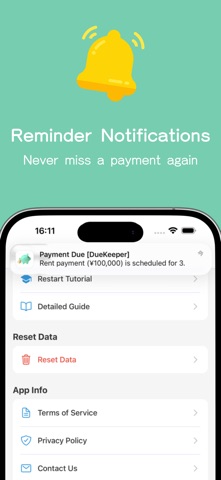
Payment Reminders
Get notified 1 to 7 days before a payment is due. Never miss a credit card charge or forget a transfer deadline again.
3 Expense Types for Detailed Tracking
- Fixed: Rent, insurance, subscriptions — recurring expenses with a set amount
- Variable: Utilities, credit cards — recurring expenses where the amount changes
- One-time: Travel, appliance purchases — expenses that occur only once
Set payment dates, accounts, and billing cycles for each to get a complete picture of your finances.
Monthly Summary & Charts
- Review your income, expenses, and balance month by month. Category breakdowns and a 6-month trend chart help you spot spending patterns.
Widget Support
- View your income/expense summary and payment schedule right on your home screen.
Multiple Budgets (Premium)
- Create up to 5 separate budget books for different purposes — household, personal, business, and more. Business mode supports daily sales tracking, making it ideal for freelancers and sole proprietors.
More Useful Features
- 10 currencies supported (JPY, USD, EUR, GBP, SGD, CAD, AUD, CNY, KRW, TWD)
- Custom month start date (align your budget with your payday)
- Account management (bank, e-money, cash)
- Custom categories (Premium)
- Available in English and Japanese
- Automatic payment date adjustment for holidays in 5 countries (Japan, US, UK, Singapore, Canada)
Designed to Be Simple and Sustainable
- Unlike typical budgeting apps, there's no need to:
- Track or reconcile account balances
- Log every daily transaction
- Scan receipts
- Link your bank accounts
Built for Privacy
All your data is stored locally on your device. Keep it safe with iCloud backup. No ads, no tracking, no sign-up required.
Pricing
Core features are free to use.
Premium Features (Subscription or One-Time Purchase)
- Multiple budget books
- Sales tracking
- Custom categories
- Automatic iCloud backup
- Annual reports
Privacy Policy: https://kakeibo.spade3.com/en/privacy-policy/
Terms of Use (EULA): https://www.apple.com/legal/internet-services/itunes/dev/stdeula/