

DuoTime: Dual Clock
DuoTime: Dual Clock is made and published by CdPlus. AppBrain is an independent app data site and isn't affiliated with CdPlus. The app name, icon, screenshots and description belong to CdPlus and are shown as published on the App Store.
AppBrain's verdict
- Last updated
- September 9, 2026
Rankings
App Store top chartsApp Store Rankings for DuoTime: Dual Clock
Competitors
Similar apps and more from CdPlus


Releases
Updates seen on the App Store- Version
- 1.0.6
- Launched
- September 2026
No changelog data
User feedback
Ratings and reviews on the App StoreComments on DuoTime: Dual Clock for iOS
We don't have enough comments to show example comments. Please check back later.
Technology
Found in the app by AppBrain- Price
- $0.99
- App size
- 24.4 MB
- Content rating
- Everyone
Technologies used by DuoTime: Dual Clock
About the app and developer
About DuoTime: Dual Clock
DuoTime: Dual Clock is an utilities app developed by CdPlus.
User Ratings
The app has no ratings yet.
App Information
DuoTime: Dual Clock costs $0.99. The app size is 24.35 MB. The latest version available is 1.0.6. The last update was on September 9, 2026.
Technical Requirements
The app has a content rating of Everyone. The app has been available on the App Store since September 2026.
Developer information for CdPlus
Address:
Store listing
By CdPlus, from the App Store



Description by CdPlus Written by the developer, not by AppBrain. Click to read.
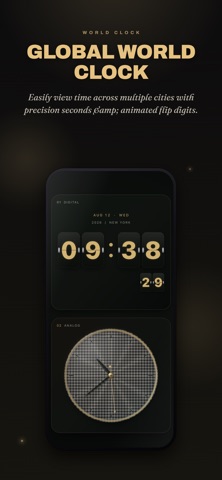
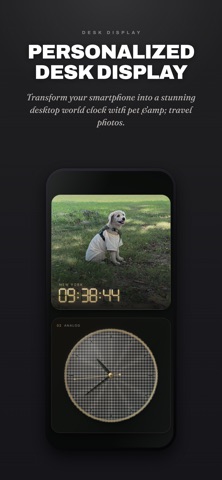
DuoTime turns your phone or tablet into a customizable dual clock. Place two time zones side by side, then choose the display that fits each panel—from digital and analog clocks to a calendar or a favorite photo.
KEY FEATURES
• Two independent panels
Set the clock type, time zone, and color of the left and right panels separately.
• World time at a glance
Keep an eye on family abroad, a destination, or your remote team without doing the time-zone math.
• Four panel types
Combine digital, analog, calendar, and photo views in any pairing that works for you.
• A look of your own
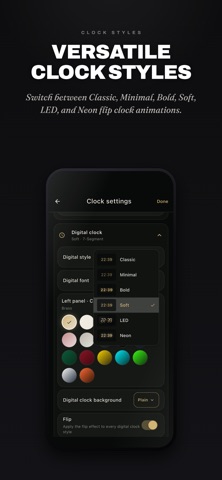
Mix digital styles and typefaces, analog dials and second hands, color palettes, and richly textured backgrounds. You can also use an image from your photo library as a clock background.
• Automatic background changes
Choose an interval and let the background designs rotate automatically for a display that stays fresh.
• Made for the desk
Keep the screen awake while the clock is showing, and enjoy a layout that adapts naturally to portrait and landscape.
• Precise display controls
Choose 12- or 24-hour time, then control digital seconds and the analog second hand independently.
Use DuoTime as a desk clock at home or work, a world clock for remote collaboration, a travel companion, or a simple way to stay connected with someone far away. Put the two times that matter most on one screen.