

DWG Reader Converter PDF CAD
DWG Reader Converter PDF CAD is made and published by Haitam Baid. AppBrain is an independent app data site and isn't affiliated with Haitam Baid. The app name, icon, screenshots and description belong to Haitam Baid and are shown as published on the App Store.
AppBrain's verdict
- Rating on App Store
- 4.04
- 26 ratings
- Last updated
- July 9, 2026
It doesn't have enough ratings yet to judge what users think.
Rankings
App Store top chartsApp Store Rankings for DWG Reader Converter PDF CAD
Competitors
Similar apps and more from Haitam BaidAlternatives to DWG Reader Converter PDF CAD






More from Haitam Baid




Releases
Updates seen on the App Store- Version
- 9.0.0
- Launched
- January 2024
No changelog data
User feedback
Ratings and reviews on the App StoreComments on DWG Reader Converter PDF CAD for iOS
We don't have enough comments to show example comments. Please check back later.
Technology
Found in the app by AppBrain- Price
- Free
- App size
- 49.8 MB
- Content rating
- Everyone
Technologies used by DWG Reader Converter PDF CAD
About the app and developer
About DWG Reader Converter PDF CAD
DWG Reader Converter PDF CAD is an utilities app developed by Haitam Baid.
What is the rating of DWG Reader Converter PDF CAD?
DWG Reader Converter PDF CAD is rated 4.04 out of 5 stars, based on 26 ratings.
Is DWG Reader Converter PDF CAD free?
DWG Reader Converter PDF CAD is free. The app size is 49.76 MB. The latest version available is 9.0.0. The last update was on July 9, 2026.
What are the requirements for DWG Reader Converter PDF CAD?
The app has a content rating of Everyone. The app has been available on the App Store since January 2024.
Developer information for Haitam Baid
Address:
Frequently asked questions about DWG Reader Converter PDF CAD
Is DWG Reader Converter PDF CAD free?
Yes. DWG Reader Converter PDF CAD is free on the App Store.
Is DWG Reader Converter PDF CAD still available?
Yes. DWG Reader Converter PDF CAD is on the App Store, and the last update we saw was on July 9, 2026.
How large is DWG Reader Converter PDF CAD?
DWG Reader Converter PDF CAD is 49.76 MB.
Is DWG Reader Converter PDF CAD suitable for children?
App Store rates the content of DWG Reader Converter PDF CAD as suitable for everyone.
How do people rate DWG Reader Converter PDF CAD?
DWG Reader Converter PDF CAD scores 4.04 out of 5 stars, from 26 ratings on the App Store.
Who made DWG Reader Converter PDF CAD?
DWG Reader Converter PDF CAD was developed by Haitam Baid. It is listed in the utilities category on the App Store.
What are the best alternatives to DWG Reader Converter PDF CAD?
People looking at DWG Reader Converter PDF CAD also look at these utilities apps: DWG to Image, DWG Converter, DWG to PDF, CAD Viewer-DWG quick view, CAD FastView: DWG Viewer, Convert Expert-PDF to WORD.
Store listing
By Haitam Baid, from the App Store
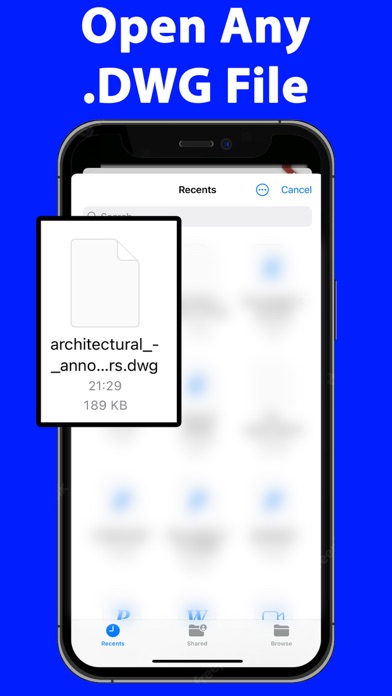


Description by Haitam Baid Written by the developer, not by AppBrain. Click to read.
Key Features:
Multi-Format Conversion: At the heart of DWG Reader Converter PDF CAD is its robust conversion engine. Convert your DWG files to a wide array of formats including PDF, CAD, DXF, SVG, JPEG, PNG, and TIFF. This flexibility ensures that your work is always compatible and sharable, regardless of the software or platforms your colleagues or clients use.
High-Quality DWG Reading: Experience crystal-clear viewing with advanced DWG reading capabilities. Our app supports essential functions like zoom, pan, and rotate, allowing you to inspect every detail of your designs. The layer management feature is a game-changer, offering the ability to isolate and view individual components of complex drawings.
Batch Processing: Efficiency is key, and with our batch processing feature, you can convert multiple DWG files simultaneously. This feature is a time-saver, especially for professionals handling large projects with numerous files.
Intuitive User Interface: DWG Reader Converter PDF CAD boasts a user-friendly interface, making it accessible to users of all skill levels. Its clean design and intuitive navigation ensure that your focus remains on your work, not on figuring out how to use the tool.
Custom Conversion Settings: Tailor your conversions to fit your specific needs. The app allows you to adjust various settings such as resolution, line thickness, and color options for each output format, ensuring your files are not just converted, but optimized.
Seamless File Sharing: Integrated sharing options enable you to send your converted files directly through email, cloud services, or social media. This streamlines collaboration and feedback processes, making it easier to keep your projects moving.
Local Processing for Security: Your privacy and security are paramount. All file conversions are processed locally on your device, ensuring that your sensitive data never leaves your workspace.
Cross-Device Functionality: Designed for versatility, DWG Reader Converter PDF CAD works seamlessly across various devices, including smartphones, tablets, and desktop computers, ensuring a consistent user experience.
Frequent Updates: We continuously evolve our app, adding new features and supporting the latest DWG formats, all based on user feedback and industry trends.
Dedicated Support: Our responsive customer support team is always available to assist you with any queries or issues, ensuring a smooth and uninterrupted user experience.
Who Can Benefit?:
DWG Reader Converter PDF CAD is perfect for anyone in the field of architecture, engineering, design, education, or even hobbyists who require a reliable tool for managing and converting DWG files.
Final Thoughts:
Elevate your design and drafting workflow with DWG Reader Converter PDF CAD - the comprehensive, user-friendly solution for reading, converting, and sharing DWG files with ease and precision. Download it today and transform your digital drafting experience!
The app offers a weekly subscription to open/convert DWG files.
Terms of use EULA: https://sites.google.com/view/termsofuseeulanewspfaosdhf/home