

DyslexiaEasyRead
DyslexiaEasyRead is made and published by RAJESH BHIMANI. AppBrain is an independent app data site and isn't affiliated with RAJESH BHIMANI. The app name, icon, screenshots and description belong to RAJESH BHIMANI and are shown as published on the App Store.
AppBrain's verdict
- Last updated
- February 7, 2025
Rankings
App Store top chartsApp Store Rankings for DyslexiaEasyRead
Competitors
Similar apps and more from RAJESH BHIMANIAlternatives to DyslexiaEasyRead





More from RAJESH BHIMANI







Releases
Updates seen on the App Store- Version
- 1.1
- Launched
- November 2024
No changelog data
User feedback
Ratings and reviews on the App StoreComments on DyslexiaEasyRead for iOS
We don't have enough comments to show example comments. Please check back later.
Technology
Found in the app by AppBrain- Price
- Free
- App size
- 101.7 MB
- Content rating
- High
Technologies used by DyslexiaEasyRead
About the app and developer
About DyslexiaEasyRead
DyslexiaEasyRead is a productivity app developed by RAJESH BHIMANI.
User Ratings
The app has no ratings yet.
App Information
DyslexiaEasyRead is freely available from the App Store. The app size is 101.70 MB. The latest version available is 1.1. The last update was on February 7, 2025.
Technical Requirements
The app has a content rating of High Maturity. The app has been available on the App Store since November 2024.
Developer information for RAJESH BHIMANI
Address:
Frequently asked questions about DyslexiaEasyRead
Is DyslexiaEasyRead free?
Yes. DyslexiaEasyRead is free on the App Store.
Is DyslexiaEasyRead still available?
Yes. DyslexiaEasyRead is on the App Store, and the last update we saw was on February 7, 2025.
How large is DyslexiaEasyRead?
DyslexiaEasyRead is 101.70 MB.
Is DyslexiaEasyRead suitable for children?
App Store gives DyslexiaEasyRead a high maturity rating. It is meant for adults.
Who made DyslexiaEasyRead?
DyslexiaEasyRead was developed by RAJESH BHIMANI. It is listed in the productivity category on the App Store.
What are the best alternatives to DyslexiaEasyRead?
People looking at DyslexiaEasyRead also look at these productivity apps: Progress-2024, Dyslexia Notes - ADHD Notepad, TaskBox: To Do List & Tasks, Cute Pomodoro, TLDR Text Summarizer・BrevityAI.
Store listing
By RAJESH BHIMANI, from the App Store




Description by RAJESH BHIMANI Written by the developer, not by AppBrain. Click to read.
1. Comprehensive App Preferences:
Tailor your reading experience by adjusting easy-to-navigate app preferences, users can customize fonts, themes, and language setting options to match their comfort level.
2. Manage Profiles for Parents and Kids:
Create and manage multiple profiles with individualized settings for each family member. Parents can see their children’s app usage to optimize their reading experience, while kids can enjoy a fun, kid-friendly interface.
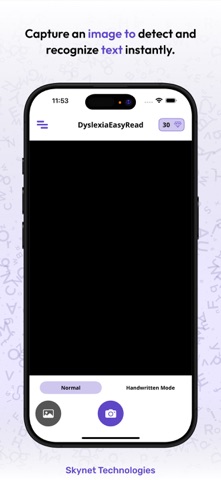
3. Capture Images and Read Text Effortlessly:
The app allows users to capture images of printed text and convert them into readable content instantly. Snap a photo of a book, sign, or document and have the text read aloud or adjusted for easy reading.
4. Enhance Reading with Text-to-Speech and Vocal Synthesis:
DyslexiaEasyRead offers high-quality text-to-speech and vocal synthesis options, enabling users to listen to text read aloud. Follow along visually as the words are spoken, or let the app read to you while you multitask.
5. Advanced Settings and Customization for an Optimized Reading Experience:
Fine-tune the app’s features with advanced customization options. Modify word spacing, letter size, background color, confusing characters / words and highlight styles to create the perfect reading environment that reduces visual stress and improves comprehension.
6. Seamless Translation Using Google ML Kit:
Easily translate text into 58 different languages using Google ML Kit integration. Ideal for language learners or anyone needing to access information in another language, this feature ensures a versatile reading experience.
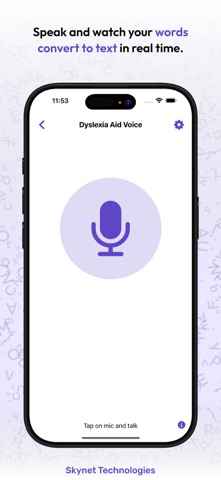
7. Dual Speech-to-Text and Text-to-Speech Features:
DyslexiaEasyRead supports both speech-to-text and text-to-speech functionalities, making it easier to convert spoken words into text or listen to written content aloud. Best suitable for note-taking, dictation, or overcoming reading challenges.
8. Built-in Web Browser with Accessibility Features:
Browse the web directly within the app using our built-in accessible web browser. Enjoy features like reading mode, adjustable font sizes, spacing, and simplified themes that make online content easier to consume.
9. Kids-Themed Interface and App Design:
Our kid-friendly interface offers a playful, themed design that makes reading fun and engaging for younger users. The intuitive layout helps children navigate the app effortlessly, while parents can rest assured that the content is tailored for kids.
10. Credit Management for Premium Features:
Access premium features through a simple credit system. Users can purchase credits to unlock premium plan, ensuring flexibility and affordability based on individual needs. Minimum 30 credits are required.
By using this app, you acknowledge and agree to the Terms and Conditions (https://www.skynettechnologies.com/terms-conditions) and privacy policy (https://www.skynettechnologies.com/privacy-policy).