

e-File Transfer
e-File Transfer is made and published by isa diliballi. AppBrain is an independent app data site and isn't affiliated with isa diliballi. The app name, icon, screenshots and description belong to isa diliballi and are shown as published on the App Store.
AppBrain's verdict
Established- Rating on App Store
- 3.00
- 1 ratings
- Last updated
- May 3, 2023
It doesn't have enough ratings yet to judge what users think.
Rankings
App Store top chartsApp Store Rankings for e-File Transfer
Competitors
Similar apps and more from isa diliballiAlternatives to e-File Transfer








Releases
Updates seen on the App Store- Version
- 1.17
- Launched
- May 2021
No changelog data
User feedback
Ratings and reviews on the App StoreComments on e-File Transfer for iOS
We don't have enough comments to show example comments. Please check back later.
Technology
Found in the app by AppBrain- Price
- Free
- App size
- 66.2 MB
- Content rating
- Everyone
Technologies used by e-File Transfer
About the app and developer
About e-File Transfer
e-File Transfer is a productivity app developed by isa diliballi.
User Ratings
e-File Transfer is rated 3.00 out of 5 stars. The rating is based on one rating ratings.
App Information
e-File Transfer is freely available from the App Store. The app size is 66.25 MB. The latest version available is 1.17. The last update was on May 3, 2023.
Technical Requirements
The app has a content rating of Everyone. The app has been available on the App Store since May 2021.
Developer information for isa diliballi
Address:
Frequently asked questions about e-File Transfer
Is e-File Transfer free?
Yes. e-File Transfer is free on the App Store.
Is e-File Transfer still available?
Yes. e-File Transfer is on the App Store, and the last update we saw was on May 3, 2023.
How large is e-File Transfer?
e-File Transfer is 66.25 MB.
Is e-File Transfer suitable for children?
App Store rates the content of e-File Transfer as suitable for everyone.
How do people rate e-File Transfer?
e-File Transfer has one rating of 3.00 stars on the App Store.
Who made e-File Transfer?
e-File Transfer was developed by isa diliballi. It is listed in the productivity category on the App Store.
What are the best alternatives to e-File Transfer?
People looking at e-File Transfer also look at these productivity apps: Syndoc Pro, BrilCloud, aiReader: AI Text to Speech, QRClip, BluDrop.
Store listing
By isa diliballi, from the App Store




Description by isa diliballi Written by the developer, not by AppBrain. Click to read.
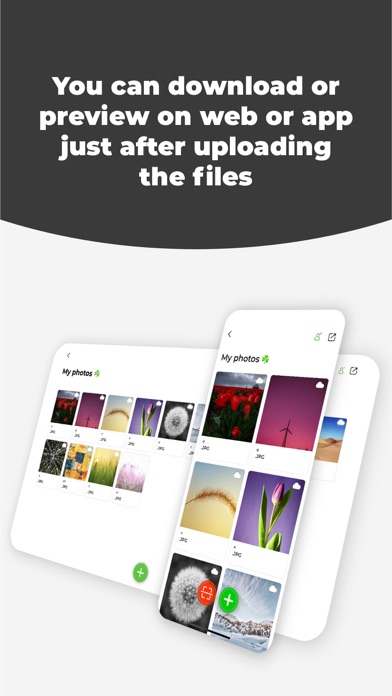
eFile Transfer is a cloud-based application. The folders you create or the files you upload from the mobile application or website are instantly synchronized on all devices. This allows you to view and download your photos, videos, PDFs, texts, documents, and other files that you have uploaded from one device instantly on other devices.
Create an account within seconds of downloading the mobile application and create folders, upload files, and instantly log in on other devices with the QR code.
How it Works:
To quickly and securely send files such as URLs, texts, photos, videos, PDFs, and documents from your phone or any other device to another device (TV, phone, computer, tablet), enter e-filetransfer.com into the web browser of the receiving device and search. You will see a QR code on the screen. Scan this QR code with the QR code scanner in the mobile application to instantly log in on the receiving device. Create folders and upload files without needing to enter your email and password again. View or download your files.
Share the files in the folders you have created by generating a sharing link. Any deletion, upload, name change of the files in the folder or any changes will take place immediately for the people with the sharing link.
If you want to share the link of the shared folder with nearby people, ask them to scan the opened QR code from the phone camera or any QR code reader by saying "QR Code" instead of "Copy" on the sharing page.
Export your files from the mobile application so you can open them later without an internet connection. By default, your file is only stored in cloud storage. You can choose to store the exported file only in cloud storage by deleting it from your device memory.
You can upload text, URLs, photos, videos, or any kind of file you choose from other applications without opening the application using the sharing extension.
Price and Features:
You can download and use eFile Transfer for free. You can also choose to upgrade to a PREMIUM account to take advantage of PREMIUM benefits.
What you can do with a PREMIUM account:
• No limit on creating folders
• No limit on file uploads
• No limit on sharing links
• Upload files up to 1 GB per file
• A total of 10 GB of storage
• No ads
• Your files will not be deleted
You can see the price of the PREMIUM account in the information section of this page.
Please read the terms of use for more details.
What you can do with a free account:
• Create up to 2 folders
• Upload up to 10 files per day
• Generate up to 10 sharing links per day
• Upload files up to 10 MB per file
• A total of 50 MB of cloud storage
• Ads will be displayed
• Your uploaded files will be deleted after 7 days if you do not upgrade to a PREMIUM account.
Please read the terms of use for more details.
Terms of Use: https://e-filetransfer.com/termsofuse.html
Privacy Policy: https://e-filetransfer.com/privacypolicy.html