

e-tide (World tide app)
e-tide (World tide app) is made and published by Mitsuhiro Shirai. AppBrain is an independent app data site and isn't affiliated with Mitsuhiro Shirai. The app name, icon, screenshots and description belong to Mitsuhiro Shirai and are shown as published on the App Store.
AppBrain's verdict
Established- Rating on App Store
- 5.00
- 8 ratings
- Last updated
- September 27, 2021
- Size
- 32.1 MB
It doesn't have enough ratings yet to judge what users think.
User feedback
Ratings and reviews on the App StoreComments on e-tide (World tide app) for iOS
We don't have enough comments to show example comments. Please check back later.
Store listing
By Mitsuhiro Shirai, from the App Store

Description by Mitsuhiro Shirai Written by the developer, not by AppBrain. Click to read.
It can be used for marine sports such as surfing and fishing. Do not use for navigation.
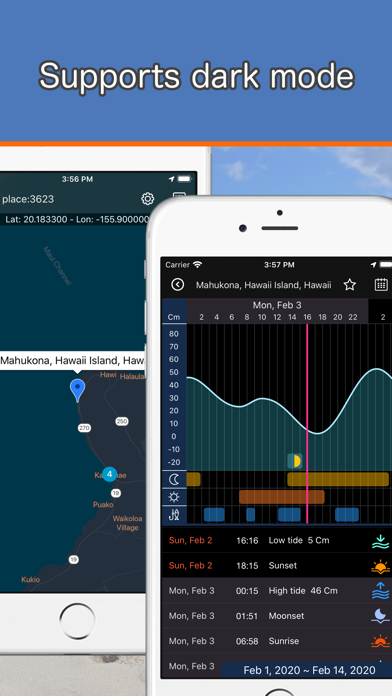
You can be easily searched tide places from the map.
Multiple places are clustered according to the zoom size of map. Tap to zoom in and break down into individual places as a map pins.
Tap the map pin to popup the place name. And then tap the popup to show a tide graph.
By default, the tide graph for two weeks from two days ago is shown.
You can also show the graph by specifying the date from the calendar.
In the initial state, the graph is automatically updated according to the date.
The tide graph can also graphically check astronomical events such as sunrise, sunset, moonrise, moonset, and moon phase.
It can also automatically calculate the time when there is a lot of tide movement and check the time suitable for fishing.
When the tide moves a lot, the size of the waves will increase slightly, making it a suitable time for surfing too.
You can change the scale in centimeters or feet in "Settings" of app.
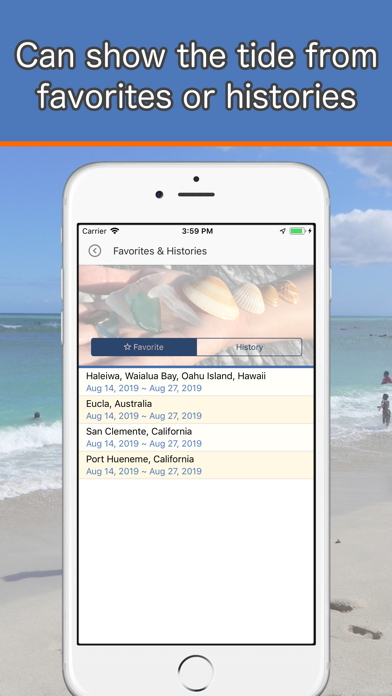
Tide places can be registered with a name as a favorite. Also, the places you have seen once will be saved as history.
You can easily access these places from “Favorites & Histories”.
To delete a favorite or history, swipe the item to the left from the list.
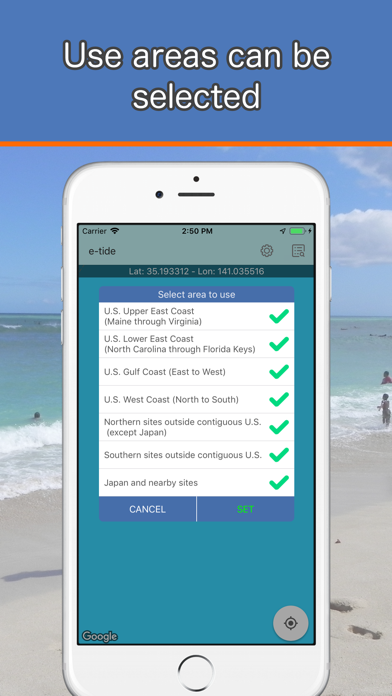
Tide area is divided into the following seven areas.
You can select which area to use at the first startup. You can also change the area selection at any time from "Settings" of app.
If you are not sure which area to select, select all.
- U.S. Upper East Coast (Maine through Virginia)
- U.S. Lower East Coast (North Carolina through Florida Keys)
- U.S. Gulf Coast (East to West)
- U.S. West Coast (North to South)
- Northern sites outside contiguous U.S. (except Japan)
- Southern sites outside contiguous U.S.
- Japan and nearby sites
When app starting, it reads the tide information of your specified area and sets the map pin, but the one with fewer selected areas will start slightly faster.
You can use “Favorites & Histories” even during the map pin setting process.
For detailed usage instructions, please refer to "Help & Support" from "Settings" of app.
Safety and technology
Found in the app by AppBrain- Price
- Free
- App size
- 32.1 MB
- Content rating
- Everyone
Technologies used by e-tide (World tide app)
Releases
Updates seen on the App Store- Version
- 1.0.14
- Launched
- August 2019
No changelog data
Alternatives
Similar apps and more from Mitsuhiro ShiraiAlternatives to e-tide (World tide app)






More from Mitsuhiro Shirai








Rankings
App Store top chartsApp Store Rankings for e-tide (World tide app)
About the app and developer
About e-tide (World tide app)
e-tide (World tide app) is a weather app developed by Mitsuhiro Shirai.
What is the rating of e-tide (World tide app)?
e-tide (World tide app) is rated 5.00 out of 5 stars, based on 8 ratings.
Is e-tide (World tide app) free?
e-tide (World tide app) is free. The app size is 32.12 MB. The latest version available is 1.0.14. The last update was on September 27, 2021.
What are the requirements for e-tide (World tide app)?
The app has a content rating of Everyone. The app has been available on the App Store since August 2019.
Developer information for Mitsuhiro Shirai
Address:
Frequently asked questions about e-tide (World tide app)
Is e-tide (World tide app) free?
Yes. e-tide (World tide app) is free on the App Store.
Is e-tide (World tide app) still available?
Yes. e-tide (World tide app) is on the App Store, and the last update we saw was on September 27, 2021.
How large is e-tide (World tide app)?
e-tide (World tide app) is 32.12 MB.
Is e-tide (World tide app) suitable for children?
App Store rates the content of e-tide (World tide app) as suitable for everyone.
How do people rate e-tide (World tide app)?
e-tide (World tide app) scores 5.00 out of 5 stars, from 8 ratings on the App Store.
Who made e-tide (World tide app)?
e-tide (World tide app) was developed by Mitsuhiro Shirai. It is listed in the weather category on the App Store.
What are the best alternatives to e-tide (World tide app)?
People looking at e-tide (World tide app) also look at these weather apps: 魚勝 潮見表, 月読君, 海快晴 海専門の気象情報サービス, Beach Time, WeatherSelfie.