

AppBrain's verdict
Established- Rating on App Store
- 5.00
- 1 ratings
- Last updated
- February 1, 2026
- Size
- 3.73 MB
It doesn't have enough ratings yet to judge what users think.
User feedback
Ratings and reviews on the App StoreComments on Easy Albums for iOS
We don't have enough comments to show example comments. Please check back later.
Store listing
By kitamura hira, from the App StoreDescription by kitamura hira Written by the developer, not by AppBrain. Click to read.
There are no ads or in-app purchases, and it doesn’t require an internet connection. The entire app is only about 3 MB in size. It supports both iPhone and iPad, as well as both landscape and portrait orientations. Using it in landscape mode is recommended.
[Features]
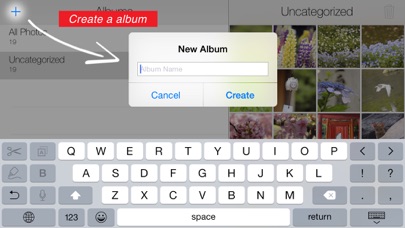
- Create a new album
Tap the “+” button in the upper-left corner to open the new album creation screen. Enter any name you like.
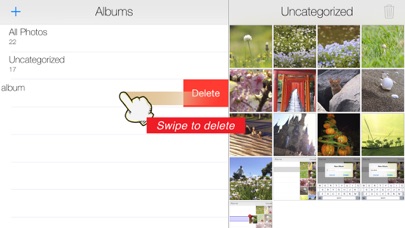
- Delete an album
Swipe left on the album you want to delete to display the “Delete” button.
- Change Album Name
Swipe right on the album you want to rename, and a “Rename” button will appear. Enter the new name and save.
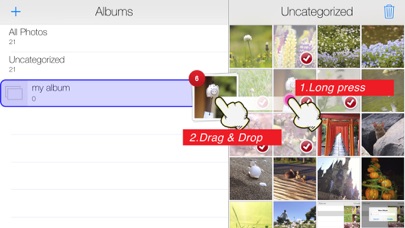
- Organize photos with drag & drop
Select the photos you want to organize and long-press one of them. When the photo pops up, move your finger to drag it. Release it over the album you want to add it to, and the photo will be placed in that album.
- Delete photos
First, select the photos you wish to delete. After selecting them, tap the “trash bin” icon in the upper-right corner to display the delete confirmation screen.
- Remove photos from an album
Select the photos you want to remove. After selecting them, tap the “minus circle” icon in the upper-right corner.
- Managing similar or duplicate photos:
After selecting a photo, tap the “flag” icon, then choose a search method as needed. Once similar or duplicate photos are found, a list will be displayed. You can triple-tap a thumbnail to enlarge it and compare the images.
[Note]
Deleting a photo within an album does not actually delete the photo itself—it only removes it from that album. Therefore, deleting an album will not delete any photos; it only ungroups them. Only the photos in the default folders “All Photos” and “Ungrouped” are physically deleted when removed.
Dragging photos into a custom album only groups them; it does not copy them. So if the original photo is deleted, it will also disappear from any group it belonged to. Please do not use groups as a backup method for your photos.
The grouping feature in this app is linked with the iOS system Photos app, so any changes made in the system Photos app will also be reflected in this app.
Safety and technology
Found in the app by AppBrain- Price
- Free
- App size
- 3.73 MB
- Content rating
- Everyone
Technologies used by Easy Albums
Releases
Updates seen on the App Store- Version
- 5.1
- Launched
- November 2012
No changelog data
Alternatives
Similar apps and more from kitamura hiraAlternatives to Easy Albums


More from kitamura hira







Rankings
App Store top chartsApp Store Rankings for Easy Albums
About the app and developer
About Easy Albums
Easy Albums is a photo & video app developed by kitamura hira.
User Ratings
Easy Albums is rated 5.00 out of 5 stars. The rating is based on one rating ratings.
App Information
Easy Albums is freely available from the App Store. The app size is 3.73 MB. The latest version available is 5.1. The last update was on February 1, 2026.
Technical Requirements
The app has a content rating of Everyone. The app has been available on the App Store since November 2012.
Easy Albums is made and published by kitamura hira. AppBrain is an independent app data site and isn't affiliated with kitamura hira. The app name, icon, screenshots and description belong to kitamura hira and are shown as published on the App Store.
Developer information for kitamura hira
Address: