

Easy Reference Measure
Easy Reference Measure is made and published by Hideo Nose. AppBrain is an independent app data site and isn't affiliated with Hideo Nose. The app name, icon, screenshots and description belong to Hideo Nose and are shown as published on the App Store.
AppBrain's verdict
- Rating on App Store
- 5.00
- 1 ratings
- Last updated
- October 5, 2025
It doesn't have enough ratings yet to judge what users think.
Rankings
App Store top chartsApp Store Rankings for Easy Reference Measure
Competitors
Similar apps and more from Hideo NoseMore from Hideo Nose



Releases
Updates seen on the App Store- Version
- 1.1
- Launched
- September 2025
No changelog data
User feedback
Ratings and reviews on the App StoreComments on Easy Reference Measure for iOS
We don't have enough comments to show example comments. Please check back later.
Technology
Found in the app by AppBrain- Price
- Free
- App size
- 3.92 MB
- Content rating
- Everyone
Technologies used by Easy Reference Measure
About the app and developer
About Easy Reference Measure
Easy Reference Measure is a productivity app developed by Hideo Nose.
What is the rating of Easy Reference Measure?
Easy Reference Measure is rated 5.00 out of 5 stars, based on one rating ratings.
Is Easy Reference Measure free?
Easy Reference Measure is free. The app size is 3.92 MB. The latest version available is 1.1. The last update was on October 5, 2025.
What are the requirements for Easy Reference Measure?
The app has a content rating of Everyone. The app has been available on the App Store since September 2025.
Developer information for Hideo Nose
Address:
Store listing
By Hideo Nose, from the App Store

Description by Hideo Nose Written by the developer, not by AppBrain. Click to read.
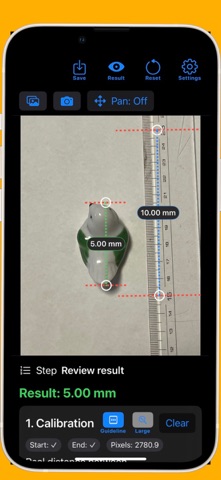
This app turns your smartphone into a powerful measuring tool. By including a reference object such as a ruler or a coin in your photo, you can instantly calculate the actual size of any object captured. Whether for research, DIY, or hobbies, this app makes measuring more accessible than ever.
*Key Features
Accurate length measurement from photos
Use reference objects (rulers, coins, cards, etc.) to set the scale
Zoom, pan, and reset gestures for precise control
Double-tap to reset zoom and position
Save and share annotated images with measurement results
*How It Works
Capture or Select a Photo
Take a new photo with your camera or select one from your gallery.
Make sure to include a reference object such as a ruler or a coin.
Set Calibration Points
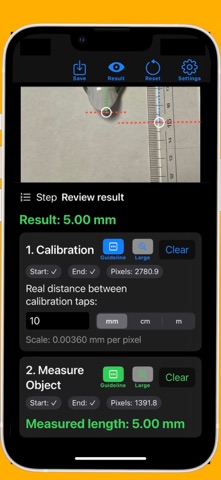
Tap the start and end points of the reference object (e.g., the 0 cm and 10 cm marks of a ruler).
Enter the real-world length between these two points to calibrate the scale.
Measure the Object
Tap the start and end points of the object you want to measure.
The app instantly calculates and displays the actual length.
Save and Share
The measurement result is added as a clear annotation on the photo.
Save the annotated image and share it via email, messaging apps, or social media.
*Use Cases
Check the size of pipes, screws, gaskets, etc.
Measure materials and objects for DIY projects
Document lengths for study and research
Assist in laboratory, or experimental records
Complex Shape Length
Simple, intuitive, and reliable.
With this app, your smartphone becomes a portable digital ruler—always ready when you need it.