Easy Scanner - PDF Doc Scan is made and published by
SMART RIVER YAZILIM HIZMETLERI LIMITED SIRKETI.
AppBrain is an independent app data site and isn't affiliated with SMART RIVER YAZILIM HIZMETLERI LIMITED SIRKETI.
The app name, icon, screenshots and description belong to SMART RIVER YAZILIM HIZMETLERI LIMITED SIRKETI and are shown as
published on the App Store.
About Easy Scanner - PDF Doc Scan
Easy Scanner - PDF Doc Scan is a business app developed by SMART RIVER YAZILIM HIZMETLERI LIMITED SIRKETI.
User Ratings
Easy Scanner - PDF Doc Scan is rated 4.45 out of 5 stars. The rating is based on 170 ratings.
App Information
Easy Scanner - PDF Doc Scan is freely available from the App Store. The app size is 78.48 MB. The latest version available is 1.3.7. The last update was on June 3, 2022.
Technical Requirements
The app has a content rating of Everyone. The app has been available on the App Store since August 2020.
Description by SMART RIVER YAZILIM HIZMETLERI LIMITED SIRKETI(from the App Store)
Easy Scanner is the easiest app that will turn your iPhone into a PDF scanner. Scan and go right back to other important things. Sign documents within seconds and save your time! Access your PDFs with cloud platforms anywhere, anytime! Easy Scanner helps you scan, store, sync your documents.
Features
-Scan Document Use your phone camera to scan and digitize all kinds of paper documents: receipts, notes, invoices, whiteboard discussions, business cards, certificates, etc.
-Create PDF/JPEG Files Convert images to PDF & JPG in a simple tap.
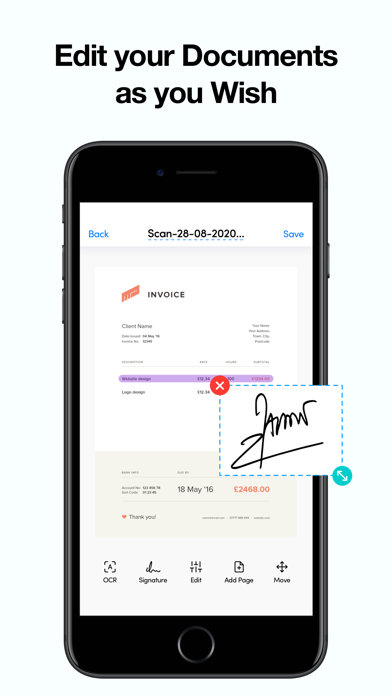
-Document Editing Edit your files with a set of editing tools.
-Quick Search When you have plenty of documents, you can search by names to categorize and easily find them.
-Sync & Secure your Files on Cloud If you want to protect confidential contents, you can save your documents with cloud platforms.
-Easily manage your documents Lets you easily manage your scanned documents.
-Automatically detects borders Tap Scanner automatically detects document borders when you scan a document!
-Add signature with one tap Draw and save your own signature and use it on documents
Once the purchase is confirmed, payments are received from the iTunes account, and the start of each renewal period may vary depending on your country. You will see the full amount before completing the payment. In-app purchases will be renewed weekly or annually based on your payment schedule. You can cancel your subscription and free trial in iTunes settings at least 24 hours before the trial ends. You can turn off auto-renew at any time in the iTunes account settings. Any unused portion (if offered) during the free trial period will be lost when you purchase a Premium subscription during the free trial period.
- Privacy Policy:http://smartriveryazilim.com/privacy.html - Terms of Use:http://smartriveryazilim.com/terms.html
Each subscription will automatically renew 3 days before the expiration date for
the same time period. Subscriptions can be cancelled at any time before the renewal.