Easy word 2 HTML editor is made and published by
Merbin Joe.
AppBrain is an independent app data site and isn't affiliated with Merbin Joe.
The app name, icon, screenshots and description belong to Merbin Joe and are shown as
published on the App Store.
About Easy word 2 HTML editor
Easy word 2 HTML editor is an education app developed by Merbin Joe.
What is the rating of Easy word 2 HTML editor?
Easy word 2 HTML editor has no ratings yet.
Is Easy word 2 HTML editor free?
Easy word 2 HTML editor is free. The app size is 13.89 MB. The latest version available is 1.7. The last update was on January 23, 2024.
What are the requirements for Easy word 2 HTML editor?
The app has a content rating of Everyone. The app has been available on the App Store since February 2023.
Description by Merbin Joe(from the App Store)
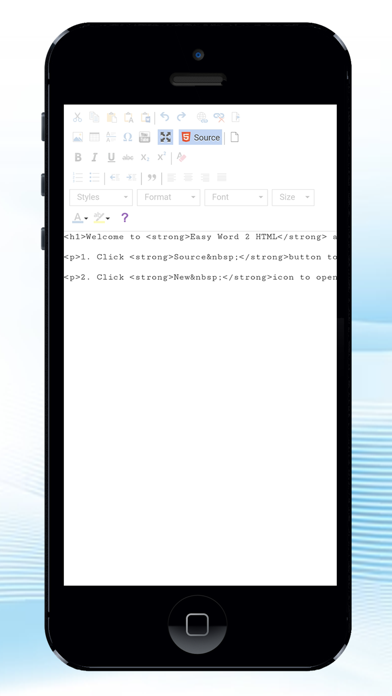
Easy word 2 HTML Editor application is help you to use simple method to convert the word tool created file to HTML code, so you can easy to create a webpage or template by using this tool without knowing any HTML knowledge. This app is using ckeditor app
This app allows users to create any type of content in your application, be it documents, reports, emails, notes or chat messages. HTML editor that can fit a wide range of use cases: from Word-like documents with large toolbars to simple toolbars with a limited set of features used for emails or instant messaging.
Get one complete software solution: rich text editor, file manager and collaboration features. Eliminate the need for external writing tools so your users can stay within your application.
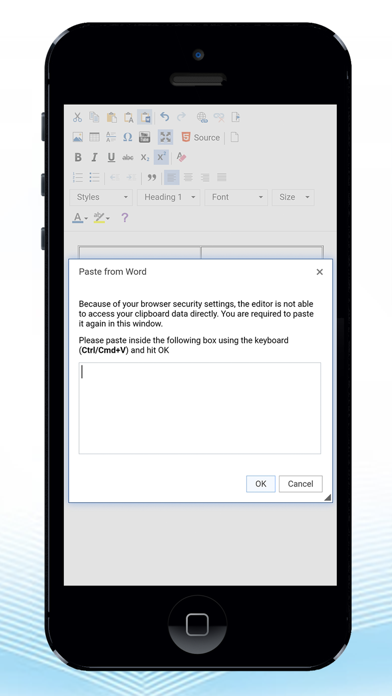
Take advantage of seamless UX and modern UI with lots of productivity features, such as @mentions, auto-formatting, spell checking, keyboard support and copy-pasting from MS Word.
Let them use Track Changes, Comments and Revision History features - all of them are available either in real-time or in a standard mode.
This HTML Editor in the market to offer both SaaS and on-premises solutions for real-time collaboration. collaboration features allow your users and teams to collaboratively write, review and discuss right within your application. They include the Track Changes, Comments and Revision History features, all of which are available for both asynchronous and real-time editing.
comments feature makes it possible to add comments to any part of the rich text content, including text and block elements such as embedded media or images. Comments would usually carry an explanation of what and why the author or editor did or wants to suggest. It may be a question about some unclear statement, remarks concerning facts or continuity errors, common mistakes, possible ways to expand a paragraph – all of these are always welcome and help improve the content.
App architecture was designed and rewritten from scratch to bring the collaborative editing features where multiple authors work on the same rich text document.
Basic text styles The basic styles feature allows you to apply the most frequently used formatting indispensable for content creation. This package provides essential text styling features such as bold, italic, underline, strikethrough, subscript, superscript, and code.
Bold – Use the bold toolbar button Bold or type **text** or __text__ Italic – Use the italic toolbar button Italic or type *text* or _text_ Code – Use the code toolbar button Code or type `text` Strikethrough – Use the strikethrough toolbar button Strikethrough or type ~~text~~.
The block indentation feature allows you to set indentation for text blocks such as paragraphs or headings and lists.
Block indentation Its main purpose is to visually distinguish parts of the content. Block indentation is mostly useful for graphically differentiate structure elements like headings or lists. It can also be applied to present quotes or to make paragraphs or passages that need to be separated from the main content body stick out more.
Block quote The block quote feature allows you to easily include block quotations or pull quotes in the rich-text content. A block quote may be used to refer to what other authors said, support your idea or present different points of view that may not necessarily be in line with the document you write, but should be included.
The block quote feature provides an attractive way to draw the readers’ attention to selected parts of text and enriches the reading experience with additional data. It also helps organize the content in a structured, elegant way to manage the flow better.
Document title The title feature enables support for adding the title field to your document. It helps ensure that there will always be a single title field at the beginning of the document.
Each subscription will automatically renew 3 days before the expiration date for
the same time period. Subscriptions can be cancelled at any time before the renewal.