

Easy2Anki-Add English from Web
Easy2Anki-Add English from Web is made and published by Jun Takahashi. AppBrain is an independent app data site and isn't affiliated with Jun Takahashi. The app name, icon, screenshots and description belong to Jun Takahashi and are shown as published on the App Store.
AppBrain's verdict
- Last updated
- February 26, 2026
Rankings
App Store top chartsApp Store Rankings for Easy2Anki-Add English from Web
Competitors
Similar apps and more from Jun TakahashiMore from Jun Takahashi


Releases
Updates seen on the App Store- Version
- 1.2.1
- Launched
- July 2023
No changelog data
User feedback
Ratings and reviews on the App StoreComments on Easy2Anki-Add English from Web for iOS
We don't have enough comments to show example comments. Please check back later.
Technology
Found in the app by AppBrain- Price
- Free
- App size
- 9.70 MB
- Content rating
- Everyone
Technologies used by Easy2Anki-Add English from Web
About the app and developer
About Easy2Anki-Add English from Web
Easy2Anki-Add English from Web is an education app developed by Jun Takahashi.
User Ratings
The app has no ratings yet.
App Information
Easy2Anki-Add English from Web is freely available from the App Store. The app size is 9.70 MB. The latest version available is 1.2.1. The last update was on February 26, 2026.
Technical Requirements
The app has a content rating of Everyone. The app has been available on the App Store since July 2023.
Developer information for Jun Takahashi
Address:
Store listing
By Jun Takahashi, from the App Store

Description by Jun Takahashi Written by the developer, not by AppBrain. Click to read.
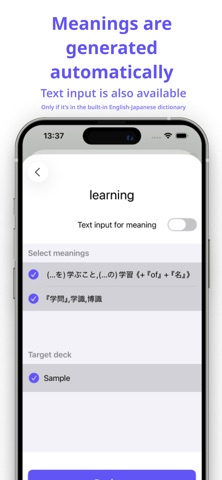
You can register words in as little as about 15 seconds—just by tapping, without manually entering definitions.
(This works when the word’s meaning is available in the built-in English–Japanese dictionary.)
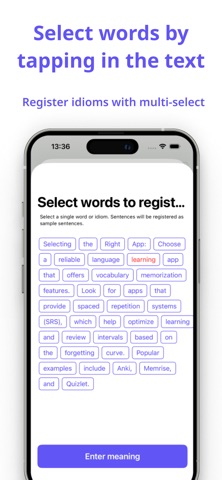
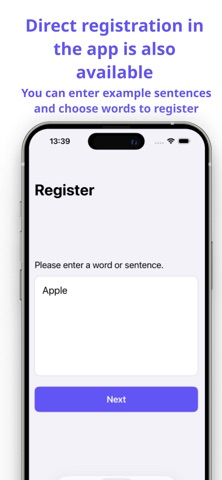
When you enter a sentence, you can select a single word from it and register both the sentence and the word at the same time.
You can add words not only from within the app, but also directly from your web browser by selecting a word and using the Share button (Share Extension).
Your registered words and settings are synced via iCloud as long as you use the same Apple ID.
For transferring to Anki, iPhone and iPad support one-by-one transfers, while Mac supports batch transfers.
(On iPhone and iPad, the Anki app is required. On Mac, both the Anki app and the AnkiConnect plugin are required.)