

EasyCode Scanner: QR & Barcode
EasyCode Scanner: QR & Barcode is made and published by Chengdu Weicao Youfang Technology Co., Ltd. AppBrain is an independent app data site and isn't affiliated with Chengdu Weicao Youfang Technology Co., Ltd. The app name, icon, screenshots and description belong to Chengdu Weicao Youfang Technology Co., Ltd. and are shown as published on the App Store.
AppBrain's verdict
- Rating on App Store
- 5.00
- 1 ratings
- Last updated
- July 27, 2026
- Size
- 70.4 MB
It doesn't have enough ratings yet to judge what users think.
User feedback
Ratings and reviews on the App StoreComments on EasyCode Scanner: QR & Barcode for iOS
We don't have enough comments to show example comments. Please check back later.
Store listing
By Chengdu Weicao Youfang Technology Co., Ltd., from the App Store



Description by Chengdu Weicao Youfang Technology Co., Ltd. Written by the developer, not by AppBrain. Click to read.
Scan QR codes and barcodes
- Read common QR content such as websites, text, Wi-Fi, contacts, email, phone numbers, SMS and locations.
- Scan common product and inventory barcodes for retail, stock checks, labels and asset tags.
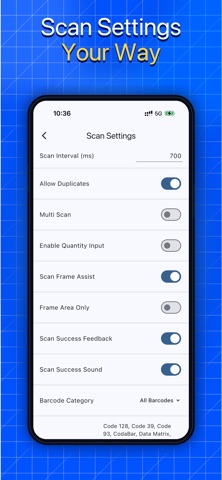
- Choose continuous scan when speed matters, or manual scan when you want controlled one-by-one capture.
- Import code images from Photos, detect multiple codes in one image or frame, and filter by code type when you only want certain formats.
- Use duplicate controls and scan intervals to keep long sessions cleaner.
Batch capture for real work
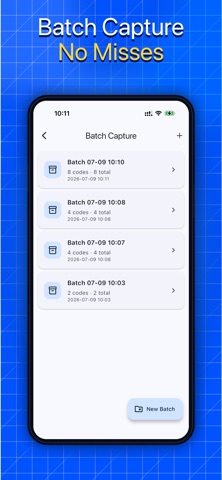
Version 1.2.1 adds Batch Capture, designed for tasks beyond a simple scan history. Create a batch for a shelf, delivery, asset audit, event desk, classroom set, warehouse zone or temporary job. Keep scanning into the same batch, review the code count and total quantity, rename the batch, select records, remove mistakes and export the results when the job is done.
Free users can keep 1 batch. VIP unlocks unlimited batches for ongoing inventory, warehouse, retail and field collection workflows.
Add quantity to scan records
Scanning is more useful when it records how many items you found. EasyCode lets you add quantities so a batch can represent product counts, package totals, equipment checks or check-in totals. Quantity and duplicate handling help turn raw scans into a cleaner list for review, sharing or spreadsheet work.
Export and manage history
Everyday scans and batch records stay organized in history. Search by keyword, code type or date, copy results, select multiple records and export TXT or Excel files with useful fields. Use exports for reporting, backup, team handoff, asset lists or your own spreadsheet process. Records are stored on your device unless you choose to share or export them.
Create QR codes
EasyCode also includes a QR code generator for common personal and business needs:
- Text and website links
- Wi-Fi network details
- vCard contacts
- Phone numbers
- SMS and email
- Geo locations
Save generated QR codes to Photos or share them as images. The generation history lets you search previous QR codes, reopen a code for editing, preserve the saved content and export the generated list to TXT or Excel.
Customize QR appearance
Make QR codes that fit labels, packaging, posters, business cards, classroom materials or event signs. Use available shapes, solid colors, gradients and optional center logos when you need a more branded look. Some advanced QR styles and logo options may require VIP.
Useful in many scenarios
- Retail: scan product barcodes, prepare small stock counts and export results.
- Warehouse and logistics: collect item, package or location codes by batch.
- Asset management: audit equipment, tools and office items with quantities and searchable records.
- Events and education: scan tickets, resources, labels or class materials.
- Personal QR tasks: open links, join Wi-Fi, save contacts, create QR codes and keep a searchable record.
EasyCode is made for people who need a scanner that is fast, organized and flexible: simple enough for daily QR tasks, but strong enough for batches, quantities, exports and custom QR creation.
Terms of Use: https://www.apple.com/legal/internet-services/itunes/dev/stdeula/
Safety and technology
Found in the app by AppBrain- Price
- Free
- App size
- 70.4 MB
- Content rating
- Everyone
Technologies used by EasyCode Scanner: QR & Barcode
Releases
Updates seen on the App Store- Version
- 1.2.4
- Launched
- November 2024
No changelog data
Alternatives
Similar apps and more from Chengdu Weicao Youfang Technology Co., Ltd.


Rankings
App Store top chartsApp Store Rankings for EasyCode Scanner: QR & Barcode
About the app and developer
About EasyCode Scanner: QR & Barcode
EasyCode Scanner: QR & Barcode is an utilities app developed by Chengdu Weicao Youfang Technology Co., Ltd.
User Ratings
EasyCode Scanner: QR & Barcode is rated 5.00 out of 5 stars. The rating is based on one rating ratings.
App Information
EasyCode Scanner: QR & Barcode is freely available from the App Store. The app size is 70.38 MB. The latest version available is 1.2.4. The last update was on July 27, 2026.
Technical Requirements
The app has a content rating of Everyone. The app has been available on the App Store since November 2024.
Developer information for Chengdu Weicao Youfang Technology Co., Ltd.
Frequently asked questions about EasyCode Scanner: QR & Barcode
Is EasyCode Scanner: QR & Barcode free?
Yes. EasyCode Scanner: QR & Barcode is free on the App Store.
Is EasyCode Scanner: QR & Barcode still available?
Yes. EasyCode Scanner: QR & Barcode is on the App Store, and the last update we saw was on July 27, 2026.
How large is EasyCode Scanner: QR & Barcode?
EasyCode Scanner: QR & Barcode is 70.38 MB.
Is EasyCode Scanner: QR & Barcode suitable for children?
App Store rates the content of EasyCode Scanner: QR & Barcode as suitable for everyone.
How do people rate EasyCode Scanner: QR & Barcode?
EasyCode Scanner: QR & Barcode has one rating of 5.00 stars on the App Store.
Who made EasyCode Scanner: QR & Barcode?
EasyCode Scanner: QR & Barcode was developed by Chengdu Weicao Youfang Technology Co., Ltd. It is listed in the utilities category on the App Store.