

EasyMapper Studio
EasyMapper Studio is made and published by Abhinav Bhardwaj. AppBrain is an independent app data site and isn't affiliated with Abhinav Bhardwaj. The app name, icon, screenshots and description belong to Abhinav Bhardwaj and are shown as published on the App Store.
AppBrain's verdict
- Rating on App Store
- 1.00
- 1 ratings
- Last updated
- October 17, 2026
It doesn't have enough ratings yet to judge what users think.
Rankings
App Store top chartsApp Store Rankings for EasyMapper Studio
Competitors
Similar apps and more from Abhinav BhardwajAlternatives to EasyMapper Studio


More from Abhinav Bhardwaj

Releases
Updates seen on the App Store- Version
- 2.1.1
- Launched
- May 2026
No changelog data
User feedback
Ratings and reviews on the App StoreComments on EasyMapper Studio for iOS
We don't have enough comments to show example comments. Please check back later.
Technology
Found in the app by AppBrain- Price
- Free
- App size
- 114.1 MB
- Content rating
- Everyone
Technologies used by EasyMapper Studio
About the app and developer
About EasyMapper Studio
EasyMapper Studio is a graphics & design app developed by Abhinav Bhardwaj.
What is the rating of EasyMapper Studio?
EasyMapper Studio is rated 1.00 out of 5 stars, based on one rating ratings.
Is EasyMapper Studio free?
EasyMapper Studio is free. The app size is 114.13 MB. The latest version available is 2.1.1. The last update was on October 17, 2026.
What are the requirements for EasyMapper Studio?
The app has a content rating of Everyone. The app has been available on the App Store since May 2026.
Developer information for Abhinav Bhardwaj
Address:
Store listing
By Abhinav Bhardwaj, from the App Store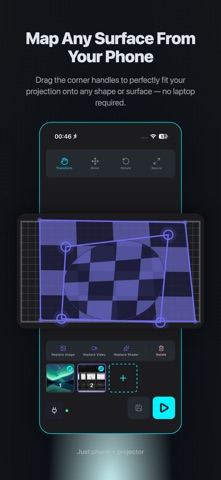

Description by Abhinav Bhardwaj Written by the developer, not by AppBrain. Click to read.
Light up your porch with glowing jack-o'-lanterns, crawling spiders, swarming ghosts, and cackling witches — then schedule the whole haunted display to trigger on a timeline so trick-or-treaters get a show, not a static sticker on your window.
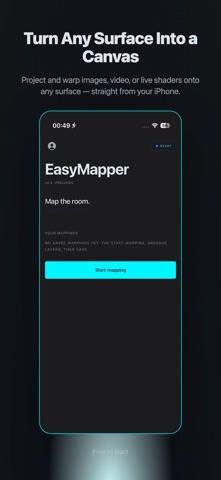
EasyMapper Studio — projection mapping you can actually carry, straight from your iPhone.
Turn any photo, video, or shader into a projection-mapped scene on walls, porches, sculptures, or storefronts. Warp it to fit the surface with your finger, then run it live through a projector. No laptop, no DMX rig, no QLab license — just your phone and a cheap HDMI projector.
PREMIUM SUBSCRIPTION
EasyMapper Studio's full feature set requires a Premium subscription. Without Premium you can install the app and explore the interface; Premium unlocks everything below.
KEY FEATURES (Premium)
Mapping & Warping
- Corner-drag perspective transform — tap any corner of a layer and drag it to match your projection surface; the keystone/perspective math is handled for you.
- Multi-layer editing — stack unlimited images, videos, and shaders on one projection. Move, resize, warp, and reorder each layer independently.
- Customizable mesh grid overlay to line up empty layers before adding media.
- Move tool with one-finger drag and pinch-to-zoom for precise placement.
- Real-time preview that mirrors exactly what the projector is outputting.
Media & Shaders
- Import photos and videos straight from your Camera Roll; video loops automatically.
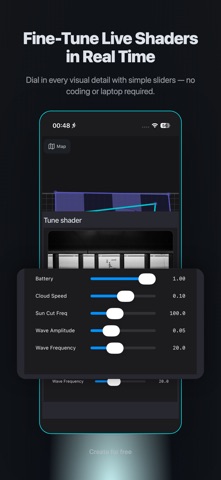
- Built-in animated shader library (flame, auroras, and more) that warps cleanly onto any mapped surface.
- Halloween effects library — pumpkins, witches, bats, crawling spiders, ghost swarm, skeleton, spooky emoji, fireflies, meteors, and fireworks, alongside year-round effects like rain, snow, bubbles, falling balls, rockets, and notes.
- Audio-reactive particles and swarms that pulse and move with the music playing in the room — no external sync hardware needed.
Show Control
- Timeline — schedule when each layer or effect appears on a per-layer track. Drag blocks to set cues, scrub to preview, hit play, and the show runs itself.
- Cue-based playback built for walk-up audiences: trick-or-treaters, party guests, or gallery visitors trigger a scene without you touching the phone.
Output
- USB-C/Lightning-to-HDMI output to any projector — wired for a rock-solid signal, not Wi-Fi that drops when the porch fills with trick-or-treaters.
PERFECT FOR
- Halloween — jack-o'-lanterns, haunted windows, porch projections, yard displays
- Social media — turn a bedroom wall into a content backdrop in minutes
- Live events — VJ-style backdrops, stage decoration, branded installations
- Galleries and pop-ups — projection art without a desktop rig
- Prototyping installations before committing to expensive software
WHAT YOU NEED
- An iPhone (this app)
- A projector (any cheap one works)
- A USB-C or Lightning to HDMI adapter
- A surface to project onto — wall, window, pumpkin, tombstone, you name it
EasyMapper Studio handles the rest.
Manage or cancel your subscription anytime in Settings → your Apple ID → Subscriptions.
PRIVACY
Your photos and videos stay on your device and are never uploaded.
Privacy Policy: https://easy-mapper-seven.vercel.app/privacy-policy
Terms of Use (EULA): https://www.apple.com/legal/internet-services/itunes/dev/stdeula/