

EasyMixer is made and published by SEASOFT LTD. AppBrain is an independent app data site and isn't affiliated with SEASOFT LTD. The app name, icon, screenshots and description belong to SEASOFT LTD. and are shown as published on the App Store.
AppBrain's verdict
- Last updated
- October 27, 2026
Rankings
App Store top chartsApp Store Rankings for EasyMixer
Competitors
Similar apps and more from SEASOFT LTD.More from SEASOFT LTD.



Releases
Updates seen on the App Store- Version
- 3.2.1
- Launched
- June 2015
No changelog data
User feedback
Ratings and reviews on the App StoreComments on EasyMixer for iOS
We don't have enough comments to show example comments. Please check back later.
Technology
Found in the app by AppBrain- Price
- Free
- App size
- 68.3 MB
- Content rating
- Everyone
Technologies used by EasyMixer
About the app and developer
About EasyMixer
EasyMixer is a music app developed by SEASOFT LTD.
User Ratings
The app has no ratings yet.
App Information
EasyMixer is freely available from the App Store. The app size is 68.29 MB. The latest version available is 3.2.1. The last update was on October 27, 2026.
Technical Requirements
The app has a content rating of Everyone. The app has been available on the App Store since June 2015.
Developer information for SEASOFT LTD.
Address:
Store listing
By SEASOFT LTD., from the App Store


Description by SEASOFT LTD. Written by the developer, not by AppBrain. Click to read.
EasyMixer is the intuitive multi-track audio mixing app for macOS. Whether you're crafting a custom iPhone ringtone, layering background music with voice recordings, or remixing your favorite songs, EasyMixer gives you professional-level control without the complexity.
Drop in your audio files, arrange them on a visual multi-track timeline, fine-tune each clip with volume, pan, and fade effects, then balance your mix with track-level mute, solo, and volume controls.
KEY FEATURES
Multi-track Timeline
Arrange audio clips across unlimited tracks with intuitive drag-and-drop editing. The waveform visualization lets you see exactly where every beat, word, and note falls. Slices never overlap on the same track — the app automatically assigns new tracks to keep your project clean.
Non-destructive Editing
Cut, copy, paste, trim, move, and select all slices at once (⌘A). Every edit is non-destructive — your original audio files are never altered.
Full Undo / Redo
Experiment without fear. Every action — from moving a slice to adjusting a fade — can be undone and redone instantly.
Per-slice Volume & Pan Control
Dial each slice's volume anywhere from 0% (silent) to 200% (boosted). Adjust stereo pan (left/right balance) for precise spatial placement. Mute individual slices with a single click.
Track Mute, Solo & Volume
Every track has dedicated Mute, Solo, and Volume controls. Solo a track to hear it in isolation, mute it to silence it, or adjust the overall track gain — all without touching individual slices.
Fade In / Fade Out
Add smooth professional transitions to any slice. Set custom fade durations in seconds — perfect for intros, outros, and crossfades between clips.
Built-in Recording
Record directly from your microphone and place your recordings straight onto the timeline. All recording history is saved for easy reuse.
Waveform Visualization
See the full waveform of every audio slice rendered directly on the timeline. Zoom in for detail or zoom out to see the full picture.
Multi-format Import
Drag and drop MP3, M4A, WAV, AIFF, OGG, WMA, and more.
One-Click Ringtone Export
Export directly to iPhone ringtone format (.m4r) with a single click. The app automatically trims to the 40-second ringtone limit.
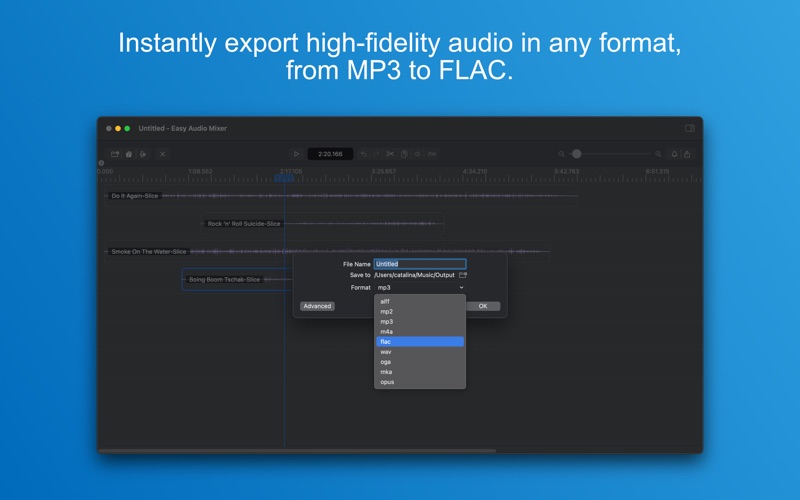
Professional Export Options
Export to MP3, AAC, WAV, FLAC, AIFF, OGG, and more with full control over:
* Sample rate (8 kHz to 96 kHz)
* Channel layout (mono, stereo, surround)
* Bitrate and encoding mode (CBR / VBR)
* Quality presets
* Output encoder selection
Project Files
Save and share your projects as .amproj files. Reopen any project later to pick up right where you left off. All your slice positions, volume settings, and effects are preserved.
PERFECT FOR
- Creating custom iPhone ringtones from your favorite songs
- Podcast producers layering intro music, voice tracks, and sound effects
- Musicians sketching quick arrangements, controlling stereo pan, and mixing demo tracks with track-level solo/mute/volume
- Video editors preparing audio mixes for their projects
- Students and educators working on audio projects and presentations
- Anyone who wants powerful multi-track mixing without the complexity
Subscription plans for unlimited exporting:
- Monthly Plan $3.99 / month
- Yearly Plan $24.99 / year (7-day free trial included)
Without a subscription, you can still export:
- iPhone ringtones always full-length, no restrictions
- Other audio formats exported at a reduced length for evaluation
Download EasyMixer today and start creating your perfect mix.
Terms & Conditions: https://getseasoft.com/legal/terms-of-service
Privacy Policy: https://getseasoft.com/legal/privacy-policy
Subscriptions renew automatically unless canceled at least 24 hours before the end of the current period. Payment is charged to your Apple ID account. Manage or cancel anytime in App Store account settings.