AppBrain
AppBrain
  • Apps
  • Apps being viewed right now Trending apps today Most popular apps All-time most installed apps Top rated apps iPhone and iPad apps
  • Intelligence ▾
    Intelligence overview → Track any Android app or your whole market
    Track & analyze
    Keyword Tracker & OptimizerTrack & improve Play rankings App Performance ReportOne-off PDF for any app StatisticsFree Android & Play market stats
    Promote your app
    Featured Apps App Links
  • Intelligence
  • Pricing
  • Dashboard
  • Sign up
  • Log in
App Store Apps > Utilities > EasyRuler: Ruler & Protractor
App profile & analytics · Utilities · Data updated 2026-10-24
EasyRuler: Ruler & Protractor icon

EasyRuler: Ruler & Protractor

by 精任 陈 · $0.99 · Version 1.1.0
Availability On the App Store since September 2026 ↗
Rating on App Store
–
Rating
–
0 reviews
Best rank
–
not in the top lists
Last updated
October 12, 2026
1.1.0

EasyRuler: Ruler & Protractor is made and published by 精任 陈. AppBrain is an independent app data site and isn't affiliated with 精任 陈. The app name, icon, screenshots and description belong to 精任 陈 and are shown as published on the App Store.

About EasyRuler: Ruler & Protractor

EasyRuler: Ruler & Protractor is an utilities app developed by 精任 陈.

What is the rating of EasyRuler: Ruler & Protractor?

EasyRuler: Ruler & Protractor has no ratings yet.

Is EasyRuler: Ruler & Protractor free?

EasyRuler: Ruler & Protractor costs $0.99. The app size is 3.41 MB. The latest version available is 1.1.0. The last update was on October 12, 2026.

What are the requirements for EasyRuler: Ruler & Protractor?

The app has a content rating of Everyone. The app has been available on the App Store since September 2026.

Description by 精任 陈 (from the App Store)
EasyRuler puts a screen ruler and an adjustable protractor on your iPhone or iPad. Check a small object's length, compare an angle, and lock your alignment while you read it.

Lengths and angles, in one place
The app opens in Length mode. Switch to Angle when you need it, and keep each tool's current measurement while moving between them during the same session.

A ruler across the screen
Read metric and imperial markings side by side. Use the clean static ruler, or align two movable markers and read the distance between them. Adjust either marker in 0.1 mm steps. Portrait and landscape layouts let you use the screen's available span.

Calibrate against a real ruler
Align the zero marks of a real ruler and the screen ruler, then adjust the full visible scale. Check the far end and the marks in between. Save when ready, or cancel without replacing your previous calibration. A standard bank card reference is also available.

A protractor that moves with your task
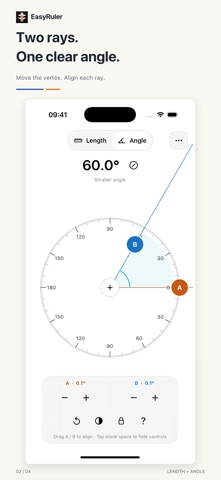
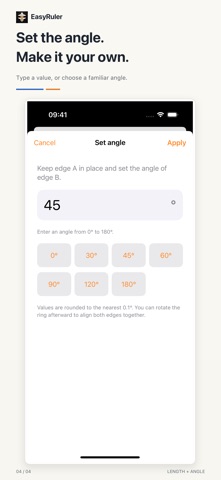
Drag edges A and B independently to match an angle. Move the vertex to reposition both edges, or drag the circular scale to rotate them together without changing their angle. Fine-tune either edge in 0.1° steps, enter a value, or choose a common angle preset. Read the smaller angle from 0° to 180°, or switch to the other side from 180° to 360°.

Keep your alignment
Lock the measurement to reduce accidental movement. Tap blank space to hide the controls while keeping the aligned positions; tap again to bring them back. Angle mode keeps the chosen angle when you turn the device. More provides measuring help and a Language entry that opens the app's system settings.

One purchase, all features
No ads, subscriptions, in-app purchases or accounts. Measuring and calibration work offline. Calibration and ruler display preferences are stored on your device, and measurements are not uploaded to us. The interface follows your device's light or dark appearance.

Using the screen
The available length depends on your screen size. Actual results depend on the device, calibration reference, alignment and viewing angle. The 0.1 mm and 0.1° steps are adjustment intervals, not guarantees of physical accuracy. Check length markings against a reliable real ruler before use. Angle mode does not require length calibration. The screen is opaque: it cannot show a drawing placed underneath like a clear plastic protractor. EasyRuler is for everyday size checks and on-screen angle reference.

For iPhone and iPad with iOS or iPadOS 16 or later.
Show more Show less

More data about EasyRuler: Ruler & Protractor

Price $0.99
Rating No ratings
Ranking Not ranked
Version 1.1.0
App size 3.41 MB
Suitable for Everyone

Screenshots

EasyRuler: Ruler & Protractor Screenshot 1 of 4
EasyRuler: Ruler & Protractor Screenshot 2 of 4
EasyRuler: Ruler & Protractor Screenshot 3 of 4
EasyRuler: Ruler & Protractor Screenshot 4 of 4
Screenshots by 精任 陈, from the the App Store listing
Official page on the App Store

More from 精任 陈

Roulette EC icon Roulette EC
精任 陈
5.0
Free
8 ratings
EasyLife - Efficiency Toolbox icon EasyLife - Efficiency Toolbox
精任 陈
5.0
Free
1 ratings
LuckyNum: A Little Luck icon LuckyNum: A Little Luck
精任 陈
0.0
Free
easyFlag-Guess Flag Challenge icon easyFlag-Guess Flag Challenge
精任 陈
0.0
Free
Veil: Private Photo Vault icon Veil: Private Photo Vault
精任 陈
0.0
Free
EasyGame-Classic Bricks puzzle icon EasyGame-Classic Bricks puzzle
精任 陈
0.0
Free

Changelog of EasyRuler: Ruler & Protractor

No changelog data

Developer information for 精任 陈

精任 陈

Address:

Share EasyRuler: Ruler & Protractor

Comments on EasyRuler: Ruler & Protractor for iOS

We don't have enough comments to show example comments. Please check back later.

App Store Rankings for EasyRuler: Ruler & Protractor

This app is not ranked

Technologies used by EasyRuler: Ruler & Protractor

Frequently asked questions about EasyRuler: Ruler & Protractor

Is EasyRuler: Ruler & Protractor free?

No. EasyRuler: Ruler & Protractor costs $0.99 on the App Store.

Is EasyRuler: Ruler & Protractor still available?

Yes. EasyRuler: Ruler & Protractor is on the App Store, and the last update we saw was on October 12, 2026.

How large is EasyRuler: Ruler & Protractor?

EasyRuler: Ruler & Protractor is 3.41 MB.

Is EasyRuler: Ruler & Protractor suitable for children?

App Store rates the content of EasyRuler: Ruler & Protractor as suitable for everyone.

Who made EasyRuler: Ruler & Protractor?

EasyRuler: Ruler & Protractor was developed by 精任 陈. It is listed in the utilities category on the App Store.

Today's trending apps Price drops on Google Play Top new apps Popular Utilities Apps Apps other people are watching
More hot apps 🔥
Overview Reviews Rankings Technology
AppBrain Intelligence premium content

Subscribe now to get full and unlimited access to AppBrain Intelligence. You'll have access to:

  • App Intelligence dashboard (performance timeline, competitor comparison, country rankings, insight cards)
  • Detailed ranking data per app
  • Full timeline per developer
  • Device market shares data per country
  • Unlimited keyword tracking
1 Month

$75/mo
(billed every month)

SAVE 0%
Subscribe
3 Months

$65/mo
($195 billed every 3 months)

SAVE 13%
Subscribe
1 Year

$57.50/mo
($690 billed every year)

SAVE 23%
Subscribe
Each subscription will automatically renew 3 days before the expiration date for the same time period. Subscriptions can be cancelled at any time before the renewal.

AppBrain is an app data site, we track rankings, ratings, installs for all apps and games on Google Play and the App Store. AppBrain doesn't host app files or APKs, all install links go directly to the official store. All trademarks are owned by their respective owners. As an Amazon Associate AppBrain earns from qualifying purchases.

More apps

  • Top Android apps being viewed
  • NumberBox:Reverse Phone Lookup
  • Fleety - Subway & Bus Tracker
  • ReadEra Premium – ebook reader

App statistics

  • Android statistics
  • Google Play Developer stats
  • Trending Android Apps
  • Trending iOS apps
  • Top popular Apps
  • Buy the best Android phone
  • Buy & sell app businesses

About AppBrain

  • Contact
  • Privacy
  • Documentation
  • DMCA takedowns
  • Articles
  • Blog
  • Android app Install tracking and attribution options for the AppBrain ad network
© 2010-2026 - AppBrain