EasyScreenOCR - Image to Text is a productivity app developed by 通 张.
User Ratings
The app has no ratings yet.
App Information
EasyScreenOCR - Image to Text is freely available from the App Store. The app size is 2.36 MB. The latest version available is 3.0.0. The last update was on October 31, 2025.
Technical Requirements
The app has a content rating of Everyone. The app has been available on the App Store since March 2018.
EasyScreenOCR - Image to Text is made and published by
通 张.
AppBrain is an independent app data site and isn't affiliated with 通 张.
The app name, icon, screenshots and description belong to 通 张 and are shown as published on the App Store.
Description by 通 张(from the App Store)
EasyScreenOCR 3.0 – Smarter, Faster, Offline, More Accurate The brand-new EasyScreenOCR 3.0 is here! Fully optimized for Apple Silicon (M1/M2/M3/M4) and tested on macOS Tahoe 26, this release brings higher OCR accuracy, smoother performance, and enhanced security.
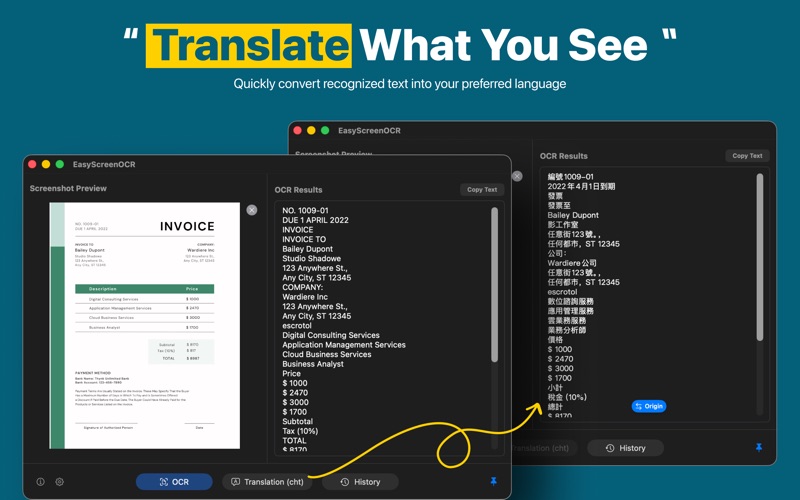
With 100% offline OCR, automatic language detection, batch processing, and text translation, EasyScreenOCR is your reliable tool to extract text instantly from screenshots and images.
Awards ---------------------- #1 Product of the Week from ProductHunt #1 Product of the Day from ProductHunt https://www.producthunt.com/posts/screenocr
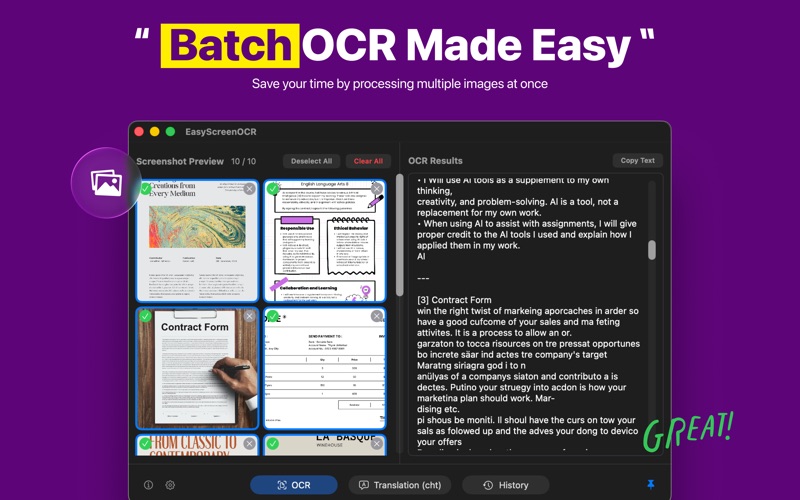
Why Choose EasyScreenOCR? ---------------------- Instant OCR – Capture any part of your screen and extract editable text in seconds. Auto Language Detection – No need to set OCR language manually; the app detects it for you. 100+ Languages Supported – Recognize characters from a wide range of languages with ease. Built-in Translation – Translate recognized text into other languages quickly and accurately. Batch Processing – Process multiple images at once to save time. Offline Privacy – All OCR runs locally on your Mac. No uploads, no risk of data leakage. Hotkey Customization – Set your own shortcuts for faster screenshots and OCR workflow. History Records – Keep track of your past OCR results for easy reference.
How It Works ---------------------- Launch EasyScreenOCR and enable Screen Recording under System Preferences > Security & Privacy. Use the hotkey to take a screenshot. Click OCR when the window pops up. The extracted text is automatically copied to your clipboard.
Subscription Plans ---------------------- EasyScreenOCR offers full functionality for free users. Upgrade to Pro for advanced usage such as batch OCR (more than 5 images at once) and extended translation capacity (over 1000 characters).
Monthly Plan: $6.99 – unlimited access Yearly Plan: $19.99 – best value Lifetime Plan: $29.99 – pay once, use forever
Languages for OCR ---------------------- AutoDetection / Albanian / Arabic / Armenian / Belorussian / Bengali / Bulgarian / Catalan / Chinese / Cloatian / Czech / Danish / Dutch / English / Estonian / Filipino / Finnish / French / German / Greek / Gujarati / Hebrew / Hindi / Hungarian / Icelandic / Indonesian / Italian / Japanese / Kannada / Khmer / Korean / Lao / Latvian / Lithuanian / Macedonian / Malay / Malayalam / Marathi / Nepali / Norwegian / Persian / Polish / Portuguese / Punjabi / Romanian / Russian / Serbian / Russian /Slovak / Slovenian / Spanish / Swedish / Tamil / Telugu / Thai / Turkish / Ukrainian / Vietnamese / Yiddish
Languages for Translation ---------------------- We support the following languages for translation: Chinese-Simplified / English / Cantonese / Japanese / Korean / French / Spanish / Thailand / Arabic / Russian/ Portuguese/ German / Italian / Greek / Dutch / Polish / Bulgarian / Estonian / Danish / Finnish / Czech / Romanian / Slovenian / Swedish / Hungarian / Chinese Traditional / Vietnamese
Note ---------------------- No data will be restored. It is essential to set the permission and allow EasyScreenOCR to record the screen.
Contact ---------------------- Have questions? Please get in touch with support@easyscreenocr.com or go to https://easyscreenocr.com Privacy Policy: https://easyscreenocr.com/privacy-policy/ Terms of Use: https://easyscreenocr.com/terms
Each subscription will automatically renew 3 days before the expiration date for
the same time period. Subscriptions can be cancelled at any time before the renewal.