

easySearch - File Search Tool
easySearch - File Search Tool is made and published by Gregory Hayrapetian. AppBrain is an independent app data site and isn't affiliated with Gregory Hayrapetian. The app name, icon, screenshots and description belong to Gregory Hayrapetian and are shown as published on the App Store.
AppBrain's verdict
Established- Rating on App Store
- 4.17
- 12 ratings
- Last updated
- March 24, 2026
It doesn't have enough ratings yet to judge what users think.
Rankings
App Store top chartsApp Store Rankings for easySearch - File Search Tool
Competitors
Similar apps and more from Gregory HayrapetianAlternatives to easySearch - File Search Tool








Releases
Updates seen on the App Store- Version
- 2.7.5
- Launched
- August 2021
No changelog data
User feedback
Ratings and reviews on the App StoreComments on easySearch - File Search Tool for iOS
We don't have enough comments to show example comments. Please check back later.
Technology
Found in the app by AppBrain- Price
- Free
- App size
- 20.5 MB
- Content rating
- Everyone
Technologies used by easySearch - File Search Tool
About the app and developer
About easySearch - File Search Tool
easySearch - File Search Tool is an utilities app developed by Gregory Hayrapetian.
User Ratings
easySearch - File Search Tool is rated 4.17 out of 5 stars. The rating is based on 12 ratings.
App Information
easySearch - File Search Tool is freely available from the App Store. The app size is 20.53 MB. The latest version available is 2.7.5. The last update was on March 24, 2026.
Technical Requirements
The app has a content rating of Everyone. The app has been available on the App Store since August 2021.
Developer information for Gregory Hayrapetian
Address:
Frequently asked questions about easySearch - File Search Tool
Is easySearch - File Search Tool free?
Yes. easySearch - File Search Tool is free on the App Store.
Is easySearch - File Search Tool still available?
Yes. easySearch - File Search Tool is on the App Store, and the last update we saw was on March 24, 2026.
How large is easySearch - File Search Tool?
easySearch - File Search Tool is 20.53 MB.
Is easySearch - File Search Tool suitable for children?
App Store rates the content of easySearch - File Search Tool as suitable for everyone.
How do people rate easySearch - File Search Tool?
easySearch - File Search Tool scores 4.17 out of 5 stars, from 12 ratings on the App Store.
Who made easySearch - File Search Tool?
easySearch - File Search Tool was developed by Gregory Hayrapetian. It is listed in the utilities category on the App Store.
What are the best alternatives to easySearch - File Search Tool?
People looking at easySearch - File Search Tool also look at these utilities apps: Pdf Text Search, Image to text°, Rova FileReader, RovaPro FileReader, PDF Search: AI Chat & OCR.
Store listing
By Gregory Hayrapetian, from the App Store




Description by Gregory Hayrapetian Written by the developer, not by AppBrain. Click to read.
Find text in different storage locations
• In apps like Files, Pages, Numbers, Acrobat, Word, Excel, or any other app that supports file sharing.
• In your iCloud Drive, Dropbox, OneDrive, network share and external media.
• Get search results instantly by creating a compact and efficient index database.
• Open files in easySearch and browse through all findings.
• Automatically update locations to find new content.
Search in various files types
• Plain text files (TXT, CSV, HTML/XML, Source Codes, Markdown, Webarchives, Jupyter Notebook, etc.)
• Rich text files (RTF)
• PDF documents (including image-only PDFs)
• Microsoft Office documents (Word, PowerPoint, Excel)
• Apple iWork documents (Pages, Numbers, Keynote)
• EPUB publications
• Mobipocket/Kindle eBooks (MOBI, PDB, PRC, AZW, AZW3, AZW4 - only DRM-free)
• MindNode, iThoughs, XMind and OmniGraffle
• Images (using text recognition)
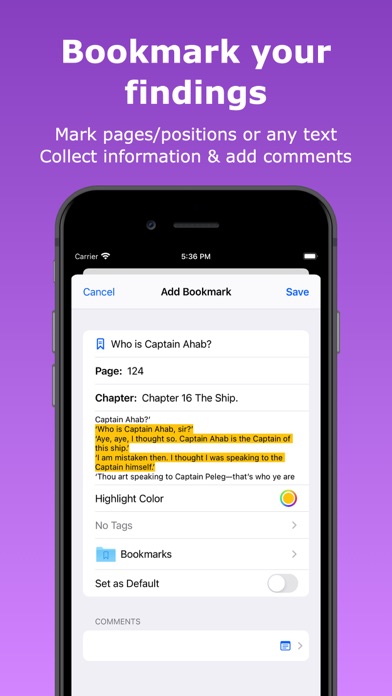
Bookmark your findings
• Mark pages/positions or any selected text in all supported file types.
• Collect information and add comments.
• Organize your bookmarks with folders and tags.
• View all your bookmarks in one place and access them quickly.
Track your progress
• Keep track of your reading progress.
• Mark finished files and remember what you have already read.
Sync your content with iCloud
• Seamlessly synchronize your bookmarks and reading progresses across your devices.
Use the up-to-date user interface
• Full Dark Mode support for all supported file types.
• Use keyboard shortcuts on iPad.
• Use easySeach as slide-over or split window with other apps on iPad.
• Add new windows and search multiple locations simultaneously on iPad.
Collaborate with the Files app
• Use favorite folders that you have defined in the Files app.
• Use tags from the Files app and add or remove it from files through the share functionality.
Respect for your privacy
• No Registration
• No Ads
• No Tracking
• No Personal Information is Collected
Privacy Policy: https://easySearch-app.com/privacy-policy.html
Terms of Use: https://www.apple.com/legal/internet-services/itunes/dev/stdeula/