

EasyToUse ! PasswordManagerApp
EasyToUse ! PasswordManagerApp is made and published by Ryo Kurachi. AppBrain is an independent app data site and isn't affiliated with Ryo Kurachi. The app name, icon, screenshots and description belong to Ryo Kurachi and are shown as published on the App Store.
AppBrain's verdict
- Last updated
- June 11, 2026
Rankings
App Store top chartsApp Store Rankings for EasyToUse ! PasswordManagerApp
Competitors
Similar apps and more from Ryo KurachiAlternatives to EasyToUse ! PasswordManagerApp








More from Ryo Kurachi


Releases
Updates seen on the App Store- Version
- 2.60
- Launched
- October 2015
No changelog data
User feedback
Ratings and reviews on the App StoreComments on EasyToUse ! PasswordManagerApp for iOS
We don't have enough comments to show example comments. Please check back later.
Technology
Found in the app by AppBrain- Price
- Free
- App size
- 6.30 MB
- Content rating
- Everyone
Technologies used by EasyToUse ! PasswordManagerApp
About the app and developer
About EasyToUse ! PasswordManagerApp
EasyToUse ! PasswordManagerApp is an utilities app developed by Ryo Kurachi.
What is the rating of EasyToUse ! PasswordManagerApp?
EasyToUse ! PasswordManagerApp has no ratings yet.
Is EasyToUse ! PasswordManagerApp free?
EasyToUse ! PasswordManagerApp is free. The app size is 6.30 MB. The latest version available is 2.60. The last update was on June 11, 2026.
What are the requirements for EasyToUse ! PasswordManagerApp?
The app has a content rating of Everyone. The app has been available on the App Store since October 2015.
Developer information for Ryo Kurachi
Address:
Frequently asked questions about EasyToUse ! PasswordManagerApp
Is EasyToUse ! PasswordManagerApp free?
Yes. EasyToUse ! PasswordManagerApp is free on the App Store.
Is EasyToUse ! PasswordManagerApp still available?
Yes. EasyToUse ! PasswordManagerApp is on the App Store, and the last update we saw was on June 11, 2026.
How large is EasyToUse ! PasswordManagerApp?
EasyToUse ! PasswordManagerApp is 6.30 MB.
Is EasyToUse ! PasswordManagerApp suitable for children?
App Store rates the content of EasyToUse ! PasswordManagerApp as suitable for everyone.
Who made EasyToUse ! PasswordManagerApp?
EasyToUse ! PasswordManagerApp was developed by Ryo Kurachi. It is listed in the utilities category on the App Store.
What are the best alternatives to EasyToUse ! PasswordManagerApp?
People looking at EasyToUse ! PasswordManagerApp also look at these utilities apps: myP@ssw0rd1, Password Manager-memorandum, AccessSecurium™, Memorandum - Password Manager, PassSecurium Password Manager.
Store listing
By Ryo Kurachi, from the App Store



Description by Ryo Kurachi Written by the developer, not by AppBrain. Click to read.
This application is a completely free password management application that allows you to manage many passwords at once with a simple operation, and you can quickly see it when you want to see it.
You can save the following information as a batch
· Name
· ID
· Password
· Notes
· Category
[Introduction of other functions]
■ Category
・ Accounts can be categorized.
・ Categories can be created by yourself. Initially, "Website", "Email", "Game", "SNS", "Work", and "Other" are registered.
・ You can narrow down the list display contents by category.
■ Search
You can narrow down the display contents of the list with search characters.
(It can be used in combination with category narrowing down)
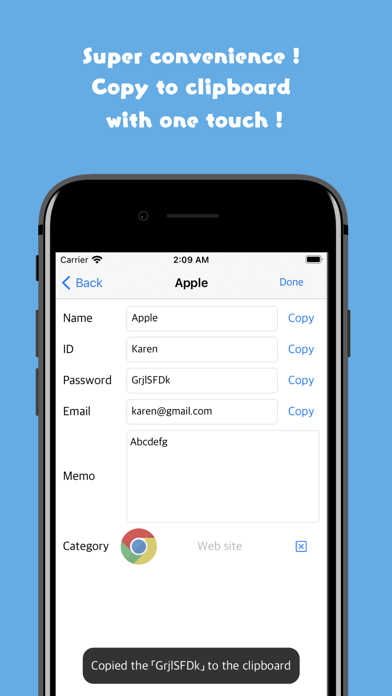
■ Copy
You can copy saved passwords etc. to the clipboard with one touch by pressing the copy button
■ Backup
・ Data in the app can be converted to text format
・ The converted text is stored in the clipboard and in the app
・ Tap the app icon once a week to save the automatic backup in the app when you launch the app
・ The maximum number of storage items is 50. If more backups are taken, the oldest backup will be deleted
■ Restore
Overview:
The text created by the backup function can be loaded into the application. There are the following two methods for restoration.
[Method 1: From backup in the app]
Select the button to create a backup or a backup created with automatic backup.
[Method: From backup text]
It is possible to restore by directly specifying the text obtained with the "Create backup button". Please use it at the time of terminal migration. (The method of data transfer at the time of device transfer is described below)
※Caution
Also, the restore function reads the specified data after deleting all the current data.
Please make a backup after making a backup just in case.
■ Passcode lock
You can choose to enter the password when launching the application
[How to use the restore function when transferring to a terminal]
① Obtain the backup character string with the backup function on the old terminal.
② Install this application on the new terminal
③ Paste the backup character string obtained in ① into the text box on the setting screen and press the restore button. (You can delete the original characters.)
④ All category images are initialized, so please reconfigure them in the category edit screen.
!!! Caution !!! (In order to prevent loss of data accident, please be sure to read below and use it after understanding)
1, please take a backup a little
This application does not perform any external communication for security reasons (excluding advertisements) Data exists only in the customer's terminal.
Even if data is erased by accidental deletion etc. for any reason, we can not do any support, so we ask you to use the backup a little and use it on your own risk.
2, Please be careful not to forget the master password
Please be careful not to forget the 4-digit number master password that can be set on the setting screen.
※ If you forget you can not log in to this application.