edEdit – Markdown & Notes is made and published by
CHING FENG WANG.
AppBrain is an independent app data site and isn't affiliated with CHING FENG WANG.
The app name, icon, screenshots and description belong to CHING FENG WANG and are shown as
published on the App Store.
About edEdit – Markdown & Notes
edEdit – Markdown & Notes is an utilities app developed by CHING FENG WANG.
What is the rating of edEdit – Markdown & Notes?
edEdit – Markdown & Notes has no ratings yet.
Is edEdit – Markdown & Notes free?
edEdit – Markdown & Notes is free. The app size is 17.13 MB. The latest version available is 1.3. The last update was on June 24, 2026.
What are the requirements for edEdit – Markdown & Notes?
The app has a content rating of Everyone. The app has been available on the App Store since May 2026.
Description by CHING FENG WANG(from the App Store)
edEdit is a native text editor for Mac and iPhone/iPad that brings notes, Markdown, and source code editing into one app.
WHY edEdit
• Truly native: AppKit on macOS, SwiftUI on iOS — no web view sluggishness. • Consistent across platforms: your notes and files sync between Mac, iPhone, and iPad via iCloud. • Standard file formats only: everything is .md / .txt / .swift / .json — open elsewhere whenever you want.
KEY FEATURES
Notes — Apple Notes-style organization, with plain Markdown content: • Hierarchical tags (work/meeting/2026Q1) • iCloud sync across devices • Share from Apple Notes and we'll auto-convert formatting to Markdown — bold, italic, headings, lists, and checklists are preserved.
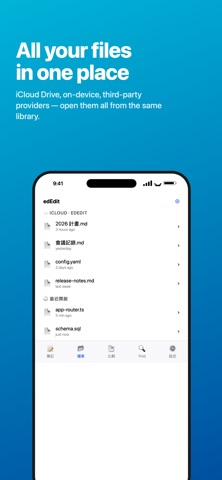
Files — Open and edit any text file on your device: • Pull from the Files app, iCloud Drive, On My iPhone, or any provider • Automatic encoding detection (UTF-8, Big5, Shift-JIS, GB18030, …) • Syntax highlighting for Swift, JavaScript, TypeScript, Python, Go, Rust, C/C++, Java, HTML, JSON, YAML, Shell, Markdown, and more • Line numbers, light and dark themes • Save edits back to the original location
iCloud Drive integration — Automatically creates an "edEdit" folder in iCloud Drive that syncs across all your devices.
Dedicated Markdown editing: • Keyboard accessory bar: headings, bold, italic, lists, tasks, quotes, links, images • Hardware keyboard shortcuts: ⌘B (bold) / ⌘I (italic) / ⌘K (link) / ⌘E (code) / ⌘1-6 (headings) • Smart list continuation: pressing Enter in a list line auto-continues; pressing Enter on an empty item exits the list • Paste an image straight from the clipboard — we save it next to the .md file and insert a Markdown reference
File compare — Visualize the differences between two files line-by-line, with added/removed/modified highlights.
Find in Files — Recursively search a folder you pick, filterable by filename glob.
Share & print — Built-in ShareLink, with AirPrint support.
WHO IT'S FOR
• Developers writing docs, reading logs, editing config files • Writers using Markdown for blog posts and drafts • Anyone who wants their files to stay theirs — no proprietary lock-in • People who switch between editing on Mac and quick capture on iPhone
PRIVACY & COMPLIANCE
• Notes, files, and images stay on your device or in your own iCloud — our servers never see them • Free tier includes ads served by Google AdMob (shown on app launch and occasionally when closing the note editor) • Upgrade to Pro to remove all ads
Each subscription will automatically renew 3 days before the expiration date for
the same time period. Subscriptions can be cancelled at any time before the renewal.