

EGK Construction AR
EGK Construction AR is made and published by Isaac Eng Gian Khor. AppBrain is an independent app data site and isn't affiliated with Isaac Eng Gian Khor. The app name, icon, screenshots and description belong to Isaac Eng Gian Khor and are shown as published on the App Store.
AppBrain's verdict
- Last updated
- August 4, 2025
Rankings
App Store top chartsApp Store Rankings for EGK Construction AR
Competitors
Similar apps and more from Isaac Eng Gian KhorAlternatives to EGK Construction AR


More from Isaac Eng Gian Khor






Releases
Updates seen on the App Store- Version
- 1.0
- Launched
- August 2025
No changelog data
User feedback
Ratings and reviews on the App StoreComments on EGK Construction AR for iOS
We don't have enough comments to show example comments. Please check back later.
Technology
Found in the app by AppBrain- Price
- $19.99
- App size
- 33.3 MB
- Content rating
- Everyone
Technologies used by EGK Construction AR
About the app and developer
About EGK Construction AR
EGK Construction AR is an education app developed by Isaac Eng Gian Khor.
User Ratings
The app has no ratings yet.
App Information
EGK Construction AR costs $19.99. The app size is 33.33 MB. The latest version available is 1.0. The last update was on August 4, 2025.
Technical Requirements
The app has a content rating of Everyone. The app has been available on the App Store since August 2025.
Developer information for Isaac Eng Gian Khor
Address:
Frequently asked questions about EGK Construction AR
Is EGK Construction AR free?
No. EGK Construction AR costs $19.99 on the App Store.
Is EGK Construction AR still available?
Yes. EGK Construction AR is on the App Store, and the last update we saw was on August 4, 2025.
How large is EGK Construction AR?
EGK Construction AR is 33.33 MB.
Is EGK Construction AR suitable for children?
App Store rates the content of EGK Construction AR as suitable for everyone.
Who made EGK Construction AR?
EGK Construction AR was developed by Isaac Eng Gian Khor. It is listed in the education category on the App Store.
What are the best alternatives to EGK Construction AR?
People looking at EGK Construction AR also look at these education apps: SetAR Augmented Reality Tool, ARC Create, kARtka z Synagogą, Leading Future Major Programs, AR-Physics.
Store listing
By Isaac Eng Gian Khor, from the App Store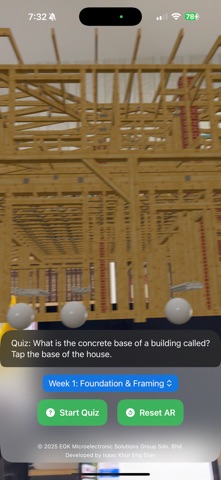
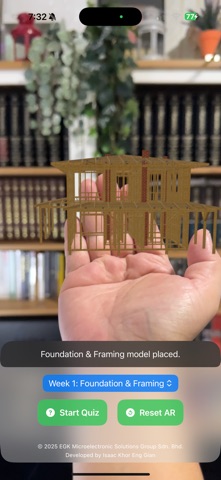
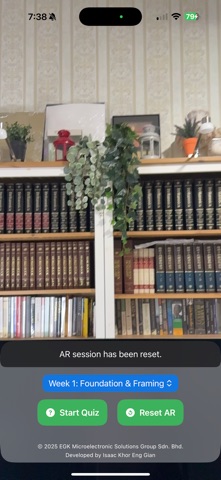
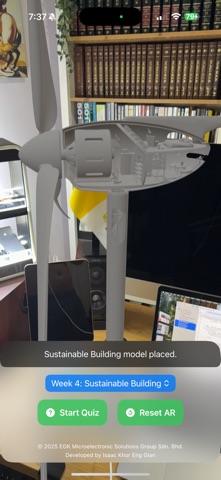




Description by Isaac Eng Gian Khor Written by the developer, not by AppBrain. Click to read.
App Description
Blueprint your future and build your knowledge with EGK Construction AR, the definitive augmented reality learning tool for the building trade. This app transforms your space into an interactive construction site, allowing you to explore the complex processes of building houses, skyscrapers, and essential infrastructure, all through your device.
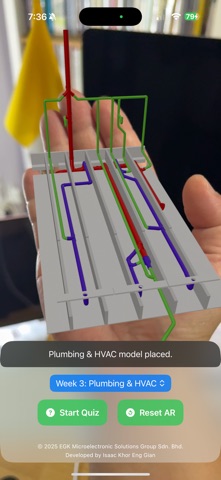
Dive into the details of every phase of a construction project with interactive 3D models. Watch a foundation being laid, see how a building's steel skeleton is erected, and trace the path of electrical wiring and plumbing systems. Each interactive model is accompanied by a detailed syllabus, offering deep insights into materials, techniques, and safety protocols that are critical to the industry.
Challenge yourself with engaging quizzes that require you to identify and interact with parts of the AR models to test your understanding. Whether you're an architecture student, a budding civil engineer, or a DIY enthusiast, EGK Construction AR provides a hands-on, educational experience that makes construction principles easy to grasp and fun to learn.
Key Features
Augmented Reality Learning: Place stunning, detailed 3D models of construction projects and their components in your real-world environment.
Interactive Simulations: Manipulate and animate models, from operating a crane to visualizing a house's structural framing, to understand how things are built.
Comprehensive Syllabus: Explore four key topics: Foundation & Framing, Electrical Systems, Plumbing & HVAC, and Sustainable Building practices.
Fun & Educational Quizzes: Answer questions by tapping on the correct component of the AR model, turning learning into an interactive game.
Intuitive Controls: Easily scale, rotate, and move the virtual models with simple, familiar gestures.
Dynamic UI: A clean and modern user interface provides real-time status updates and easy access to all features.