

Eight: Business Card Manager
Eight: Business Card Manager is made and published by Sansan, Inc. AppBrain is an independent app data site and isn't affiliated with Sansan, Inc. The app name, icon, screenshots and description belong to Sansan, Inc. and are shown as published on the App Store.
AppBrain's verdict
EstablishedTop 10- Best rank
- #4
- Top Grossing, Japan
- Rating on App Store
- 4.55
- 73 ratings
- Last updated
- October 6, 2026
It doesn't have enough ratings yet to judge what users think. Its best ranking is #4 in Top Grossing, Business in Japan.
Rankings
App Store top charts- Highest rank
- #4
- Chart
- Top Grossing
- Business
- Country
- Japan
Competitors
Similar apps and more from Sansan, Inc.Alternatives to Eight: Business Card Manager





More from Sansan, Inc.



Releases
Updates seen on the App Store- Version
- 10.83.0
- Launched
- June 2011
No changelog data
User feedback
Ratings and reviews on the App StoreComments on Eight: Business Card Manager for iOS
We don't have enough comments to show example comments. Please check back later.
Technology
Found in the app by AppBrain- Price
- Free
- App size
- 149.0 MB
- Content rating
- Everyone
Technologies used by Eight: Business Card Manager
About the app and developer
About Eight: Business Card Manager
Eight: Business Card Manager is a business app developed by Sansan, Inc.
What is the rating of Eight: Business Card Manager?
Eight: Business Card Manager is rated 4.55 out of 5 stars, based on 73 ratings.
Is Eight: Business Card Manager free?
Eight: Business Card Manager is free. The app size is 148.98 MB. The latest version available is 10.83.0. The last update was on October 6, 2026.
What are the requirements for Eight: Business Card Manager?
The app has a content rating of Everyone. The app has been available on the App Store since June 2011.
Developer information for Sansan, Inc.
Address:
Frequently asked questions about Eight: Business Card Manager
Is Eight: Business Card Manager free?
Yes. Eight: Business Card Manager is free on the App Store.
Is Eight: Business Card Manager still available?
Yes. Eight: Business Card Manager is on the App Store, and the last update we saw was on October 6, 2026.
How large is Eight: Business Card Manager?
Eight: Business Card Manager is 148.98 MB.
Is Eight: Business Card Manager suitable for children?
App Store rates the content of Eight: Business Card Manager as suitable for everyone.
How do people rate Eight: Business Card Manager?
Eight: Business Card Manager scores 4.55 out of 5 stars, from 73 ratings on the App Store.
Who made Eight: Business Card Manager?
Eight: Business Card Manager was developed by Sansan, Inc. It is listed in the business category on the App Store.
What are the best alternatives to Eight: Business Card Manager?
People looking at Eight: Business Card Manager also look at these business apps: Wantedly People, 名刺ソナー, 三井住友カード Vpassアプリ, 住信SBIネット銀行 - NEOBANK, SMBC Trust Bank App - PRESTIA.
Store listing
By Sansan, Inc., from the App Store




Description by Sansan, Inc. Written by the developer, not by AppBrain. Click to read.
Eight accurately digitizes business card information in multiple languages, scanning every detail. Manage your professional network easily from your smartphone, and create digital business cards to share your contact information with anyone via QR code or link.
//Main features//
**Unlimited FREE digitization**
AI-powered business card scanning trusted by 3.7+ million users. It scan and digitizes all the information on the front in multiple languages, , ensuring nothing is missed.
**Quickly find the contact info you need**
Search by name, company name, department, or position, and use full-text search of memos and grouping by tags, to quickly find the information you need after scanning biz cards.
**Stay up to date with your professional network**
When you connect with someone via Eight, you’ll be notified when they change their biz card because of a career move such as a promotion or job change. You can also message your contacts via Eight and build your relationships, , keeping scanned information current.
**Automatic profile creation**
Simply snap a photo of a biz card and our proprietary digitization rapidly and accurately creates a digital profile.
**Digital card sharing **
Eight users can just open the app, hold their phones together, and exchange digital cards immediately. If the other person doesn’t use Eight, share a QR code or URL that links to your Virtual Card and scanned information.
//More benefits//
* Always free
* Use the web version of Eight on your PC
* Unlimited cloud storage capacity and duration for all scanned cards
*1-touch digital card exchange
//Eight is for those seeking…//
- A free business card scanning and management app to keep track of contacts and companies
- An easy way to swap digital contacts whether or not you’re carrying a paper business card
- A tool to search for and keep track of contact and customer information after scanning
- An easy way to manage your paper business cards with scanning
- Info on career movements and changes among your professional network
- A way to quickly create an online digital business profile with your skills and work history
- A more feature-rich and accurate business card canning app
//Eight Premium puts you a step ahead//
Almost all of Eight’s functions are free. But add on Eight Premium and you’ll take it up a notch.
-Digitize both sides of a business card using enhanced scanning to create a complete digital card
-Batch download business card data to create cutomer lists from scanned cards
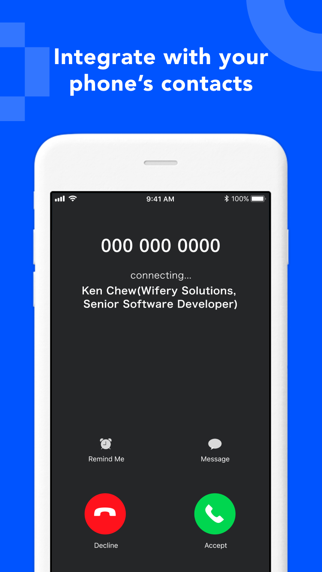
-Integrate with phone book apps, all for a small monthly fee
**Eight Premium pricing and terms**
* 600 yen/month or 6,000 yen/year (auto-renewed, paid in local currency)
* Billed to your Apple ID.
*The subscription will auto-renew unless you cancel at least 24 hours before the end of your subscription period. You’ll be billed within 24 hours before the period expires.
* Manage your subscriptions and turn off auto-renewal in your Account Settings in the iTunes Store.
* Canceling your Eight subscription does not cancel auto-renewal.
* You cannot cancel within the Eight Premium usage period.
* Terms of Use – https://8card.net/en/kiyaku
* Personal Information Protection Policy – https://8card.net/en/privacy
** Frequently Asked Questions **
-How do you securely manage business card information?
We encrypt scanned business card information to ensure its safety.
I-s it easy to scan business cards?
Yes, simply hold the business card in front of the camera, and it can be easily digitized into a digital format.
Got a new feature you want to see added or feedback for the Eight team? We hear you! Email us at support@8card.net