elios APP is an overall app developed by PessTechnologies.
Download Statistics
User Ratings
The app has no ratings yet.
App Information
elios APP is FREE to download. The APK download size is 39.41 MB. The latest version available is 2.0.8. The last update was on November 4, 2025.
Technical Requirements
The app has a content rating of Everyone. The app has been available on Google Play April 2016.
Description
Elios APP is the application that can handle the PESS Elios system via TCP / IP. In this way we obtain a bi-directional link between the panel and your smartphone without having to send and receive numerous SMS Once you create a profile, accessing to the control panel, will automatically learn all the programming. You now have the ability to manage the system by entering the same password used to access the keyboard. There are no limits for the creation of profiles; 2 different layouts make this app customizable The app can manage 2 languages : Italian and English by setting the language on the device’s menu.
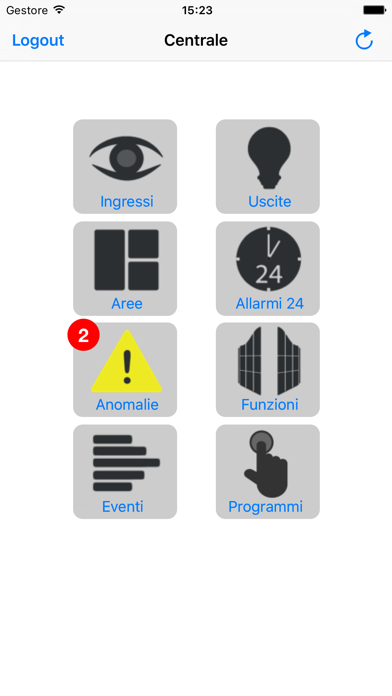
The application can manage: -Inputs: Status, enabling and disabling. -Areas: Status, enabling and disabling, locking and unlocking, supervision ON / OFF. -Alarms H24: status, enabling and disabling. -Anomalies: Display all anomalies in the Elios system -Functions: Status, enabling and disabling, locking and unlocking -Events: Display up to 4000 events. -Programmes: Status, enabling and disabling
Functionning: Once installed and opened on the device the profiles screen will be displayed where the different profiles will be saved. To create a profile just click on the + displayed on the top right and choose the type of connection, direct or CLOUD.
Direct connection: Requires the update of the Elios 1.00 or above. A window will open to enter the data of the i.Lan board (WAN host and port and LAN host and port). The profile will be created when you click OK. The APP can manage automatically the LAN and WAN depending on the device connection.
CLOUD connection: Requires the update of the Elios 1.00 or above.
A window will open to enter the data of the CLOUD (Username, Password, panel ID ). The profile will be created when you click OK.
Every profile is a PESS Elios system. Clicking on one of them a password will be requested. Typing the password followed by a click on OK allow you the manage the system after few minutes. The following page will be the "MENU'" where the icons for inputs, outputs, areas, alarm H24, anomalies, functions, events and programmes will be displayed.
Each subscription will automatically renew 3 days before the expiration date for
the same time period. Subscriptions can be cancelled at any time before the renewal.