

Elly: Simple To Do List
Elly: Simple To Do List is made and published by Sasikumar Chhotelal Das. AppBrain is an independent app data site and isn't affiliated with Sasikumar Chhotelal Das. The app name, icon, screenshots and description belong to Sasikumar Chhotelal Das and are shown as published on the App Store.
AppBrain's verdict
- Last updated
- June 5, 2026
- Size
- 16.8 MB
User feedback
Ratings and reviews on the App StoreComments on Elly: Simple To Do List for iOS
We don't have enough comments to show example comments. Please check back later.
Store listing
By Sasikumar Chhotelal Das, from the App Store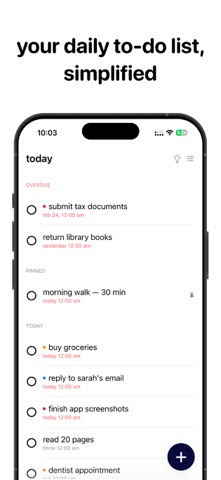


Description by Sasikumar Chhotelal Das Written by the developer, not by AppBrain. Click to read.
Add tasks in seconds, set smart reminders, and build streaks as you check things off. Whether you're planning your week or clearing daily
errands, Elly gets out of your way and lets you focus.
PLAN YOUR DAY IN SECONDS
• Instant Capture: Tap the floating button to add a task instantly. No forms, no friction — just type and go.
• Smart Organization: Set due dates, assign priorities from Low to High, and pin urgent items to the top of your list.
• Today View: See exactly what needs your attention right now — nothing else. Your daily checklist, distraction-free.
• Schedule Prompt: Elly asks when a task is due right when you create it — today, tomorrow, or pick a date.
SMART REMINDERS THAT ADAPT TO YOU
Seven customizable notifications built around your routine:
• Morning Planning: Start your day with a clear plan of what's ahead.
• End of Day Review: Reflect on what you accomplished before winding down.
• Overdue Nudge: Midday alerts for tasks you might have missed.
• Inactivity Reminder: A gentle push when you haven't checked anything off in a while.
• Due Date Alerts: Task-specific reminders with configurable lead times — at the moment, 15 minutes before, 1 hour before, or 1 day before.
• Weekly Review: A weekly summary to check in on your progress.
• Streak Celebrations: Get notified when you hit task milestones or extend your streak.
BUILD MOMENTUM WITH STREAKS
Stay consistent and watch your productivity grow.
• Streaks: Complete tasks on consecutive days — your streak starts at 3 days and keeps climbing.
• Milestones: Celebrate when you hit 10, 25, 50, 100, 250, and 500 completed tasks.
• Daily Records: Beat your personal best for tasks completed in a single day.
• Weekly Comparison: See how this week stacks up against last week.
SEE YOUR TASKS YOUR WAY
• Upcoming View: A 30-day calendar strip so you can plan ahead with confidence.
• Deep Search: Find any task instantly — search across titles, notes, and subtasks.
• Board View (Pro): Kanban-style columns to visualize your workflow from to-do to done.
• Calendar View (Pro): A full monthly grid to see everything at a glance.
• Display Settings: Customize how tasks are sorted, grouped, and filtered.
BUILT NATIVELY FOR APPLE
Designed with SwiftUI for a fast, fluid experience that feels right at home on your device.
• iPhone: One-handed use with swipe gestures and haptic feedback. Complete tasks with a swipe right, delete with a swipe left.
• iPad: Full sidebar navigation with room to see more of your schedule.
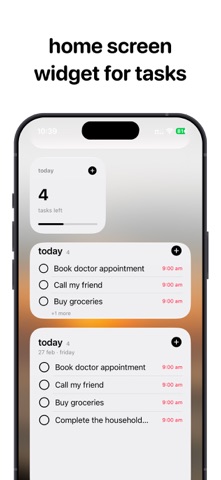
• Widgets: Small, medium, and large home screen widgets — see your task count, progress, and upcoming items without opening the app.
• Siri: Add tasks hands-free using your voice.
• Deep Links: Tap a widget to jump straight into adding a new task.
ELLY PRO — UNLOCK EVERYTHING
Take your productivity further:
• Board & Calendar Layouts for visual task management.
• Recurring Tasks: Set tasks to repeat daily, weekly, or monthly — perfect for habits and routines.
• Subtasks: Break big tasks into smaller, actionable steps and track each one.
• Advanced Sorting & Filters: Organize by priority, due date, creation date, or custom order.
• Face ID / Touch ID Lock: Keep your task list private and secure.
• iCloud Sync: Your tasks stay updated across all your devices via secure CloudKit.
PRIVACY FIRST
Your data stays on your device by default. No ads, no tracking, no data mining. iCloud sync is optional and encrypted.
Privacy Policy: https://indielabs.dev/elly/privacy
Terms of Use: https://indielabs.dev/elly/terms
Safety and technology
Found in the app by AppBrain- Price
- Free
- App size
- 16.8 MB
- Content rating
- Everyone
Technologies used by Elly: Simple To Do List
Releases
Updates seen on the App Store- Version
- 1.0
- Launched
- June 2026
No changelog data
Alternatives
Similar apps and more from Sasikumar Chhotelal DasAlternatives to Elly: Simple To Do List





More from Sasikumar Chhotelal Das


Rankings
App Store top chartsApp Store Rankings for Elly: Simple To Do List
About the app and developer
About Elly: Simple To Do List
Elly: Simple To Do List is a productivity app developed by Sasikumar Chhotelal Das.
What is the rating of Elly: Simple To Do List?
Elly: Simple To Do List has no ratings yet.
Is Elly: Simple To Do List free?
Elly: Simple To Do List is free. The app size is 16.79 MB. The latest version available is 1.0. The last update was on June 5, 2026.
What are the requirements for Elly: Simple To Do List?
The app has a content rating of Everyone. The app has been available on the App Store since June 2026.
Developer information for Sasikumar Chhotelal Das
Address:
Frequently asked questions about Elly: Simple To Do List
Is Elly: Simple To Do List free?
Yes. Elly: Simple To Do List is free on the App Store.
Is Elly: Simple To Do List still available?
Yes. Elly: Simple To Do List is on the App Store, and the last update we saw was on June 5, 2026.
How large is Elly: Simple To Do List?
Elly: Simple To Do List is 16.79 MB.
Is Elly: Simple To Do List suitable for children?
App Store rates the content of Elly: Simple To Do List as suitable for everyone.
Who made Elly: Simple To Do List?
Elly: Simple To Do List was developed by Sasikumar Chhotelal Das. It is listed in the productivity category on the App Store.
What are the best alternatives to Elly: Simple To Do List?
People looking at Elly: Simple To Do List also look at these productivity apps: Simple_Todos, Paper - To-Do List, Proonus: Task Manager, Typerite, Filto - Simple Todo Calendar.