

Elm-Lappwald Erfahren
Elm-Lappwald Erfahren is made and published by FootMap GmbH. AppBrain is an independent app data site and isn't affiliated with FootMap GmbH. The app name, icon, screenshots and description belong to FootMap GmbH and are shown as published on the App Store.
AppBrain's verdict
- Last updated
- January 19, 2026
- Size
- 128.2 MB
User feedback
Ratings and reviews on the App StoreComments on Elm-Lappwald Erfahren for iOS
We don't have enough comments to show example comments. Please check back later.
Store listing
By FootMap GmbH, from the App Store


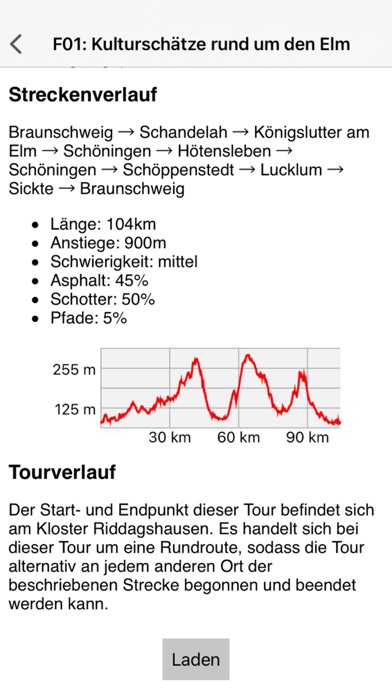


Description by FootMap GmbH Written by the developer, not by AppBrain. Click to read.
Von der Autostadt in Wolfsburg bis zum Wasserschloss Westerburg und von der Gedenkstätte Deutsche Teilung Marienborn bis zum Schloss Wolfenbüttel erfahren Sie viel Wissenswertes über diese Region. Zu jeder Tour gehören jeweils zwei digitale „Stempelstellen“ mit umfassenden Informationen im Text- und Audioformat. Mit dieser Neuerung hält das beliebte „Stempel sammeln“ jetzt auch bei den Radsportlerinnen und Radsportlern Einzug. Diejenigen, die 50 digitale Stempel gesammelt haben, erhalten in den Tourist-Informationen der Region die „Elmi-Radnadel“ für den Naturpark Elm-Lappwald.
Die App „Elm-Lappwald Erfahren“ ist Ihr digitaler Begleiter auf den Radtouren. Sie zeigt Ihre aktuelle Position, die Route, Infos zur Tour, aber auch POIs an der Strecke sowie die Position der Info-/Stempelstellen. Mit ihr können Sie nicht nur die Stempel „digital“ sammeln, sondern Sie erhalten auch an jeder Info-/Stempelstelle einen digitalen Sticker.
Wenn Sie in die Nähe der Info-/Stempelstelle kommen, erscheint ein Popup und es ertönt ein Signalton. Nach Drücken des OK-Buttons erhalten Sie den digitalen Stempel und einen Sticker mit mehr Infos über diesen Ort als MP3-Infos sowie als Bild und Text. Die Sticker sammeln Sie nun in der App wie analog in einem Album. Diese können Sie jederzeit wieder aufrufen und die MP3-Infos anhören.
Funktionsbeschreibung:
Während der Installation der App werden die Kartendaten geladen. Danach können Sie die Elm-Lappwald App "offline" nutzten. Das heißt, eine Internetverbindung ist nun nicht mehr erforderlich. Für Zugriff auf externe Internetseiten, E-Mail und Telefonanrufe ist eine Online-Verbindung herzustellen. Falls kein WLAN verfügbar ist, aktivieren Sie in den Einstellungen des iPhones unter App den Schalter "Mobiles Netz". Bitte beachten Sie hierbei, dass dies zu Lasten Ihres Datenvolumens erfolgt.
Damit Ihre aktuelle Position in der Karte angezeigt wird, bestätigen Sie bitte, dass die App Zugriff auf Ihren Gerätestandort erhält.
Weitere Hinweise zur Bedienung finden Sie im Menü "Hilfe".
Safety and technology
Found in the app by AppBrain- Price
- Free
- App size
- 128.2 MB
- Content rating
- Everyone
Technologies used by Elm-Lappwald Erfahren
Releases
Updates seen on the App Store- Version
- 1.0.2
- Launched
- June 2022
No changelog data
Alternatives
Similar apps and more from FootMap GmbHAlternatives to Elm-Lappwald Erfahren


More from FootMap GmbH


Rankings
App Store top chartsApp Store Rankings for Elm-Lappwald Erfahren
About the app and developer
About Elm-Lappwald Erfahren
Elm-Lappwald Erfahren is a travel app developed by FootMap GmbH.
What is the rating of Elm-Lappwald Erfahren?
Elm-Lappwald Erfahren has no ratings yet.
Is Elm-Lappwald Erfahren free?
Elm-Lappwald Erfahren is free. The app size is 128.18 MB. The latest version available is 1.0.2. The last update was on January 19, 2026.
What are the requirements for Elm-Lappwald Erfahren?
The app has a content rating of Everyone. The app has been available on the App Store since June 2022.
Developer information for FootMap GmbH
Address:
Frequently asked questions about Elm-Lappwald Erfahren
Is Elm-Lappwald Erfahren free?
Yes. Elm-Lappwald Erfahren is free on the App Store.
Is Elm-Lappwald Erfahren still available?
Yes. Elm-Lappwald Erfahren is on the App Store, and the last update we saw was on January 19, 2026.
How large is Elm-Lappwald Erfahren?
Elm-Lappwald Erfahren is 128.18 MB.
Is Elm-Lappwald Erfahren suitable for children?
App Store rates the content of Elm-Lappwald Erfahren as suitable for everyone.
Who made Elm-Lappwald Erfahren?
Elm-Lappwald Erfahren was developed by FootMap GmbH. It is listed in the travel category on the App Store.
What are the best alternatives to Elm-Lappwald Erfahren?
People looking at Elm-Lappwald Erfahren also look at these travel apps: Lessingstadt Wolfenbüttel-App, Sigwardskirche.