

Else Screen
Else Screen is made and published by Yunus Yurduseven. AppBrain is an independent app data site and isn't affiliated with Yunus Yurduseven. The app name, icon, screenshots and description belong to Yunus Yurduseven and are shown as published on the App Store.
AppBrain's verdict
- Best rank
- #68
- New Apps, Australia
- Last updated
- November 1, 2026
Rankings
App Store top charts- Highest rank
- #68
- Chart
- New Apps
- Books
- Country
- Australia
App Store Rankings for Else Screen
Top rankings
| Rank | Country | Category | List |
|---|---|---|---|
| 68 | Australia | Books | New Apps |
| 68 | Australia | Business | New Apps |
| 68 | Australia | Education | New Apps |
| 68 | Australia | Entertainment | New Apps |
| 68 | Australia | Finance | New Apps |
| 68 | Australia | Food & Drink | New Apps |
| 68 | Australia | Games | New Apps |
| 68 | Australia | Action Games | New Apps |
| 68 | Australia | Adventure Games | New Apps |
| 68 | Australia | Arcade Games | New Apps |
Ranking history in Australia
Competitors
Similar apps and more from Yunus YurdusevenMore from Yunus Yurduseven


Releases
Updates seen on the App Store- Version
- 1.0
- Launched
- November 2026
No changelog data
User feedback
Ratings and reviews on the App StoreComments on Else Screen for iOS
We don't have enough comments to show example comments. Please check back later.
Technology
Found in the app by AppBrain- Price
- $9.99
- App size
- 7.23 MB
- Content rating
- Everyone
Technologies used by Else Screen
About the app and developer
About Else Screen
Else Screen is an utilities app developed by Yunus Yurduseven.
User Ratings
The app has no ratings yet.
App Information
Else Screen costs $9.99. The app size is 7.23 MB. The latest version available is 1.0. The last update was on November 1, 2026.
Technical Requirements
The app has a content rating of Everyone. The app has been available on the App Store since November 2026.
Developer information for Yunus Yurduseven
Address:
Frequently asked questions about Else Screen
Is Else Screen free?
No. Else Screen costs $9.99 on the App Store.
Is Else Screen still available?
Yes. Else Screen is on the App Store, and the last update we saw was on November 1, 2026.
How large is Else Screen?
Else Screen is 7.23 MB.
Is Else Screen suitable for children?
App Store rates the content of Else Screen as suitable for everyone.
Who made Else Screen?
Else Screen was developed by Yunus Yurduseven. It is listed in the utilities category on the App Store.
Store listing
By Yunus Yurduseven, from the App Store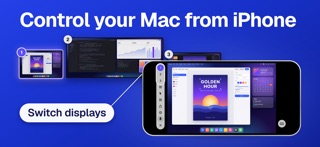


Description by Yunus Yurduseven Written by the developer, not by AppBrain. Click to read.
EVERY DISPLAY
Each of your Mac's displays gets a button. Tap one, and it fills your screen. All Displays shows them side by side, live, laid out as they sit on your desk. Only the display you're using streams at full quality, so even three stay quick.
FEELS LIKE A TRACKPAD
One finger moves the pointer, a tap clicks, two fingers scroll, and a pinch zooms in on small text. Touch and hold to drag. Prefer to point right at things? Touch mode clicks where you tap. Push the pointer past an edge to move on to the next display.
A KEYBOARD FOR THE MAC
The key bar adds Esc, Tab, the arrows, and ⌃ ⌥ ⇧ ⌘. Type in any language, paste from your iPhone, and type a saved password on your Mac without copying it. Mac shortcuts such as Mission Control, Spotlight, and Lock Screen are a tap away.
FROM ANYWHERE
Reach your Mac away from home with no port forwarding and no account. Your devices connect directly where the networks allow, and through a relay that can't read your screen where they don't. A session from away carries on when you move between Wi-Fi and cellular.
MADE FOR IPAD
Use a mouse, trackpad, or Apple Pencil, lock the pointer for games and 3D apps, and open a window for each of your Macs. On a TV or display, by cable or AirPlay, your Mac fills the big screen while your device is its trackpad.
PRIVATE BY DESIGN
Pair each device once by scanning a code on your Mac; only paired devices can connect. Every session is encrypted end to end with keys pinned at pairing. At home, your screen goes straight from your Mac to your device over your own network. Privacy Mode blacks out your Mac's own screens, silences its speakers, and keeps its keyboard and mouse still while you work from elsewhere. Face ID can lock the app, and your Mac can lock itself when you're done. ElseScreen collects nothing: no account, no analytics, no ads.
AND MORE
Hear your Mac's sound. Copy and paste between devices, formatting included. Send files and photos to your Mac, and save what you copy in Finder. View Only, Wake your Mac, Quality mode at your display's own resolution, up to 120 frames a second on ProMotion displays, Shortcuts, Siri, and widgets. In English, French, German, Italian, Japanese, Korean, Russian, Simplified Chinese, and Spanish.
WHAT YOU NEED
ElseScreen Host, our companion app for the Mac, free from elsescreen.com, on a Mac with macOS 26 or later, and an iPhone or iPad with iOS or iPadOS 26 or later. Pair on the same network; after that, connect from anywhere.