

emdee - .md Editor, No Syntax
emdee - .md Editor, No Syntax is made and published by Keita Eto. AppBrain is an independent app data site and isn't affiliated with Keita Eto. The app name, icon, screenshots and description belong to Keita Eto and are shown as published on the App Store.
AppBrain's verdict
- Best rank
- #44
- Top Paid, Iran
- Last updated
- October 15, 2026
Rankings
App Store top charts- Highest rank
- #44
- Chart
- Top Paid
- Productivity
- Country
- Iran
App Store Rankings for emdee - .md Editor, No Syntax
Top rankings
| Rank | Country | Category | List |
|---|---|---|---|
| 45 | United States | Productivity | Top Paid |
| 44 | Iran | Productivity | Top Paid |
Ranking history in United States
Releases
Updates seen on the App Store- Version
- 1.2
- Launched
- August 2026
No changelog data
User feedback
Ratings and reviews on the App StoreComments on emdee - .md Editor, No Syntax for iOS
We don't have enough comments to show example comments. Please check back later.
Technology
Found in the app by AppBrain- Price
- $7.99
- App size
- 6.02 MB
- Content rating
- Everyone
Technologies used by emdee - .md Editor, No Syntax
About the app and developer
About emdee - .md Editor, No Syntax
emdee - .md Editor, No Syntax is a productivity app developed by Keita Eto.
User Ratings
The app has no ratings yet.
App Information
emdee - .md Editor, No Syntax costs $7.99. The app size is 6.02 MB. The latest version available is 1.2. The last update was on October 15, 2026.
Technical Requirements
The app has a content rating of Everyone. The app has been available on the App Store since August 2026.
Developer information for Keita Eto
Address:
Store listing
By Keita Eto, from the App Store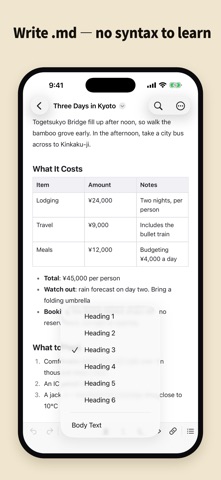


Description by Keita Eto Written by the developer, not by AppBrain. Click to read.
You don't need to switch between a reading mode and an editing mode. You edit the document while it stays clean and properly formatted, exactly as a .md document should look.
Headings stay heading-sized, tables stay tables, and you type directly into the document. Want bold? Select the text and tap the button. You never type the symbols, and you never see them. Save, and it's still a plain .md file.
■ When you'd use it
You saved an AI answer as .md — now you want it in your own words, not just readable
AI drafted your travel plan or checklist — now the dates and details need to be yours
You want to keep notes and minutes in .md, without looking up syntax as you write
■ What you can actually edit
"emdee" is not a viewer — it's a true WYSIWYG Markdown editor. All of this works right in the formatted view:
Headings (six levels), bold, italic, strikethrough, inline code, links
Bullet lists, numbered lists, and checklists you can tick with a tap
Block quotes, code blocks, horizontal rules
Tables: insert with one button, and add or delete rows and columns from that same button's menu. Line breaks inside cells are supported
Find and replace — Replace All comes back with a single undo
It all sits in the format bar along the bottom, which rises with the keyboard so you can change formatting mid-sentence
■ Images
An image in the same folder as the document you have open is drawn right there in the text. So is one in a folder below it.
PNG, JPEG, GIF, WebP and SVG are drawn. So are images on the web (https://)
HEIC — what an iPhone camera writes — is not drawn. Export it as JPEG and it is
The first time, emdee asks permission to read that folder — one button, and it never asks again
Anything it cannot draw shows its path in a frame instead
The image button on the format bar puts one in. An image from outside the document's folder is copied into that folder first, and a file of the same name is never overwritten. What gets written is a relative path, so hand the images over along with the document.
Exported HTML and PDF have the pictures embedded, so they travel on their own.
The  in your file is not touched by any of this.
■ More features
Table of contents — tap a heading to jump there. On iPad it opens as a column beside your text instead of covering it
Print, and export to PDF, HTML, or plain text. Lines break on paper exactly where they break on screen, and tables never split mid-row across pages
Light, dark, or follow the system
Body text can follow the system text size or stay at a size you choose, and the line width is yours: fit the screen, or match A4 print
■ What you write stays a .md
No proprietary format, no importing. The file you have open is the .md itself, opened in place where it lives — no copy is made. It saves back readable by GitHub, VS Code, Obsidian — anything. Even details like line breaks inside table cells are written the standard way, as an HTML br tag.
Line endings (LF / CRLF / CR) and text encodings (UTF-8, UTF-16, and legacy encodings such as Shift_JIS) are preserved exactly as the file was opened. Files made on Windows keep their format intact.
■ One purchase — iPhone, iPad, and Mac
The same document, on the same page layout, wherever you open it.
■ What emdee doesn't do
File management belongs to the Files app, and sync belongs to iCloud Drive. There is no proprietary notes database and no cloud service. The only thing open is your .md file.
Images are looked for inside the folder your document is in, and nowhere else. A reference pointing outside it (../ or an absolute path) is not drawn, and neither are HEIC, AVIF or TIFF files, or images over roughly 8 MB (24 MB per document). Anything that cannot be drawn shows its path in a frame instead.
Questions and bug reports are welcome — see the support page.