

Encode Keyboard
Encode Keyboard is made and published by Dat Thanh Nguyen. AppBrain is an independent app data site and isn't affiliated with Dat Thanh Nguyen. The app name, icon, screenshots and description belong to Dat Thanh Nguyen and are shown as published on the App Store.
AppBrain's verdict
- Last updated
- September 18, 2026
Rankings
App Store top chartsApp Store Rankings for Encode Keyboard
Competitors
Similar apps and more from Dat Thanh NguyenAlternatives to Encode Keyboard


More from Dat Thanh Nguyen


Releases
Updates seen on the App Store- Version
- 1.5.1
- Launched
- April 2026
No changelog data
User feedback
Ratings and reviews on the App StoreComments on Encode Keyboard for iOS
We don't have enough comments to show example comments. Please check back later.
Technology
Found in the app by AppBrain- Price
- Free
- App size
- 9.98 MB
- Content rating
- Everyone
Technologies used by Encode Keyboard
About the app and developer
About Encode Keyboard
Encode Keyboard is an utilities app developed by Dat Thanh Nguyen.
User Ratings
The app has no ratings yet.
App Information
Encode Keyboard is freely available from the App Store. The app size is 9.98 MB. The latest version available is 1.5.1. The last update was on September 18, 2026.
Technical Requirements
The app has a content rating of Everyone. The app has been available on the App Store since April 2026.
Developer information for Dat Thanh Nguyen
Address:
Store listing
By Dat Thanh Nguyen, from the App Store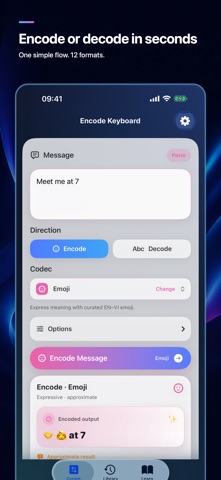



Description by Dat Thanh Nguyen Written by the developer, not by AppBrain. Click to read.
TYPE, CONVERT, CONTINUE
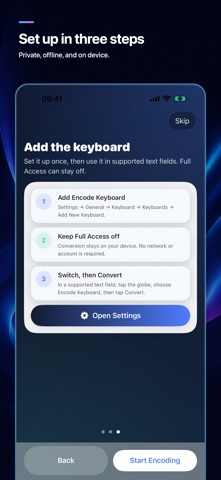
• Type in a supported text field, choose Encode or Decode, then select a codec
• Tap Convert to replace the current line before the cursor
• Undo the last conversion instantly
• Switch between English and Vietnamese input
TWELVE FORMATS, HONEST LABELS
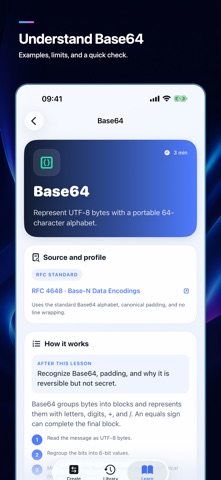
• RFC 4648 Base64, Base64URL, Base32, and Base16/Hex
• RFC 3986 URL Percent and International Morse
• UTF-8 Binary as an educational app profile; ROT13 as a classic convention
• Emoji, Kaomoji, Leetspeak, and your own Personal Code for expression
CREATE AND LEARN IN THE APP
• Convert text with one clear direction-and-codec flow
• Copy, share, or save a result; revisit favorites and recent history
• Learn all 12 formats with specification sources, canonical examples, practice, and quick checks
• Create, import, and export custom Emoji mappings and Personal Codebooks
PRIVATE BY DESIGN
All transformations run on device. No account or Full Access is required. There are no ads, analytics, or subscriptions. The keyboard has no network access and does not collect what you type.
IMPORTANT
Encoding is not encryption. Do not use these formats to protect passwords or sensitive information. Byte-based standard formats, Binary, and ROT13 can restore valid text exactly. Morse may normalize accents, case, and spacing. Emoji, Kaomoji, Leetspeak, and Personal Code are approximate or require the same codebook.
Third-party keyboards are unavailable in secure text fields and some app-specific fields because of iOS restrictions.