

Endpoint Central MSP
Endpoint Central MSP is made and published by Zoho Corporation. AppBrain is an independent app data site and isn't affiliated with Zoho Corporation. The app name, icon, screenshots and description belong to Zoho Corporation and are shown as published on the App Store.
AppBrain's verdict
Established- Rating on App Store
- 4.16
- 19 ratings
- Last updated
- September 24, 2026
It doesn't have enough ratings yet to judge what users think.
Rankings
App Store top chartsApp Store Rankings for Endpoint Central MSP
Competitors
Similar apps and more from Zoho Corporation





Releases
Updates seen on the App Store- Version
- 26.09.03
- Launched
- November 2018
No changelog data
User feedback
Ratings and reviews on the App StoreComments on Endpoint Central MSP for iOS
We don't have enough comments to show example comments. Please check back later.
Technology
Found in the app by AppBrain- Price
- Free
- App size
- 132.8 MB
- Content rating
- Everyone
Technologies used by Endpoint Central MSP
About the app and developer
About Endpoint Central MSP
Endpoint Central MSP is a business app developed by Zoho Corporation.
User Ratings
Endpoint Central MSP is rated 4.16 out of 5 stars. The rating is based on 19 ratings.
App Information
Endpoint Central MSP is freely available from the App Store. The app size is 132.78 MB. The latest version available is 26.09.03. The last update was on September 24, 2026.
Technical Requirements
The app has a content rating of Everyone. The app has been available on the App Store since November 2018.
Developer information for Zoho Corporation
Address:
Frequently asked questions about Endpoint Central MSP
Is Endpoint Central MSP free?
Yes. Endpoint Central MSP is free on the App Store.
Is Endpoint Central MSP still available?
Yes. Endpoint Central MSP is on the App Store, and the last update we saw was on September 24, 2026.
How large is Endpoint Central MSP?
Endpoint Central MSP is 132.78 MB.
Is Endpoint Central MSP suitable for children?
App Store rates the content of Endpoint Central MSP as suitable for everyone.
How do people rate Endpoint Central MSP?
Endpoint Central MSP scores 4.16 out of 5 stars, from 19 ratings on the App Store.
Who made Endpoint Central MSP?
Endpoint Central MSP was developed by Zoho Corporation. It is listed in the business category on the App Store.
What are the best alternatives to Endpoint Central MSP?
People looking at Endpoint Central MSP also look at these business apps: Delinea Mobile, NinjaRMM Screenshare Utility, EndpointLock, ADSignify - Active Directory, SuperOps.
Store listing
By Zoho Corporation, from the App Store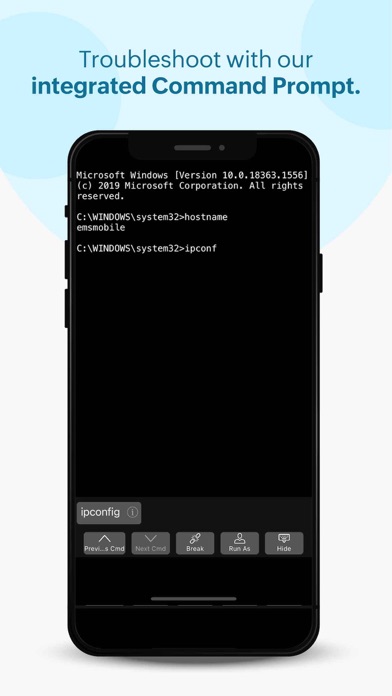


Description by Zoho Corporation Written by the developer, not by AppBrain. Click to read.
Manages Windows, Mac and Linux computers
Supported Features:
Scope of Management, Patch Management, Asset Management, Tools and Mobile Device Management
ManageEngine Endpoint Central MSP iOS app formerly known as Desktop Central MSP is exclusively packaged for service providers to seamlessly connect and interact with customer servers, laptops and desktops across the globe. It enables IT service providers to manage customer systems on the go and frees them from being stuck in office to do these routines, thereby making them more productive.
Perform the following tasks in just a few clicks using the app,
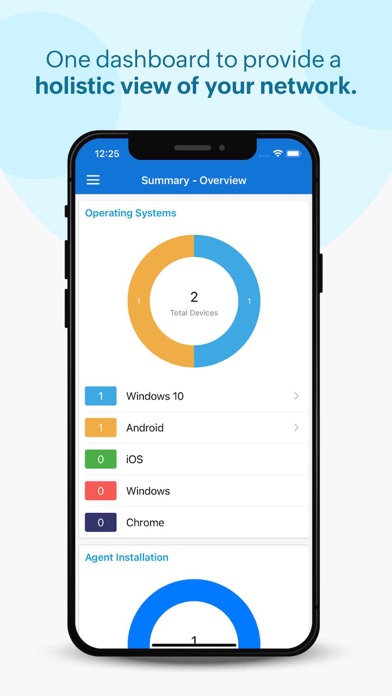
Manage Customer Computers
• Add or remove computers to be managed using Endpoint Central MSP
• Initiate installation of agents in the computers to be managed
• Check status of installation of agents in computers required
• Monitor frequency of agent contact to the server
• Review information on each Remote offices
Asset Management:
• Overview of assets being managed by the app
• Scan systems for generating information on hardware and software
• Review information on Hardware assets being managed
• Check software compliance status
• Analyze software usage of any software to optimize resources
• Prohibit software: Forbid usage of certain applications
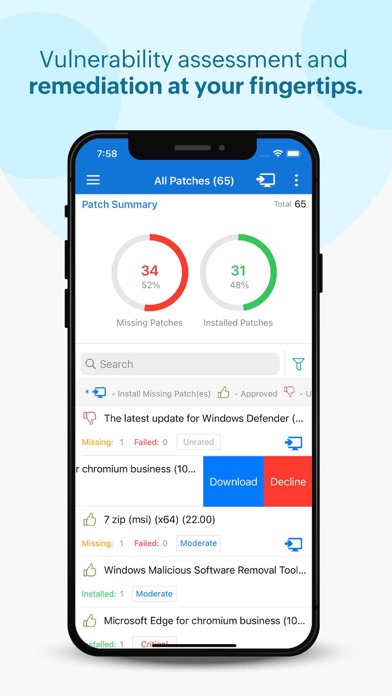
Patch Management:
• Scan and identify vulnerable computers
• Detect missing patches for Windows, Mac, Linux and 3rd party applications
• Approve/Decline patches
• Monitor automated patch deployment tasks
• View system health status
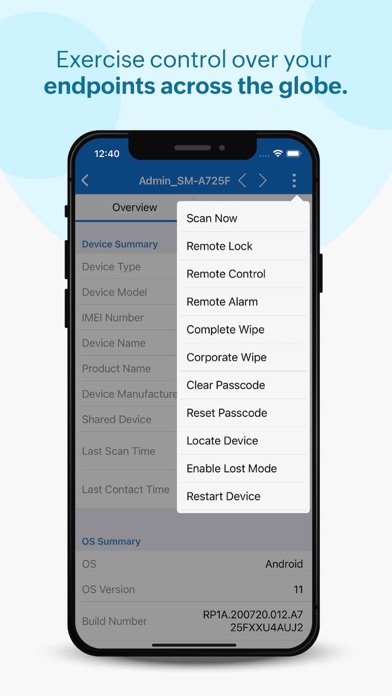
Advanced Remote Control:
• Multi-monitor Support
• Shadow User
• Reboot during a remote session
• Collaborative remote session
• Audit remote sessions
How to activate?
1. Install the Endpoint Central MSP iOS app on your device.
2. Provide your Endpoint Central MSP server URL
3. Sign-in with your Endpoint Central MSP credentials