

Entangled.org is made and published by Entagled. AppBrain is an independent app data site and isn't affiliated with Entagled. The app name, icon, screenshots and description belong to Entagled and are shown as published on the App Store.
AppBrain's verdict
- Rating on App Store
- 4.50
- 10 ratings
- Last updated
- October 31, 2026
It doesn't have enough ratings yet to judge what users think.
Rankings
App Store top chartsApp Store Rankings for Entangled.org
Competitors
Similar apps and more from EntagledAlternatives to Entangled.org


Releases
Updates seen on the App Store- Version
- 2.2.0
- Launched
- July 2024
No changelog data
User feedback
Ratings and reviews on the App StoreComments on Entangled.org for iOS
We don't have enough comments to show example comments. Please check back later.
Technology
Found in the app by AppBrain- Price
- Free
- App size
- 67.8 MB
- Content rating
- Everyone
Technologies used by Entangled.org
About the app and developer
About Entangled.org
Entangled.org is an education app developed by Entagled.
User Ratings
Entangled.org is rated 4.50 out of 5 stars. The rating is based on 10 ratings.
App Information
Entangled.org is freely available from the App Store. The app size is 67.78 MB. The latest version available is 2.2.0. The last update was on October 31, 2026.
Technical Requirements
The app has a content rating of Everyone. The app has been available on the App Store since July 2024.
Developer information for Entagled
Address:
Store listing
By Entagled, from the App Store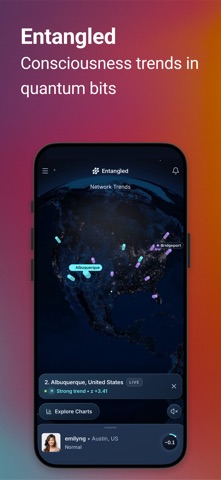


Description by Entagled Written by the developer, not by AppBrain. Click to read.
Every 10 minutes, quantum hardware gives your account 200 fresh random bits. Entangled shows how far they stray from chance, for you, for your city and for everyone on the network.
Network Trends
Open the app and the Earth at night fills the screen. Up to 20 cities are marked on it: the places whose people's bits are furthest from chance right now. Cyan means more 1s than chance, violet means more 0s. Turn it, zoom in, and tap a city to see its rank and z-score.
Explore Charts
• Charts for everyone on the network and for your city, over Live, 1H, 24H and 7D. Drag across a chart to read each bar.
• Trending Cities: the 20 cities furthest from chance in the last 10 minutes, hour or 24 hours. Tap one and the globe turns to it.
Your own data
• Your card shows your latest 200 bits as a counter of 1s and 0s, and your own chart over Live, 1H, 24H and 7D with a plain status line: "Normal", "Slight trend" or "Strong trend".
• Tap a bar on your chart to open those 10 minutes: your count of 1s, your z-score and how rare that is by chance.
• Add a private note to any of them and answer one question: "What was happening?"
• The Trend log keeps your strong trends and your notes together.
A rare alert
When your bits show a strong trend, Entangled can let you know. Chance alone does that about once every 3 days on average, so an alert stands out, and you can add a note straight from the notification. From 11 PM to 7 AM your local time, alerts arrive silently. You can turn quiet hours, or alerts, off in Settings.
What a trend means
• Each bit starts as a single photon meeting a semi-transparent mirror. It passes through or bounces off, a 50/50 chance in quantum physics, and becomes a 1 or a 0.
• Before any bit is read, the server commits to who gets which bits and records it with a cryptographic hash, so no result can change the allocation.
• By chance alone, about 100 of your 200 bits are 1s. The z-score says how far your count landed from that, either way.
• Slight trend: a z-score of 2 or more either way. For your bits, chance alone does this about 1 time in 25, around 6 times a day. Charts mark these.
• Strong trend: a z-score of 3 or more either way, about 1 time in 439. Only these send an alert.
How Entangled Works, in the app, explains it all with pictures.
Privacy
• You choose your city from a list built into the app. Entangled never asks for or reads your location.
• Other members don't see your name, username, photo, city or notes. Cities and the network are shown only as totals, and a city appears only when at least 3 people counted toward it.
• No ads, no tracking and no third-party usage analytics. Crash reports are used only to find and fix problems.
• Sign in with your phone number and a code. Delete your account in Settings at any time.
For ages 13 and up. More ways to explore the data together are on the way.
Questions or ideas: hi@entangled.org