

Envecka is made and published by Markus Larsson. AppBrain is an independent app data site and isn't affiliated with Markus Larsson. The app name, icon, screenshots and description belong to Markus Larsson and are shown as published on the App Store.
AppBrain's verdict
- Best rank
- #54
- Top Paid, Sweden
- Last updated
- October 14, 2026
Rankings
App Store top charts- Highest rank
- #54
- Chart
- Top Paid
- Utilities
- Country
- Sweden
App Store Rankings for Envecka
Top rankings
| Rank | Country | Category | List |
|---|---|---|---|
| 54 | Sweden | Utilities | Top Paid |
Ranking history in Sweden
Releases
Updates seen on the App Store- Version
- 1.1
- Launched
- October 2026
No changelog data
User feedback
Ratings and reviews on the App StoreComments on Envecka for iOS
We don't have enough comments to show example comments. Please check back later.
Technology
Found in the app by AppBrain- Price
- $0.49
- App size
- 4.46 MB
- Content rating
- Everyone
Technologies used by Envecka
About the app and developer
About Envecka
Envecka is an utilities app developed by Markus Larsson.
User Ratings
The app has no ratings yet.
App Information
Envecka costs $0.49. The app size is 4.46 MB. The latest version available is 1.1. The last update was on October 14, 2026.
Technical Requirements
The app has a content rating of Everyone. The app has been available on the App Store since October 2026.
Developer information for Markus Larsson
Address:
Store listing
By Markus Larsson, from the App Store



Screenshots by Markus Larsson, from the the App Store listing
Description by Markus Larsson Written by the developer, not by AppBrain. Click to read.
Envecka gives you a clear view of the current week and the moments you’re looking forward to.
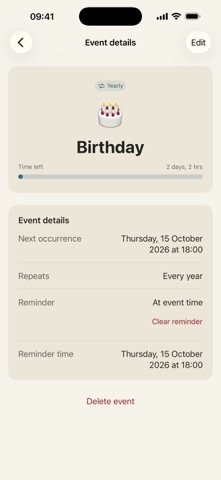
See the week number, dates, and year progress at a glance. Count down to the weekend, then add events that matter to you. Each event has its own emoji, date, progress bar, and optional local reminder.
Set birthdays, anniversaries, and other events to repeat every week or every year. Choose from expanded emoji, including Work & study. Clearer VoiceOver labels make event controls easier to navigate.
Your upcoming events stay close on the home screen. When a one-time event’s time arrives, it moves to Past, where you can find it, edit its date, or delete it. Search and filter your upcoming and past events whenever you need to.
Choose light or dark appearance, set when your weekend begins on Friday, and show event progress as time or percentage. Your events are stored on your device.
Choose month or year progress for the overview. Back up your events to an .envecka file and preview an import before adding events. Your existing events stay unchanged.
Optional emoji suggestions help you choose an emoji from your event title. Mention a simple weekday, such as “on Friday”, to see a date suggestion you can accept. Nothing changes until you choose it.
On compatible devices with Apple Intelligence available, summarize the events remaining this week on your device. After the first request, the summary updates as relevant events change. You can turn it off in Settings. Emoji generation also requires available Apple Intelligence; manual emoji and date selection remain available.
Find past events grouped by week, with the most recent weeks first. Search and year filtering remain available.
See the week number, dates, and year progress at a glance. Count down to the weekend, then add events that matter to you. Each event has its own emoji, date, progress bar, and optional local reminder.
Set birthdays, anniversaries, and other events to repeat every week or every year. Choose from expanded emoji, including Work & study. Clearer VoiceOver labels make event controls easier to navigate.
Your upcoming events stay close on the home screen. When a one-time event’s time arrives, it moves to Past, where you can find it, edit its date, or delete it. Search and filter your upcoming and past events whenever you need to.
Choose light or dark appearance, set when your weekend begins on Friday, and show event progress as time or percentage. Your events are stored on your device.
Choose month or year progress for the overview. Back up your events to an .envecka file and preview an import before adding events. Your existing events stay unchanged.
Optional emoji suggestions help you choose an emoji from your event title. Mention a simple weekday, such as “on Friday”, to see a date suggestion you can accept. Nothing changes until you choose it.
On compatible devices with Apple Intelligence available, summarize the events remaining this week on your device. After the first request, the summary updates as relevant events change. You can turn it off in Settings. Emoji generation also requires available Apple Intelligence; manual emoji and date selection remain available.
Find past events grouped by week, with the most recent weeks first. Search and year filtering remain available.