

ENYO Metronome: Setlists & BPM
ENYO Metronome: Setlists & BPM is made and published by TAMAS HALASZ. AppBrain is an independent app data site and isn't affiliated with TAMAS HALASZ. The app name, icon, screenshots and description belong to TAMAS HALASZ and are shown as published on the App Store.
AppBrain's verdict
New- Rating on App Store
- 5.00
- 1 ratings
- Last updated
- October 13, 2026
ENYO Metronome: Setlists & BPM came out 77 days ago. It doesn't have enough ratings yet to judge what users think.
Rankings
App Store top chartsApp Store Rankings for ENYO Metronome: Setlists & BPM
Competitors
Similar apps and more from TAMAS HALASZAlternatives to ENYO Metronome: Setlists & BPM


More from TAMAS HALASZ


Releases
Updates seen on the App Store- Version
- 1.3
- Launched
- August 2026
No changelog data
User feedback
Ratings and reviews on the App StoreComments on ENYO Metronome: Setlists & BPM for iOS
We don't have enough comments to show example comments. Please check back later.
Technology
Found in the app by AppBrain- Price
- Free
- App size
- 32.5 MB
- Content rating
- Everyone
Technologies used by ENYO Metronome: Setlists & BPM
About the app and developer
About ENYO Metronome: Setlists & BPM
ENYO Metronome: Setlists & BPM is a music app developed by TAMAS HALASZ.
What is the rating of ENYO Metronome: Setlists & BPM?
ENYO Metronome: Setlists & BPM is rated 5.00 out of 5 stars, based on one rating ratings.
Is ENYO Metronome: Setlists & BPM free?
ENYO Metronome: Setlists & BPM is free. The app size is 32.51 MB. The latest version available is 1.3. The last update was on October 13, 2026.
What are the requirements for ENYO Metronome: Setlists & BPM?
The app has a content rating of Everyone. The app has been available on the App Store since August 2026.
Developer information for TAMAS HALASZ
Address:
Frequently asked questions about ENYO Metronome: Setlists & BPM
Is ENYO Metronome: Setlists & BPM free?
Yes. ENYO Metronome: Setlists & BPM is free on the App Store.
Is ENYO Metronome: Setlists & BPM still available?
Yes. ENYO Metronome: Setlists & BPM is on the App Store, and the last update we saw was on October 13, 2026.
How large is ENYO Metronome: Setlists & BPM?
ENYO Metronome: Setlists & BPM is 32.51 MB.
Is ENYO Metronome: Setlists & BPM suitable for children?
App Store rates the content of ENYO Metronome: Setlists & BPM as suitable for everyone.
How do people rate ENYO Metronome: Setlists & BPM?
ENYO Metronome: Setlists & BPM has one rating of 5.00 stars on the App Store.
Who made ENYO Metronome: Setlists & BPM?
ENYO Metronome: Setlists & BPM was developed by TAMAS HALASZ. It is listed in the music category on the App Store.
What are the best alternatives to ENYO Metronome: Setlists & BPM?
People looking at ENYO Metronome: Setlists & BPM also look at these music apps: TuneTempo Tuner Metronome, Metronome & Tuner: Tap Tempo, Metronome Tracker & Tuner, imusic-school, Music Pads - Pads Continuos.
Store listing
By TAMAS HALASZ, from the App Store



Description by TAMAS HALASZ Written by the developer, not by AppBrain. Click to read.
Beats are generated from the audio clock itself rather than from a software timer, so there is no accumulating error. Play for an hour and the click is exactly where it should be.
One app for iPhone, iPad, Mac, Apple Watch and Apple Vision Pro, each laid out for the device it runs on. Every feature is unlocked from the first launch. No ads, no subscription and no account.
PRACTICE JOURNAL
• Just play: your practice is logged on its own
• Your week at a glance, your stats, and a calendar that marks your gigs
• A weekly goal, and reminders only on the days you choose
• Synced between your iPhone and iPad through your own iCloud
PRACTICE TOOLS
• Tempo trainer: raises the tempo a little at a time as you play, up to your target
• Rhythm trainer: the click drops out for a few bars while you keep time
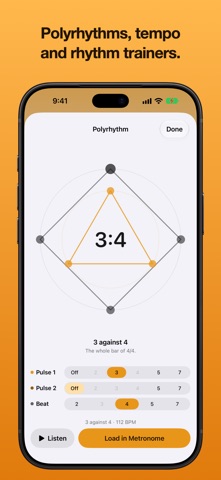
• Polyrhythm: two or three pulses at once, to feel one rhythm against another
• All three, and a timer, one tap away on Home
STAGE MODE
• A full-screen player for your set: the song, its tempo and what comes next
• Step through a setlist without breaking the beat, and drag Up Next into a new order
• On iPhone it stays on the Lock Screen and in the Dynamic Island while the click runs
PLAY ALONG
• Hear a song's 30-second preview before you practise it
• With an Apple Music subscription, play the whole song with the click over it
• Tap on beat 1 to line the click up with the record
LISTEN
• Play a few bars and the app works out the tempo for itself
• Audio is analysed on the device and is never recorded or sent anywhere
TUNER
• A chromatic tuner in the same app, reading to a fraction of a cent
• Note names as letters, German (H and B) or solfège
• Reference pitch from 415 to 466 Hz
TIMING
• Beats taken from the audio clock, so they never drift
• 20 to 300 BPM: drag the tempo scale, tap it in, type it or step a beat at a time
• Tempo names from Grave to Prestissimo as you go
LIBRARY AND SEARCH
• Your setlists, your own songs, and 1,000 well-known song tempos across 17 genres
• A Practising shelf for the songs you're learning, showing how far each one has come
• Each song remembers its tempo, time signature, subdivision, accent, click sound, cross rhythm and per-beat pattern
• Setlists sync through your own iCloud account, and can be sent to a bandmate as a file
TIME SIGNATURES, SUBDIVISIONS AND POLYRHYTHMS
• The common meters, cut time and odd groupings, or build your own
• Eighths through 32nds, triplets, quintuplets, sextuplets and septuplets
• Lay a second pulse of 2, 3, 4, 5 or 7 across the bar
• Set each beat to accent, normal, soft or silent, right on the main screen
SEE IT, HEAR IT, FEEL IT
• A pendulum, a sweeping bar, dots, rings or bars, and a screen flash for loud rooms
• Two click sounds, and haptics on the devices that have them
ON THE WATCH
• Haptic beats you feel rather than hear
• Stage Mode on your wrist: step through a set, change the subdivision or the time signature
FREE, AND HONEST ABOUT IT
No ads, no subscription, no account. The app counts anonymous usage with TelemetryDeck: how many people use it, on which devices, which features they use and whether they have become a supporter, so we know what to improve. No names, no songs, nothing you type, and nothing linked to you. Your setlists stay on your devices and in your own iCloud. Your practice journal stays there too.
Two optional tips: buy me a coffee, or become a supporter and get a platinum app icon. Neither unlocks a feature; everything is already free. Apple sells the tips, and RevenueCat records them anonymously.