

EOPAN is made and published by EOGLANZ. AppBrain is an independent app data site and isn't affiliated with EOGLANZ. The app name, icon, screenshots and description belong to EOGLANZ and are shown as published on the App Store.
AppBrain's verdict
- Last updated
- August 22, 2022
Rankings
App Store top chartsApp Store Rankings for EOPAN
This app is not ranked
Competitors
Similar apps and more from EOGLANZAlternatives to EOPAN








Releases
Updates seen on the App Store- Version
- 2.4.2
- Launched
- August 2014
No changelog data
User feedback
Ratings and reviews on the App StoreComments on EOPAN for iOS
We don't have enough comments to show example comments. Please check back later.
Technology
Found in the app by AppBrain- Price
- Free
- App size
- 57.6 MB
- Content rating
- Everyone
Technologies used by EOPAN
About the app and developer
About EOPAN
EOPAN is a photo & video app developed by EOGLANZ.
User Ratings
The app has no ratings yet.
App Information
EOPAN is freely available from the App Store. The app size is 57.63 MB. The latest version available is 2.4.2. The last update was on August 22, 2022.
Technical Requirements
The app has a content rating of Everyone. The app has been available on the App Store since August 2014.
Developer information for EOGLANZ
Address:
Store listing
By EOGLANZ, from the App Store
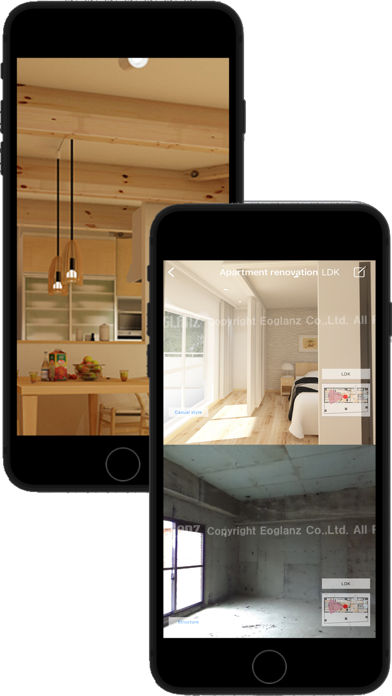


Screenshots by EOGLANZ, from the the App Store listing
Description by EOGLANZ Written by the developer, not by AppBrain. Click to read.
EOPAN is a panorama image viewer for JPEG and EPA files.
You can select different views of a scene to display side-by-side and show popup text and images (for EPA files).
Good Design Award 2014 Best 100
Design for the Future Award
[Main Features]
- EOPAN displays sphere images and pictures taken by an omnidirectional camera (for example, RICOH THETA m15, S, SC1、SC2 and THETA V)
- Move your iPad or iPhone and the screen is smoothly synchronized using the gyro, or drag the screen to rotate the view
- Imports images from 3D CAD “Walk in home”
- Open multiple JPEG files as a ZIP file then change selection while viewing
- Images sharing with apps supported by the sharing function
- Store images locally to view off-line
- EOPAN can display two images side-by-side, so you can compare before-and-after plans or different proposals
- Create EPA files with “EOPAN Cloud”. You can embed links to web pages and YouTube
- using embedding code from EOPAN cloud, you can paste your spherical images into WordPress etc.
[Supported file types]
JPG (sphere type)
ZIP (with sphere type JPG files)
EPA (created by EOPAN Cloud Portal)
[How to import files]
JPEG
1. Direct import of spherical camera image via Wi-Fi
2. Tap Camera Roll icon and choose image
3. Transfer between devices running EOPAN via Wi-Fi P2P
4. Add via Mac OS Finder or Windows iTunes
5. Download from "EOPAN cloud"
- ZIP
1. Transfer between devices running EOPAN via Wi-Fi P2P
2. Add via Mac OS Finder or Windows iTunes
3. Download from "EOPAN cloud"
- EPA
1. Transfer between devices running EOPAN via Wi-Fi P2P
2. Add via Mac OS Finder or Windows iTunes
3. Download from "EOPAN cloud"
Flick the screen downwards to update the image list.
You can select different views of a scene to display side-by-side and show popup text and images (for EPA files).
Good Design Award 2014 Best 100
Design for the Future Award
[Main Features]
- EOPAN displays sphere images and pictures taken by an omnidirectional camera (for example, RICOH THETA m15, S, SC1、SC2 and THETA V)
- Move your iPad or iPhone and the screen is smoothly synchronized using the gyro, or drag the screen to rotate the view
- Imports images from 3D CAD “Walk in home”
- Open multiple JPEG files as a ZIP file then change selection while viewing
- Images sharing with apps supported by the sharing function
- Store images locally to view off-line
- EOPAN can display two images side-by-side, so you can compare before-and-after plans or different proposals
- Create EPA files with “EOPAN Cloud”. You can embed links to web pages and YouTube
- using embedding code from EOPAN cloud, you can paste your spherical images into WordPress etc.
[Supported file types]
JPG (sphere type)
ZIP (with sphere type JPG files)
EPA (created by EOPAN Cloud Portal)
[How to import files]
JPEG
1. Direct import of spherical camera image via Wi-Fi
2. Tap Camera Roll icon and choose image
3. Transfer between devices running EOPAN via Wi-Fi P2P
4. Add via Mac OS Finder or Windows iTunes
5. Download from "EOPAN cloud"
- ZIP
1. Transfer between devices running EOPAN via Wi-Fi P2P
2. Add via Mac OS Finder or Windows iTunes
3. Download from "EOPAN cloud"
- EPA
1. Transfer between devices running EOPAN via Wi-Fi P2P
2. Add via Mac OS Finder or Windows iTunes
3. Download from "EOPAN cloud"
Flick the screen downwards to update the image list.