

EPUB Reader: eBook & FB2
EPUB Reader: eBook & FB2 is made and published by ZeroPlay Ltd. AppBrain is an independent app data site and isn't affiliated with ZeroPlay Ltd. The app name, icon, screenshots and description belong to ZeroPlay Ltd. and are shown as published on the App Store.
AppBrain's verdict
- Rating on App Store
- 5.00
- 1 ratings
- Last updated
- August 18, 2026
It doesn't have enough ratings yet to judge what users think.
Rankings
App Store top chartsApp Store Rankings for EPUB Reader: eBook & FB2
Competitors
Similar apps and more from ZeroPlay Ltd.Alternatives to EPUB Reader: eBook & FB2


More from ZeroPlay Ltd.


Releases
Updates seen on the App Store- Version
- 1.1
- Launched
- June 2026
No changelog data
User feedback
Ratings and reviews on the App StoreComments on EPUB Reader: eBook & FB2 for iOS
We don't have enough comments to show example comments. Please check back later.
Technology
Found in the app by AppBrain- Price
- Free
- App size
- 104.1 MB
- Content rating
- Everyone
Technologies used by EPUB Reader: eBook & FB2
About the app and developer
About EPUB Reader: eBook & FB2
EPUB Reader: eBook & FB2 is a books app developed by ZeroPlay Ltd.
User Ratings
EPUB Reader: eBook & FB2 is rated 5.00 out of 5 stars. The rating is based on one rating ratings.
App Information
EPUB Reader: eBook & FB2 is freely available from the App Store. The app size is 104.14 MB. The latest version available is 1.1. The last update was on August 18, 2026.
Technical Requirements
The app has a content rating of Everyone. The app has been available on the App Store since June 2026.
Developer information for ZeroPlay Ltd.
Address:
Store listing
By ZeroPlay Ltd., from the App Store



Description by ZeroPlay Ltd. Written by the developer, not by AppBrain. Click to read.
An ebook reader that takes the file as it is. EPUB reflows to your settings. DRM-free MOBI, AZW, AZW3 and PRC open directly, with AZW3 read from its KF8 layer for better typography. FB2 arrives as .fb2, .fb2.zip or .fbz, and TXT is decoded as UTF-8 or GBK, with a long chapterless file split into chapters you can navigate. The format is read from the contents of the file, so a book that lost its extension in mail still opens; what will not open is reported as unsupported or damaged.
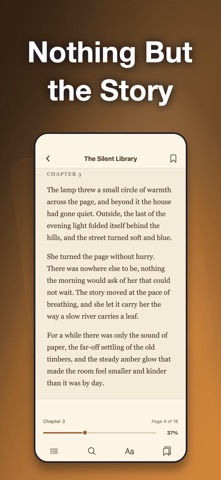
Reading is paginated, not an endless scroll: tap a side of the page or swipe. The contents list opens on the chapter you are in, the bottom bar carries the chapter name, page X of Y and your percentage through the book, and the progress bar jumps only when you let go. A reopened book starts on the page you left.
Search the whole book from two characters up. Every hit arrives with its chapter name and the words around it; tap one and the reader lands there with the match highlighted. Highlight any passage in one of four colors, attach a note or copy it. Bookmarks, highlights and notes share one panel and export as plain text.
Type size, page brightness, justified or left-aligned text and the light, sepia and dark paper themes are all free, night reading included. Every pixel of the reader follows the paper theme, and a book's own CSS cannot turn sepia or dark into dark text on a dark page.
Offline books are the normal case here, not a mode you switch on: on a plane, in the subway, in a dead zone on the highway, the library and the book behave the same. At night the dark paper theme and the brightness slider let you read beside someone who is asleep. Studying, you highlight what matters, write your thought next to it, then export chapter, progress, passage and note into your notes app.
Most of what sits beside this app in search is a different product. Content platforms hand you a catalog and want you signed in. Converters turn one format into another. Borrowing apps need a library card. Read-aloud apps are built around a voice. This one opens the files that are already yours and stays out of the way.
• Open DRM-free EPUB, MOBI, AZW, AZW3, PRC, FB2 and TXT files
• Format read from file contents, even with a wrong extension
• TXT in UTF-8 or GBK, long files split into navigable chapters
• Import several files in one go and get a single summary
• Ebook library as a cover grid, three to six columns
• Search by title or author, filter by reading, not started or finished
• Sort by recently read, recently added, title or author to organize the shelf
• Continue Reading card for the book you had open last
• Page turns by tap or swipe, with a draggable progress bar
• Contents list, chapter name, page X of Y and whole-book percentage
• Full-book search with chapter name and context per hit
• Four highlight colors, notes and copy from the selection bar
• Bookmarks, highlights and notes in one panel, exportable as text
• Line spacing, page margins and font family (Pro)
Your books and your reading position stay in this app's storage on the device: no account, no sync, no record of what you read. To be clear about the edges: no PDF, no comic archives, no DOC or CHM, no conversion between formats, no way into books locked by another store's DRM, no text-to-speech, no audiobooks, no translation, no dictionary.
The free library holds three books; EPUB Reader Pro lifts that limit and unlocks line spacing, page margins and font family. Bring your own files, drop them in and start reading.
Terms of Use: https://zeroplay.io/docs/legal/terms-of-service
Privacy Policy: https://zeroplay.io/docs/legal/privacy-policy