Equatch is made and published by
Artur Janowicz.
AppBrain is an independent app data site and isn't affiliated with Artur Janowicz.
The app name, icon, screenshots and description belong to Artur Janowicz and are shown as
published on the App Store.
About Equatch
Equatch is a productivity app developed by Artur Janowicz.
User Ratings
The app has no ratings yet.
App Information
Equatch costs $0.99. The app size is 10.39 MB. The latest version available is 5.5. The last update was on August 22, 2026.
Technical Requirements
The app has a content rating of Everyone. The app has been available on the App Store since July 2025.
Description by Artur Janowicz(from the App Store)
Numbers and charts on your wrist or anywhere...
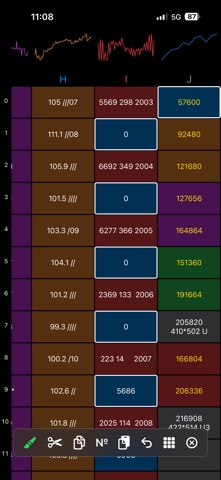
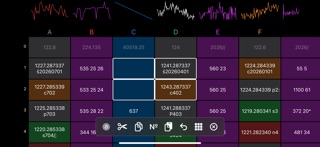
100 rows (0-99), 15 columns (A-O). Row numbers and column names (watchOS 11+) are always visible. (On iOS, chart thumbnails are also permanently visible). Automatic saving of each cell. Local and iCloud backup (10 slots), manual data synchronization between devices. Restored backups automatically save the current state to Local Save. Chart data for each column with a single press (the button above the column). Return to the furthest saved cell in a column (without the =off function) after leaving the chart (watchOS). Return to the beginning of the sheet after hitting the system clock. Additionally, charts and data appear on widgets and watch faces. When a cell is selected, a bar with buttons appears: ”Color”, "Cut", "Copy", "Past", "Undo", "Cancel." (On iOS, the bar also includes "Copy Numbers" and "Select All"). ! The first tap selects the cell, the second tap activates edit mode.
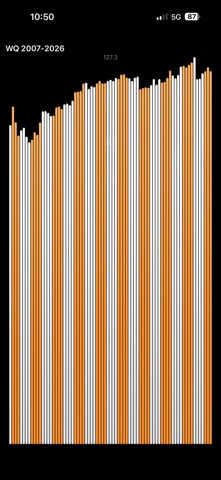
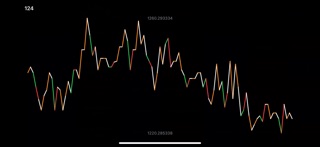
Basic cell operations: + - * / ^ Constants: π (pi) e (eu) Functions: sin(x) cos(x) tan(x) log(x) ln(x) Factorial (from 0 to 170): (x)! Sum: sum(a0:o99) Arithmetic mean: ave(a0:o99) Maximum value: max(a0:o99) Minimum value: min(a0:o99) Median: med(a0:o99) Standard deviation: std(a0:o99) Remainder from a division: mod(x/y) Absolute value: abs(x) Signum: sgn(x) Random number from 0 to 1: rnd Rounding to an integer: rou(x), to decimal places 1-9: ro1(x) … ro9(x) Rounding up to an integer: up(x) Rounding down to an integer: do(x) Row number as a number (0 ... 99): row Column number (A=0 ... O=14) as a number: col Value in percent per(x) Value in per mille pro(x) Converting a decimal number from -65535 to 65535 to binary: bin(x) Converting a binary number from -11111111111111111 to 11111111111111111 to decimal: dec(b) Counter of numeric cells in the given range (ignores itself): cou(a0:o99) Counter of symbols in the given range: sy...(a0:o99) where ... is any string of characters Turns off a numeric value for charts, widgets, and formulas: =off(x) or for charts and widgets: =lin(x) =bar(x) =sav(name) =lin(x) provides a full-screen line chart =bar(x) provides a full-screen bar chart for non-negative values =sav(name) replaces the Save slot name ! What the lin and bar functions return (number, text, formula result) becomes the title of the full-screen chart.
Cell Colors: The "Color" button on the toolbar changes the color of selected cells in the following order: gray, red, blue, green, purple, orange. ! If the selected cells are in different colors and at least one has a different color, pressing the button for the first time resets them to the default colors.
Font Colors: Without the formula: white Formula =off(x): gray Formula =sav(name): red Formulas =lin(x) =bar(x): orange Other formulas: yellow
Fullscreen chart colors: each bar/line is the color of its own cell. Chart colors in widgets and thumbnails: same as the last numeric cell in the column.
Variable button under the column: - If the column is empty, the button (white arrow with a function) will fill it with numbers corresponding to the function assigned to the row number. Row 99 will contain the formula for that function. - If the column is empty, when you enter a formula in row 99, the button (yellow arrow) will fill the entire column with that formula. - If the column is not empty, the "Select Column" button appears, which can be used to clear the column using the "Cut" button or copy it using the "Copy" button.
Each subscription will automatically renew 3 days before the expiration date for
the same time period. Subscriptions can be cancelled at any time before the renewal.