

eSign: PDF Editor & Converter
eSign: PDF Editor & Converter is made and published by Tech Nest. AppBrain is an independent app data site and isn't affiliated with Tech Nest. The app name, icon, screenshots and description belong to Tech Nest and are shown as published on the App Store.
AppBrain's verdict
- Rating on App Store
- 5.00
- 3 ratings
- Last updated
- September 8, 2026
- Size
- 15.6 MB
It doesn't have enough ratings yet to judge what users think.
User feedback
Ratings and reviews on the App StoreComments on eSign: PDF Editor & Converter for iOS
We don't have enough comments to show example comments. Please check back later.
Store listing
By Tech Nest, from the App Store


Description by Tech Nest Written by the developer, not by AppBrain. Click to read.
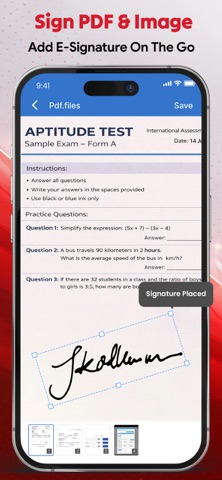
eSign: PDF Editor & Converter is the fastest, easiest, and most reliable app for signing PDF document, eSign images, and securely managing all your digital e-signatures. Sign PDF is deSigned for students, professionals, and freelancers. ESign lets you create, save, and reuse signatures without printing or scanning. Signing documents is now simpler, faster, and more convenient with eSign. Create an eSign with full customization: adjust font size, font color, background color, and swash style. Prefer a personal touch? Draw your signature manually, scan eSign with your camera, and save it for future use. All signed documents are organized for quick access, making your workflow paper-free and efficient.
Sign PDF also works as a reader, editor, and converter of PDF all in one. You can merge multiple PDF files, convert documents with a PDF converter, scan files using your phone camera, and manage your saved documents effortlessly. With a PDF reader, easily view, share, rename, or delete files anytime, keeping your workflow seamless and organized. Our eSign app is perfect for students, professionals, and freelancers handling PDF document, contracts, reports, or assignments.
Key Features of ESign: PDF Editor & Converter
• Digital signature with font size, color, background & swash style
• Scan e-signatures using your phone camera
• Draw signatures manually
• ESign PDF document & image
• Save, view, reuse signatures
• PDF reader for smooth viewing
• Edit and manage PDFs easily.
• Merge PDF document
• Convert files to PDF
• Manage documents: view, share, rename, delete
Why ESign: PDF Editor & Converter?
• Save time with auto and reusable signatures using eSign.
• Quickly sign PDF documents and images without printing.
• Edit files easily with the powerful PDF Editor.
• View documents smoothly with the built-in PDF reader.
• Convert files instantly using the smart PDF converter.
• Scan papers in seconds with your phone camera quickly.
• Organize every PDF document in one secure place.
• Combine multiple files effortlessly with Merge PDF.
How to Use ESign: PDF Editor & Converter
ESign: Customize font size, color, background, and swash style.
Scan: Capture and scan with camera.
Draw Signature: Create manually on screen.
Saved Signatures: Reuse signed documents anytime.
ESign PDF & Images: Add signature, save instantly.
PDF Editor: Edit, sign, and manage your documents in seconds.
PDF Tools:
PDF Reader—view smoothly.
Merge PDF—combine multiple files.
PDF Converter—from images or documents.
PDF Editor—edit PDF files instantly.
Saved Documents—view, share, rename, and delete.
Scan—Digitize handwritten signatures via your phone camera.
Download ESign: PDF Editor & Converter now to eSign PDF documents instantly, manage PDFs efficiently, and enjoy a fast, simple, paper-free workflow.
By using this app you agree to:
Privacy Policy: https://sites.google.com/view/technestitservices/esign/privacy-policy
Terms of use: https://sites.google.com/view/technestitservices/esign/terms-of-use
Safety and technology
Found in the app by AppBrain- Price
- Free
- App size
- 15.6 MB
- Content rating
- Everyone
Technologies used by eSign: PDF Editor & Converter
Releases
Updates seen on the App Store- Version
- 1.0.2
- Launched
- March 2026
No changelog data
Alternatives
Similar apps and more from Tech NestAlternatives to eSign: PDF Editor & Converter


More from Tech Nest


Rankings
App Store top chartsApp Store Rankings for eSign: PDF Editor & Converter
About the app and developer
About eSign: PDF Editor & Converter
eSign: PDF Editor & Converter is a business app developed by Tech Nest.
User Ratings
eSign: PDF Editor & Converter is rated 5.00 out of 5 stars. The rating is based on 3 ratings.
App Information
eSign: PDF Editor & Converter is freely available from the App Store. The app size is 15.60 MB. The latest version available is 1.0.2. The last update was on September 8, 2026.
Technical Requirements
The app has a content rating of Everyone. The app has been available on the App Store since March 2026.
Developer information for Tech Nest
Address:
Frequently asked questions about eSign: PDF Editor & Converter
Is eSign: PDF Editor & Converter free?
Yes. eSign: PDF Editor & Converter is free on the App Store.
Is eSign: PDF Editor & Converter still available?
Yes. eSign: PDF Editor & Converter is on the App Store, and the last update we saw was on September 8, 2026.
How large is eSign: PDF Editor & Converter?
eSign: PDF Editor & Converter is 15.60 MB.
Is eSign: PDF Editor & Converter suitable for children?
App Store rates the content of eSign: PDF Editor & Converter as suitable for everyone.
How do people rate eSign: PDF Editor & Converter?
eSign: PDF Editor & Converter scores 5.00 out of 5 stars, from 3 ratings on the App Store.
Who made eSign: PDF Editor & Converter?
eSign: PDF Editor & Converter was developed by Tech Nest. It is listed in the business category on the App Store.
What are the best alternatives to eSign: PDF Editor & Converter?
People looking at eSign: PDF Editor & Converter also look at these business apps: WorkPilot OS, Interview Prepped, ChatPDF: AI Document Assistant, UAE Holidays calendar 2026, EditPDF | PDF Editor & Sign.