

EXIF Manager
EXIF Manager is made and published by Essence Computing. AppBrain is an independent app data site and isn't affiliated with Essence Computing. The app name, icon, screenshots and description belong to Essence Computing and are shown as published on the App Store.
AppBrain's verdict
Established- Rating on App Store
- 2.50
- 2 ratings
- Last updated
- December 19, 2025
It doesn't have enough ratings yet to judge what users think.
Rankings
App Store top chartsApp Store Rankings for EXIF Manager
Competitors
Similar apps and more from Essence ComputingAlternatives to EXIF Manager




More from Essence Computing






Releases
Updates seen on the App Store- Version
- 1.8.22
- Launched
- June 2013
No changelog data
User feedback
Ratings and reviews on the App StoreComments on EXIF Manager for iOS
We don't have enough comments to show example comments. Please check back later.
Technology
Found in the app by AppBrain- Price
- $0.99
- App size
- 4.60 MB
- Content rating
- Everyone
Technologies used by EXIF Manager
About the app and developer
About EXIF Manager
EXIF Manager is a photo & video app developed by Essence Computing.
User Ratings
EXIF Manager is rated 2.50 out of 5 stars. The rating is based on 2 ratings.
App Information
EXIF Manager costs $0.99. The app size is 4.60 MB. The latest version available is 1.8.22. The last update was on December 19, 2025.
Technical Requirements
The app has a content rating of Everyone. The app has been available on the App Store since June 2013.
Developer information for Essence Computing
Address:
Frequently asked questions about EXIF Manager
Is EXIF Manager free?
No. EXIF Manager costs $0.99 on the App Store.
Is EXIF Manager still available?
Yes. EXIF Manager is on the App Store, and the last update we saw was on December 19, 2025.
How large is EXIF Manager?
EXIF Manager is 4.60 MB.
Is EXIF Manager suitable for children?
App Store rates the content of EXIF Manager as suitable for everyone.
How do people rate EXIF Manager?
EXIF Manager scores 2.50 out of 5 stars, from 2 ratings on the App Store.
Who made EXIF Manager?
EXIF Manager was developed by Essence Computing. It is listed in the photo & video category on the App Store.
What are the best alternatives to EXIF Manager?
People looking at EXIF Manager also look at these photo & video apps: The Photographer's Ephemeris, Lumy, DSLR Camera, MyPics - A Powerful PhotoAlbum, EXIF Viewer LITE by Fluntro.
Store listing
By Essence Computing, from the App Store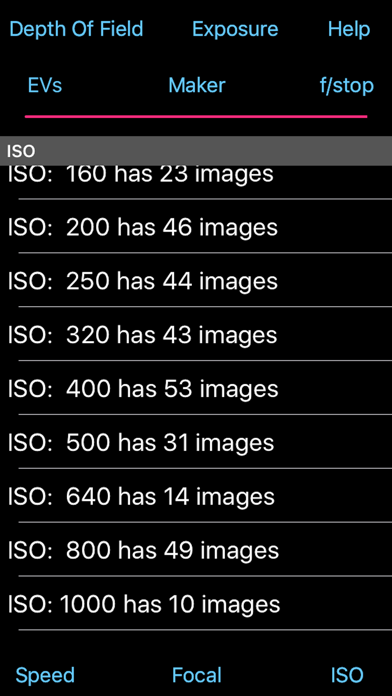

Description by Essence Computing Written by the developer, not by AppBrain. Click to read.
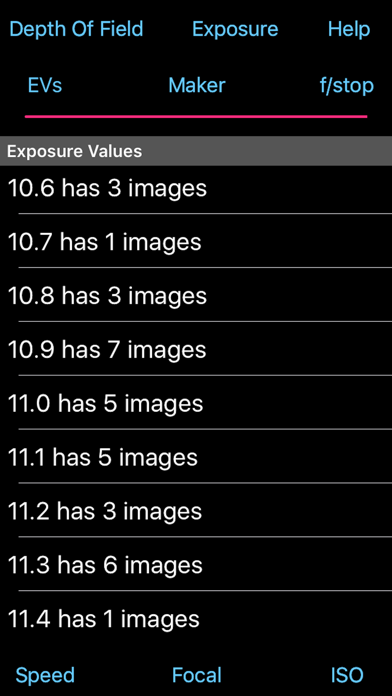
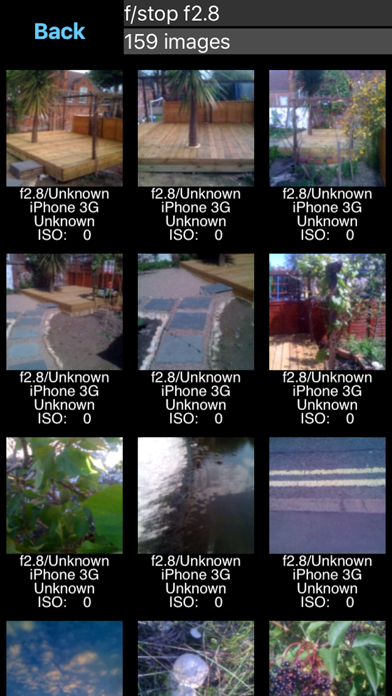
Select one of the various rows in the table and you'll be shown a screen of images with the relevant information underneath each one. You can then select to view just that image to have a better look at it.
Exposure Value Ordering: Each image was taken assuming a certain level of exposure. The f/stop, focal length, shutter speed and iso were set and you took the image. You hoped you that you got the setting correct and the image was properly exposed, but was it?
Looking at the images by Exposure Value allows you to check what EV was assumed against what was actually achieved. So if for a given EV value 75% of the images look correctly exposed it is the other 25% that you need to look at. These may be either under or over exposed. The App shows you the relevant settings for each image so you can compared the correct ones with the incorrect ones and learn which of the settings of were wrong.
The correctly exposed images can also teach you what setting are required in a similar situation. So when next you're taking pictures in an EV 3 setting (indoors, not particularly bright) you can look at the EV 3 images in the App and check what sort of settings will be required.
Shutter Speed Ordering: All images taken with the same shutter speed are collated together. This is useful to look at to see if the images are correctly exposed. If the images for a shutter speed all appear over exposed or under exposed then you know that you are incorrectly using this speed and you should consider changing your use of this speed or changing other setting to make this speed correct.
Images may also appear blurred with certain shutter speeds and this also points to the use of too low a speed.
ISO Rating Ordering: Most digital cameras have multiple ISO settings and it can be useful to see which ones were taken with which ISO ratings. You might find that you rely too heavily on one specific ISO setting whereas you should consider using a higher rating to enable you to take fast action or low lighting images.
F/Stop Ordering: Being able to see what images were taken with what f/stop is another way to see whether you have been selecting the correct f/stop for the exposure to be correct. A quick look at all my f/5.6 images showed images that were under exposed (so if possible I should have been using a lower f/stop or slower shutter speed) but also images that were massively over exposed (so I should have used a much higher f/stop).
Focal Length Ordering: The images are ordered based on what focal length was used. This may well show you that you either only use one fixed focal length lens or you may have an variable focal length lens but many of your images are at one extreme or the other and few with any of the other values. You may be missing a few tricks and should try to use the other lengths that are possible.
Camera Maker Ordering: The final option is to see which images were taken with with device. With PhotoStream enabled your device will have images on it that were taken with other devices. I load my DSLR images onto my iPad on site to look at them so my DSLR images are also on my iPad.
The EXIF Manager is trying to show you other ways to consider the images you take so that you can improve your photo taking abilities.
Note: Not all images have all the EXIF data in them that will allow this App to function correctly. In these cases it may not be possible to calculate the Exposure value for the image or the image may basically say very little (images from my iPhone 3G seem to have little EXIF data in them).
For the various orderings if the required information is not available then the image is placed in the 'Unknown' set of images.