

Expense It - Receipt Tracker
Expense It - Receipt Tracker is made and published by Plexum, LLC. AppBrain is an independent app data site and isn't affiliated with Plexum, LLC. The app name, icon, screenshots and description belong to Plexum, LLC and are shown as published on the App Store.
AppBrain's verdict
- Rating on App Store
- 4.00
- 6 ratings
- Last updated
- April 25, 2026
- Size
- 86.8 MB
It doesn't have enough ratings yet to judge what users think.
User feedback
Ratings and reviews on the App StoreComments on Expense It - Receipt Tracker for iOS
We don't have enough comments to show example comments. Please check back later.
Store listing
By Plexum, LLC, from the App Store
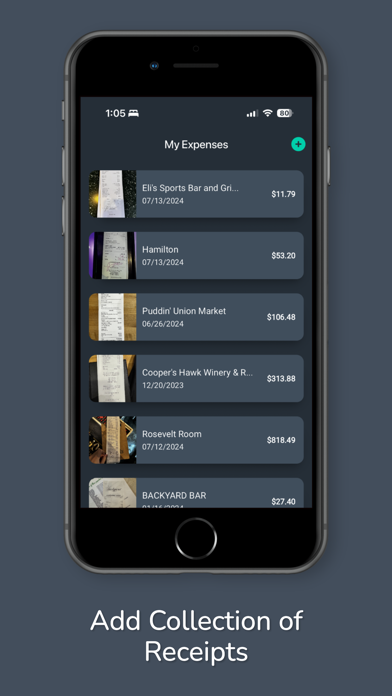


Description by Plexum, LLC Written by the developer, not by AppBrain. Click to read.
Stop typing in expenses by hand. Snap a photo of any receipt and ExpenseIt reads it for you — extracting the merchant, total, and date automatically using on-device text recognition and AI. Review the details, assign a category, and move on. When you're ready, generate a clean PDF expense report and share it anywhere.
How It Works
Photograph a receipt or import one from your photo library
ExpenseIt scans the text and extracts key details instantly
Review, edit if needed, and save
Generate and export a polished PDF expense report
Core Features
Smart Receipt Scanning — Point your camera at a receipt. On-device OCR reads the text, and AI pulls out the merchant name, total amount, and date so you don't have to.
Auto-Crop & Cleanup — The app detects receipt boundaries and crops the image automatically, keeping your records sharp and storage-efficient.
Automatic Categorization — Expenses are sorted into categories like Meals, Travel, Lodging, Mileage, Entertainment, Office Supplies, and more. Customize categories to fit your workflow.
Batch Import — Scan multiple receipts in one session and review them one by one. Perfect for catching up after a business trip or a week of spending.
PDF Expense Reports — Generate detailed, professional expense reports as PDFs. Share them with your accountant, upload to your bookkeeping software, or save them for tax season.
Notes & Editing — Add notes to any receipt. Edit the merchant, date, total, or category at any time.
Multi-Language Support — Available in English, French, and Spanish.
Privacy First
Text recognition runs entirely on your device. Your receipt images and financial data stay on your phone — nothing is stored on external servers.
Free to Start, Affordable to Grow
Scan and track up to 3 receipts completely free. Upgrade to Pro for unlimited receipts, bulk import, and an ad-free experience — with flexible monthly or annual plans.
Built For:
Freelancers and self-employed professionals tracking deductible expenses
Small business owners who need organized records for tax filing
Anyone who wants to stop losing receipts and start keeping clean financial records
Download ExpenseIt and turn a pile of receipts into organized expense reports in minutes.
Safety and technology
Found in the app by AppBrain- Price
- Free
- App size
- 86.8 MB
- Content rating
- Everyone
Technologies used by Expense It - Receipt Tracker
Releases
Updates seen on the App Store- Version
- 1.1.1
- Launched
- July 2024
No changelog data
Alternatives
Similar apps and more from Plexum, LLCAlternatives to Expense It - Receipt Tracker


More from Plexum, LLC





Rankings
App Store top chartsApp Store Rankings for Expense It - Receipt Tracker
About the app and developer
About Expense It - Receipt Tracker
Expense It - Receipt Tracker is a business app developed by Plexum, LLC.
What is the rating of Expense It - Receipt Tracker?
Expense It - Receipt Tracker is rated 4.00 out of 5 stars, based on 6 ratings.
Is Expense It - Receipt Tracker free?
Expense It - Receipt Tracker is free. The app size is 86.79 MB. The latest version available is 1.1.1. The last update was on April 25, 2026.
What are the requirements for Expense It - Receipt Tracker?
The app has a content rating of Everyone. The app has been available on the App Store since July 2024.
Developer information for Plexum, LLC
Address: