Download Android Apps and Games
AppBrain
  • Apps
  • Apps being viewed right now Trending apps today Most popular apps All-time most downloaded apps Top rated apps
  • Intelligence ▾
    Intelligence overview → Track any Android app or your whole market
    Track & analyze
    Keyword Tracker & OptimizerTrack & improve Play rankings App Performance ReportOne-off PDF for any app StatisticsFree Android & Play market stats
    Promote your app
    Featured Apps App Links
  • Intelligence
  • Pricing
  • Dashboard
  • Sign up
  • Log in
Last updated on: 2026-05-28
App Store Apps > Utilities > ExpiryMeter
ExpiryMeter icon

ExpiryMeter

2.1
Francisco Lara Ruiz
0.00
0 reviews
Free

Not recently updated — last update was on 2023-11-03. This app may no longer be actively maintained.
ExpiryMeter Screenshot 1 of 10
ExpiryMeter Screenshot 2 of 10
ExpiryMeter Screenshot 3 of 10
ExpiryMeter Screenshot 4 of 10
ExpiryMeter Screenshot 5 of 10
ExpiryMeter Screenshot 6 of 10
ExpiryMeter Screenshot 7 of 10
ExpiryMeter Screenshot 8 of 10
ExpiryMeter Screenshot 9 of 10
ExpiryMeter Screenshot 10 of 10
Download from the App Store

About ExpiryMeter

ExpiryMeter is an overall app developed by Francisco Lara Ruiz.

Download Statistics

User Ratings

The app has no ratings yet.

App Information

ExpiryMeter is FREE to download. The APK download size is 13.80 MB. The latest version available is 2.1. The last update was on November 3, 2023.

Technical Requirements

The app has a content rating of Everyone. The app has been available on Google Play February 2022.

Description
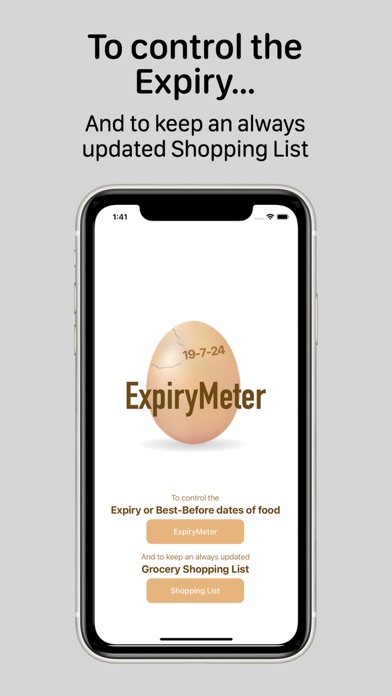
ExpiryMeter is a free app for iPhone and iPad, available in Spanish and English, very simple and intuitive, and packing two functions:

• EXPIRYMETER: To keep under control the Expiration or the Best-Before dates of the food you have at home.
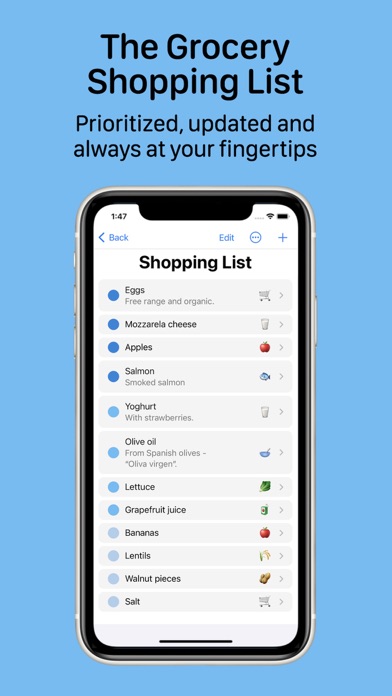
• GROCERY SHOPPING LIST: To keep updated your running Grocery Shopping List, prioritized and always at hand.

These two functions match two simple gestures proposed by United Nations’ Food and Agriculture Organization to help reduce food waste. Every year more than a billion tons of food are thrown away, wasting a third of the food produced for human consumption. Halving food waste by 2030 is one of the 17 Sustainable Development Goals set by the UN.

EXPIRYMETER

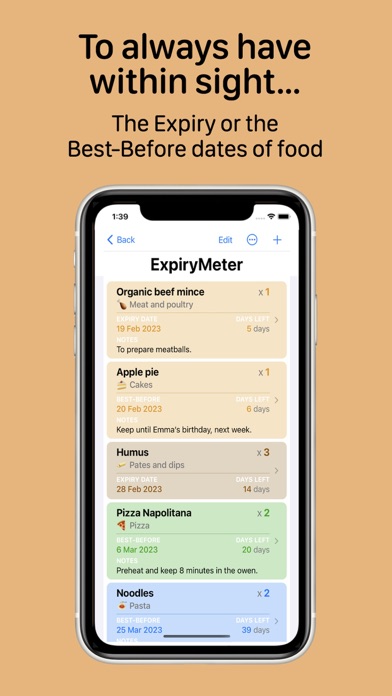
This first function allows you to manage the list of food stored at home. It sorts food by their Expiry or Best-Before dates and shows the number of days left until that date.

In addition, a color code allows to see, in a quick glance, if the food Expiry or Best-Before date has already been exceeded, or how far it is.

Its operation is very simple:
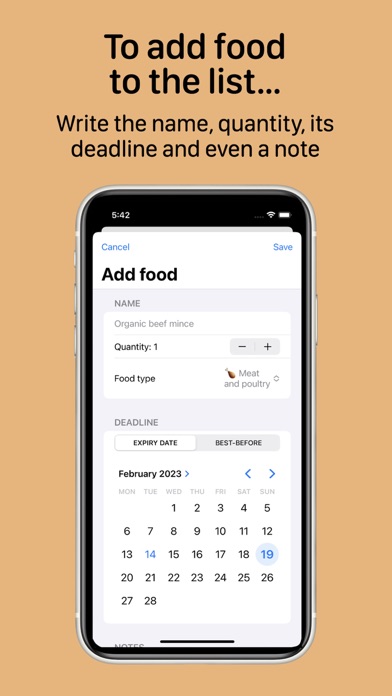
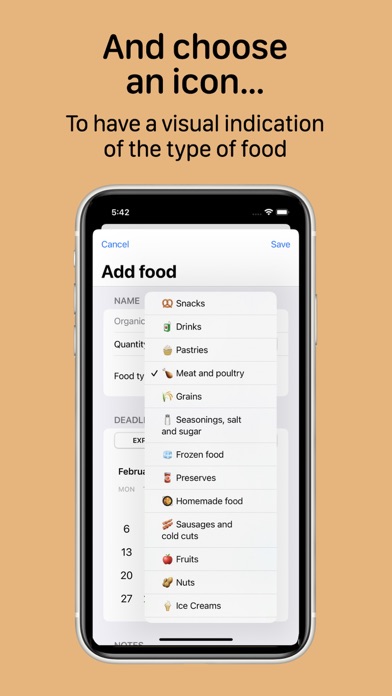
— Add food to the list: Tap + and write its name, the Expiry date or the Best-Before date and the quantity purchased. Choose a food icon and add a note if you wish.
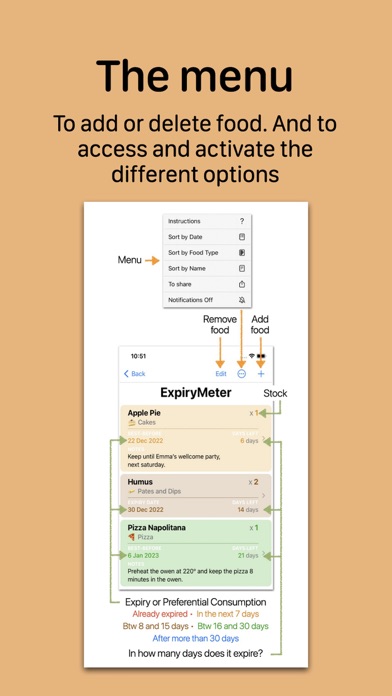
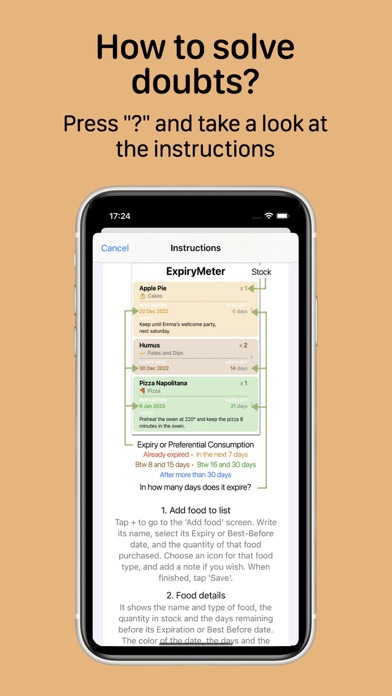
— Food details: It shows every detail of each food, and the background color points out if it has already expired (red). Or if it will expire in the next 7 days (orange), between 8 and 15 days (brown), between 16 and 30 days (green) or after more than 30 days (blue).
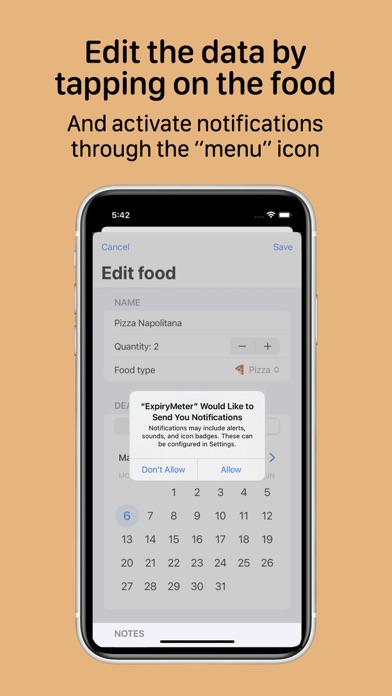
— Edit the data of a food: Tap on the tab of the food to be modified.
— Remove food from the list: Tap 'Edit' or swipe the food card to the left, and press 'Delete’.
— Sort the Shopping List by 'Date', by 'Food type' or by 'Name': Tap on the 'Menu' and choose one of the options.
— Add a food to the Grocery Shopping List, from the ExpiryMeter: Swipe the food card to the right, touch ‘To buy', and that food will be automatically added to the Shopping List.
— Duplicate a food that you already have in the ExpiryMeter: If you have repurchased any of the foods that you already have in the ExpiryMeter, swipe the card of that food to the right and tap 'Duplicate'.
— Activate Notifications: Tap on the 'Menu' icon and choose whether you want to activate or deactivate notifications. With 'Notifications on', at 8:00 in the morning a 'Food to eat soon' alert will appear in the event that there are less than 4 days left before the Expiry or Best-Before date of any food.
— Share the list: Tap on the 'Menu' icon and select 'To share'.

GROCERY SHOPPING LIST

To keep your grocery shopping list always updated, prioritized and at hand.

Keeping the list updated is simple and intuitive:
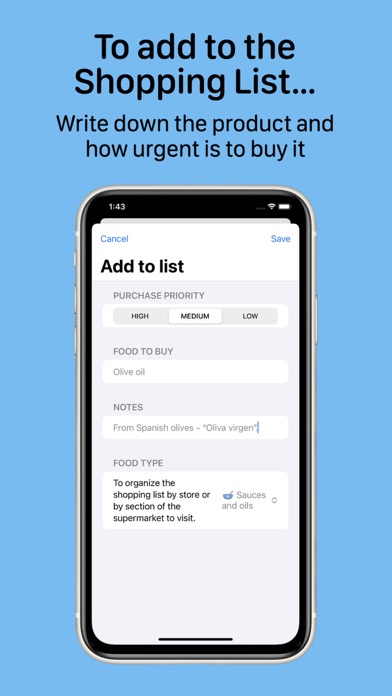
— Add to Shopping List: Tap + and write the name of the product to buy, and add a note if you wish. And choose an icon for the food type to sort the shopping list by 'Food type'.
— Do I have to buy it right away?: Tap on one of the three buttons, depending on the purchase priority: High priority (dark blue), medium (blue), low (light blue).
— Edit the details of any product: Just tap on the product.
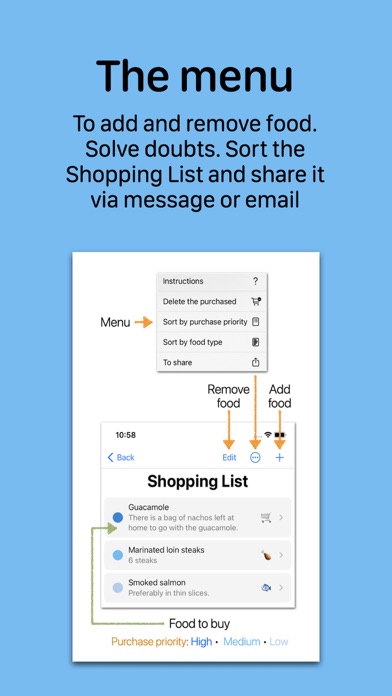
— Remove food from the list: Tap 'Edit' or swipe with your finger the food card to the left, and press 'Delete’.
— Mark on the list the products already 'purchased': You can mark on the list the products as you are buying them. Swipe the product card to the right, and a blue validation icon will appear with a question mark; touch it and the 'Already purchased' mark will appear in the blue circle of that product. Or tap on the product card and press 'Yes' in the 'Already purchased?' section.
— Remove the products marked as 'Already purchased': Tap on the 'Menu' and choose the option 'Remove the purchased'.
— Sort the Shopping List by 'Purchase Priority' or by 'Food type': Tap on the 'Menu' icon and choose one or the other option. Initially, the list is sorted by 'Purchase Priority'.
— Share the Grocery Shopping List: Tap on the 'Menu' and select 'To share' option.
Show more Show less

More data about ExpiryMeter

Price Free to download
Rating No ratings
Ranking Not ranked
Version 2.1
App download size 13.8 MB
Suitable for Everyone

Alternative downloads for the ExpiryMeter app

Expiration_Date icon Expiration_Date
Seung-Un Ham
4.7
Free
57 ratings
Expiry Journal icon Expiry Journal
Fung Yiu Fu
4.7
Free
47 ratings
Exlert icon Exlert
Lok Yee Chan
5.0
Free
1 ratings
Expires Today icon Expires Today
Giampaolo Bellizzi
0.0
Free
SEI icon SEI
SEICOV
5.0
Free
3 ratings
Cesta (Lista de la compra) icon Cesta (Lista de la compra)
J. Fornieles Apps
5.0
Free
1 ratings
D-Link Cat 6 Mi-Fi icon D-Link Cat 6 Mi-Fi
维 张
0.0
Free
BestCon icon BestCon
Broadlink Co.,Ltd
3.0
Free
2 ratings

More from Francisco Lara Ruiz

Que Arbol Es icon Que Arbol Es
Francisco Lara Ruiz
5.0
Free
1 ratings
MundiRetos - Asia icon MundiRetos - Asia
Francisco Lara Ruiz
0.0
Free
MedicMeter icon MedicMeter
Francisco Lara Ruiz
0.0
Free
PcLegends icon PcLegends
Francisco Lara Ruiz
0.0
Free
Mis Dibujos icon Mis Dibujos
Francisco Lara Ruiz
0.0
Free

Changelog of ExpiryMeter

No changelog data

Show more Show less

Developer information for Francisco Lara Ruiz

Francisco Lara Ruiz

N/A

Share ExpiryMeter

Comments on ExpiryMeter for iOS

We don't have enough comments to show example comments. Please check back later.

App Store Rankings for ExpiryMeter

This app is not ranked

Technologies used by ExpiryMeter

Apps other people are watching Apps on sale Today's trending apps Popular Overall Top new apps
Expiration_Date icon Expiration_Date
Expiry Journal icon Expiry Journal
Exlert icon Exlert
Expires Today icon Expires Today
SEI icon SEI
Cesta (Lista de la compra) icon Cesta (Lista de la compra)
D-Link Cat 6 Mi-Fi icon D-Link Cat 6 Mi-Fi
BestCon icon BestCon

Back to top
AppBrain Intelligence premium content

Subscribe now to get full and unlimited access to AppBrain Intelligence. You'll have access to:

  • App Intelligence dashboard (performance timeline, competitor comparison, country rankings, insight cards)
  • Detailed ranking data per app
  • Full timeline per developer
  • Device market shares data per country
1 Month

$75/mo
(billed every month)

SAVE 0%
Subscribe
3 Months

$65/mo
($195 billed every 3 months)

SAVE 13%
Subscribe
1 Year

$57.50/mo
($690 billed every year)

SAVE 23%
Subscribe
Each subscription will automatically renew 3 days before the expiration date for the same time period. Subscriptions can be cancelled at any time before the renewal.

AppBrain is a directory focused on discovering great apps and games. We give statistics, rankings and search options that Google Play and the App Store don't have. All trademarks are owned by their respective owners. AppBrain doesn't offer APKs or binaries, and always lets users install the official version from Google Play or the App Store.

More apps

  • Top Android apps being viewed
  • Tebikii stats
  • Prmovies - Movies and TV Shows
  • Owl of a Season Xmas Edition

Android Statistics

  • Android statistics
  • Google Play Developer stats
  • Trending Android Apps
  • Top popular Apps
  • Buy the best Android phone

About AppBrain

  • Contact
  • Privacy
  • Documentation
  • DMCA takedowns
  • Articles
  • Blog
  • Android app Install tracking and attribution options for the AppBrain ad network
© 2010-2026 - AppBrain