Export Contacts to CSV & Excel is an utilities app developed by Ertugrul Sari.
User Ratings
Export Contacts to CSV & Excel is rated 4.65 out of 5 stars. The rating is based on 23 ratings.
App Information
Export Contacts to CSV & Excel is freely available from the App Store. The app size is 18.23 MB. The latest version available is 2.0.1. The last update was on October 20, 2026.
Technical Requirements
The app has a content rating of Everyone. The app has been available on the App Store since March 2025.
Export Contacts to CSV & Excel is made and published by
Ertugrul Sari.
AppBrain is an independent app data site and isn't affiliated with Ertugrul Sari.
The app name, icon, screenshots and description belong to Ertugrul Sari and are shown as published on the App Store.
Description by Ertugrul Sari(from the App Store)
Your iPhone contacts are too important to lose.
Whether you are switching phones, cleaning up duplicates, or sharing your address book with a colleague, this app gets it done in seconds.
EXPORT TO ANY FORMAT
- CSV, opens in any spreadsheet or contacts app - XLSX, opens in any spreadsheet app - vCard (.vcf), the standard format for phone-to-phone transfers - PDF, a clean printable contact list
BACKUP AND RESTORE
Back up your entire address book with one tap. Every backup is stored with a date and device label so you can restore any version instantly, adding back only what is missing so nothing you already have is touched.
IMPORT CONTACTS
Have a CSV or XLSX file? Import it directly to your iPhone contacts. Great for switching phones, adding a batch of business contacts, or restoring from a spreadsheet.
REMOVE DUPLICATES
Scans your address book and surfaces duplicate entries. Review and remove them before your next export so your file is clean from the start.
STAYS ON YOUR DEVICE
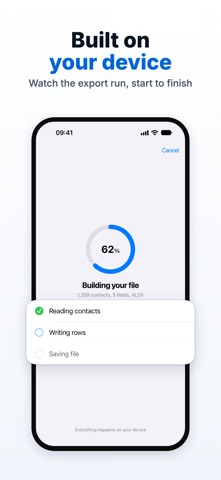
Everything runs on your device. No account required. Your contacts are never uploaded, except to the backup you turn on yourself, never anywhere else.
FULL CONTROL OVER WHAT YOU EXPORT
Choose all contacts, a specific group, or hand-picked entries. Customise which fields to include: names, phone numbers, emails, addresses and more.
HOW TO USE
1. Open the app and allow contact access 2. Choose contacts: all, by group, or individual 3. Pick your format: CSV, XLSX, vCard or PDF 4. Customise your fields if needed 5. Export, save, or share in seconds
Don't risk losing your contacts. Download free, and export or back up your address book in minutes.
Free to download. Some features require a premium purchase. SUBSCRIPTION INFORMATION
Export Contacts offers a weekly auto-renewing subscription or a one-time Lifetime Access purchase. Either one removes the free plan's export limit and unlocks exporting by group, exporting everything at once, importing, duplicate cleanup, and backup.
- Weekly Subscription, renews every week. Removes the free plan's export limit and unlocks every premium feature. - Lifetime Access, one-time purchase that never renews. Unlocks every premium feature for good.
The weekly subscription renews automatically for the same period and price unless auto-renew is turned off at least 24 hours before the end of the current period. Your Apple ID account is charged for renewal within 24 hours before the end of the current period. Manage or cancel in your Apple ID account settings or from your App Store account page; deleting the app does not cancel a subscription. Restore a purchase from the app's own Restore button.
Privacy Policy: https://ios.estifie.com/exportcontacts/privacy-policy Terms of Use: https://ios.estifie.com/exportcontacts/terms-of-use
Each subscription will automatically renew 3 days before the expiration date for
the same time period. Subscriptions can be cancelled at any time before the renewal.