

ExpressTruckTax: E-File 2290
ExpressTruckTax: E-File 2290 is made and published by Express Truck Tax. AppBrain is an independent app data site and isn't affiliated with Express Truck Tax. The app name, icon, screenshots and description belong to Express Truck Tax and are shown as published on the App Store.
AppBrain's verdict
Established- Rating on App Store
- 4.42
- 36 ratings
- Last updated
- August 20, 2026
- Size
- 25.3 MB
It doesn't have enough ratings yet to judge what users think.
User feedback
Ratings and reviews on the App StoreComments on ExpressTruckTax: E-File 2290 for iOS
We don't have enough comments to show example comments. Please check back later.
Store listing
By Express Truck Tax, from the App Store




Description by Express Truck Tax Written by the developer, not by AppBrain. Click to read.
Instead of waiting in a long line at the IRS or post office, you can quickly complete your Form 2290 from your mobile device, no matter where the road takes you. When you file and pay your Heavy Vehicle Use Tax (HVUT) with ExpressTruckTax, you will receive your stamped Schedule 1 in minutes! Our locally-based support team is here to help answer any questions you may have about filing your Form 2290!
WHY SHOULD I USE THE EXPRESSTRUCKTAX APP TO E-FILE FORM 2290?
GET YOUR STAMPED SCHEDULE 1 IN MINUTES:
Stop waiting in long lines at the IRS or waiting for your Schedule 1 to be delivered via mail. E-filing is easy and takes only a few simple steps. You will receive your Stamped Schedule 1 within minutes after e-filing.
YOUR TAX AMOUNT IS AUTOMATICALLY CALCULATED:
The ExpressTruckTax App does all of the HVUT calculations for you. All you have to do is to enter your business and truck information to see the amount you owe the IRS.
INSTANT NOTIFICATIONS:
You will receive instant notifications about your filing status from the IRS. You can also opt in for text notifications or for your Schedule 1 to be faxed. And with the ExpressTruckTax mobile app, you can check on the status of your filing or access your Schedule 1 at any time.
ACCESS A SAVED COPY OF YOUR FORM 2290 & STAMPED SCHEDULE 1 ANY TIME:
A copy of your completed return and Stamped Schedule 1 will be kept secure in your account for you to access any time. You can also get a physical copy of your Schedule 1 mailed to you.
US-BASED CUSTOMER SUPPORT:
Our support team members are standing by in beautiful Rock Hill, SC to help you answer any questions you may have related to HVUT Filing and our services.
STEPS TO E-FILE YOUR FORM 2290 WITH EXPRESSTRUCKTAX APP
STEP 1: Create Your Account
If you don't have an account with ExpressTruckTax, you will be prompted to create one and enter some basic business information including your EIN, Business Name, and Business Address.
STEP 2: Enter Your Vehicle Information
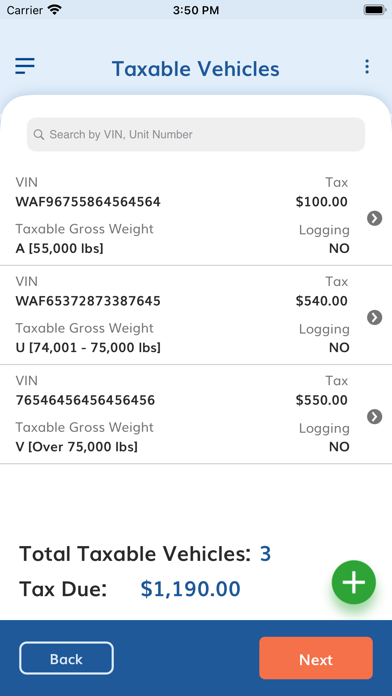
Enter your vehicle details including your VIN, Taxable Gross Weight Category, and any Suspended Vehicles you may have. Your information will be saved automatically in the TruckZone to make your future filings easy.
STEP 3: Choose an IRS Payment Method
You can make your HVUT payment to the IRS via EFW (direct debit - you will need your bank Account/Routing number), Credit/Debit card, check/money order, or EFTPS (Electronic Federal Tax Payment System).
STEP 4: Review and Transmit your return to the IRS
Before you transmit your return, you will be able to review it and make sure that your information is correct. When you are ready, click the Transmit button and it's off to the IRS for processing. The IRS typically only takes a few minutes to process your return, and your stamped Schedule 1 will be sent to your registered email.
If your return is rejected for any reason, we will let you know why it was rejected and how to fix the issue. Once it is fixed, you can re-transmit your corrected Form 2290 for free.
Have questions? Contact our locally-based support team for support available in English and Spanish via phone (704.234.6005), email (support@expresstrucktax.com), or live chat.
Safety and technology
Found in the app by AppBrain- Price
- Free
- App size
- 25.3 MB
- Content rating
- Everyone
Technologies used by ExpressTruckTax: E-File 2290
Releases
Updates seen on the App Store- Version
- 5.7.8
- Launched
- June 2014
No changelog data
Alternatives
Similar apps and more from Express Truck TaxAlternatives to ExpressTruckTax: E-File 2290






Also available on Google Play

Rankings
App Store top chartsApp Store Rankings for ExpressTruckTax: E-File 2290
About the app and developer
About ExpressTruckTax: E-File 2290
ExpressTruckTax: E-File 2290 is a finance app developed by Express Truck Tax.
What is the rating of ExpressTruckTax: E-File 2290?
ExpressTruckTax: E-File 2290 is rated 4.42 out of 5 stars, based on 36 ratings.
Is ExpressTruckTax: E-File 2290 free?
ExpressTruckTax: E-File 2290 is free. The app size is 25.29 MB. The latest version available is 5.7.8. The last update was on August 20, 2026.
What are the requirements for ExpressTruckTax: E-File 2290?
The app has a content rating of Everyone. The app has been available on the App Store since June 2014.
Developer information for Express Truck Tax
Address: